BIGTREETECH CB2 User Manual
21
5.4. Configuring the Display
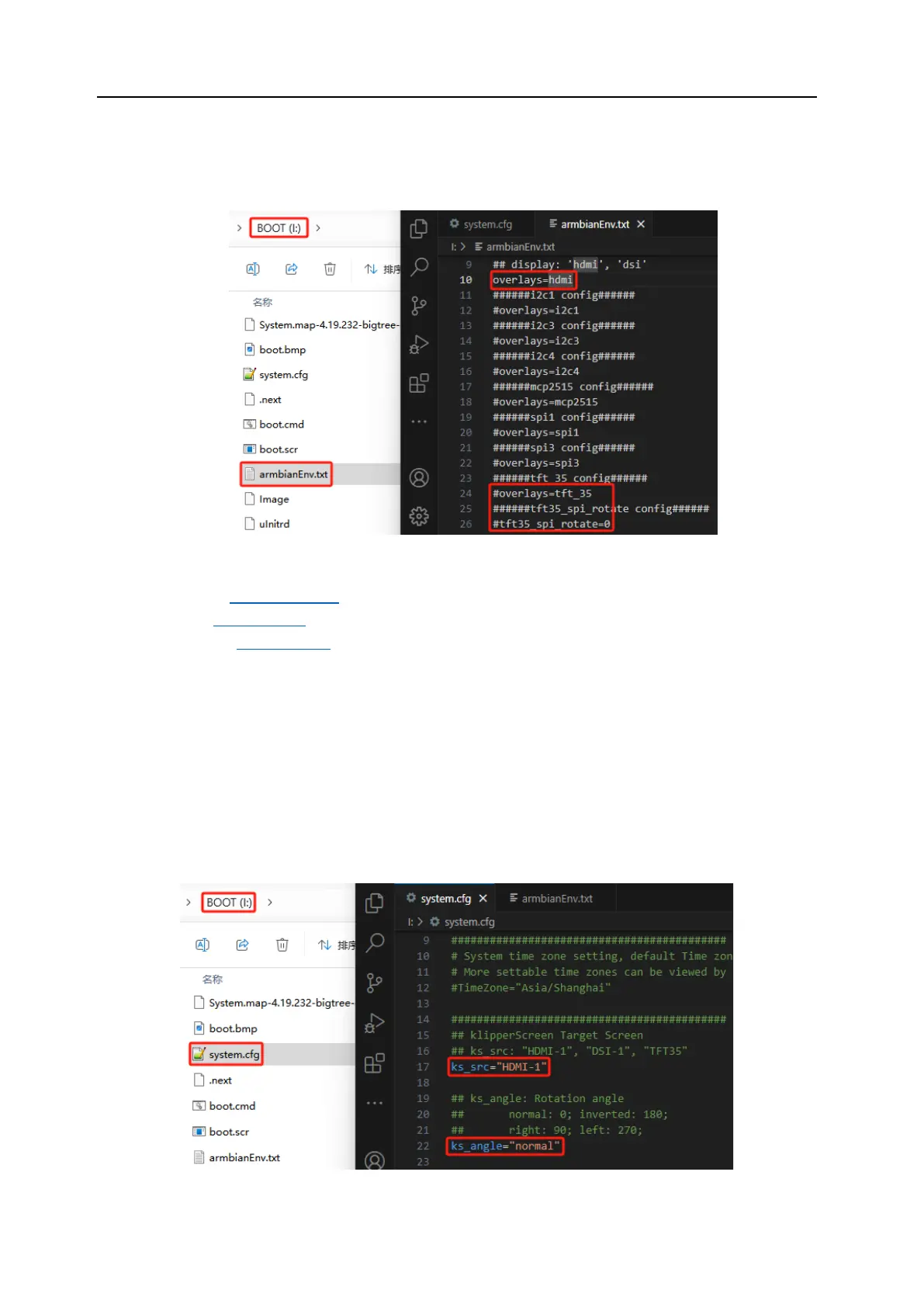
1. Open the "armbianEnv.txt" file in the BOOT partition.
2. The default overlay is set to "hdmi," meaning the system uses an HDMI screen by
default. This can be changed to match the actual screen being used, such as:
"hdmi": HDMI screen
"dsi": DSI screen
"tft_35": SPI Screen
For "tft_35", there is also a "tft35_spi_rotate" parameter for system-level screen
rotation, with default "0" meaning no rotation, other options include "90", "180",
"270".
Note: Only one screen type can be used at a time.
3. To configure KlipperScreen, open the `system.cfg` file in the BOOT partition. Set
the screen type with the parameter `ks_src`, and the rotation angle with
`ks_angle`.




 To Next Page