Bird SiteHawk Operation Manual
5
Measurement Capability
Fast measurement speed
Seven user-selectable trace capture options: 51, 101, 201, 401, 801,
1601, or 3201 data points per sweep
Adjustable pass/fail limit with visual indicator
16 GB of internal flash memory for storing thousands of traces and
setups
X and Y scales and units are user adjustable
Six markers, direct or difference measurement
Measure relative to limit line or recalled trace
Measurement hold to temporarily store a trace
Frequency Start/Stop or Center/Span frequencies
Return Loss [dB], Cable Loss [dB], SWR [ratio], DTF SWR [ratio] or DTF
Return Loss [dB]
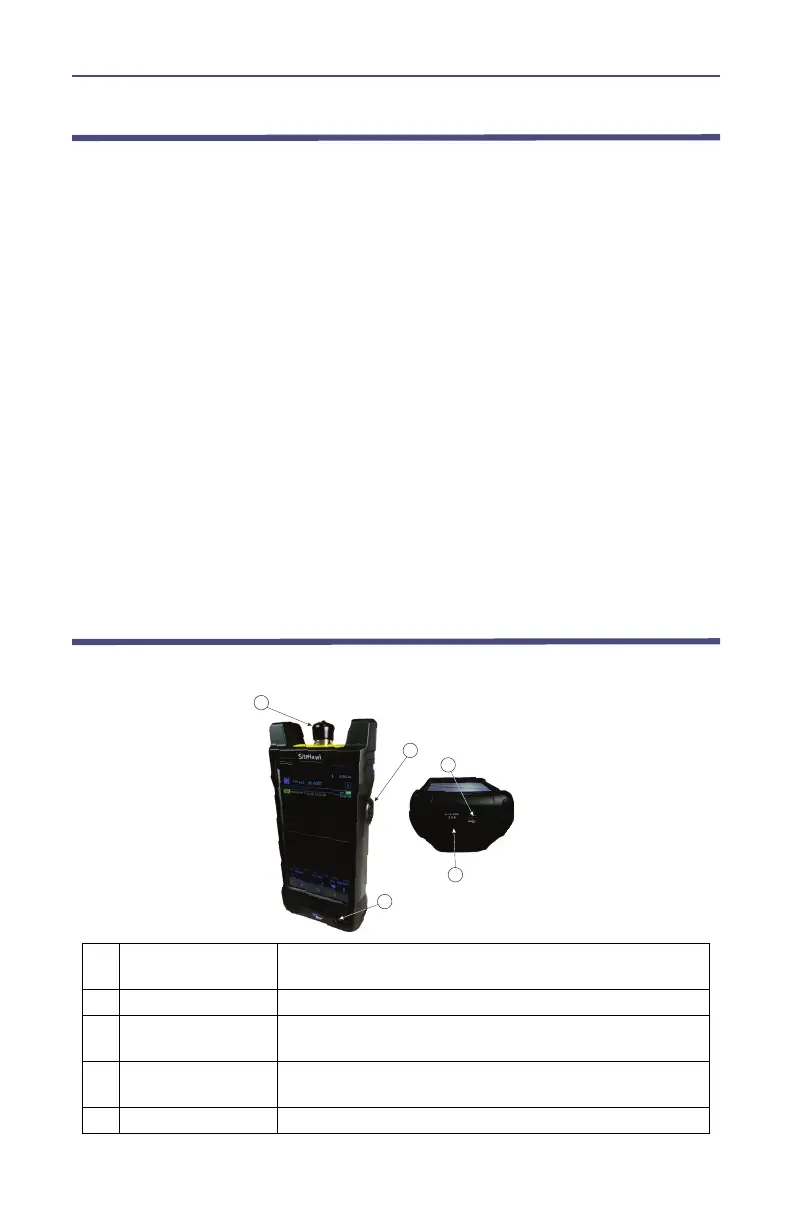
Controls, Indicators, Connectors and Ports
Figure 1 SK-6000 Controls, Indicators, Connectors and Ports
1 Antenna Test Port
Female N connector for connecting to the antenna. Use a
phase-stable cable for best results.
2 Power Button Used to power on and off the SiteHawk
3 USB-C 3.0 Type
USB device port for connection to a USB Drive or Bird
Power Sensor.
4 Charger Input
Input connector for charging the SK-6000 using the
supplied charger.
5 Charge Indicator Indicator is red when charging, green when fully charged



 To Next Page