Bird SiteHawk Operation Manual
7
Measurement Port
CAUTION
Do not exceed +22 dBm (100 mW) RF Power input at the measurement port.
Damag
e to the units RF module will result.
Note: Antenna systems can build up a static charge large enough to
damage the SiteHawk, if discharged through the device. It is
recommended a load or attenuator be used to bleed off any static
charge prior to connecting the SiteHawk to the system.
The measurement port is a 50 ohm N-type. This port is used to connect the
device under test.
User Interface
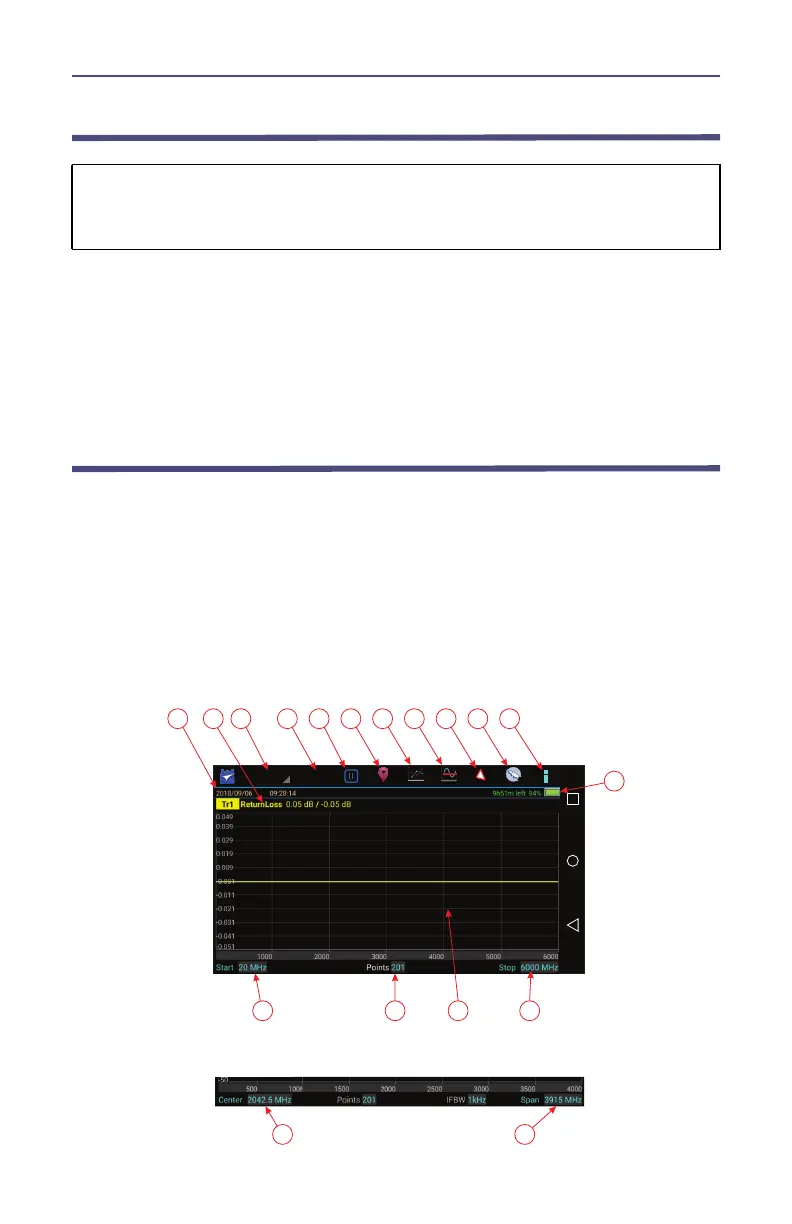
The SiteHawk user interface consists of a touch screen interface. The user
presses the screen to access menus, change settings, perform measurements
and save results.
Note: The displays used in this manual are shown with the SiteHawk
in the horizontal position, some menus may display differently if
accessed with the unit in a vertical position. Display options can be
controlled via the settings menu on the home screen.
Figure 2 User Interface Description (Match Measurement Mode)



 To Next Page