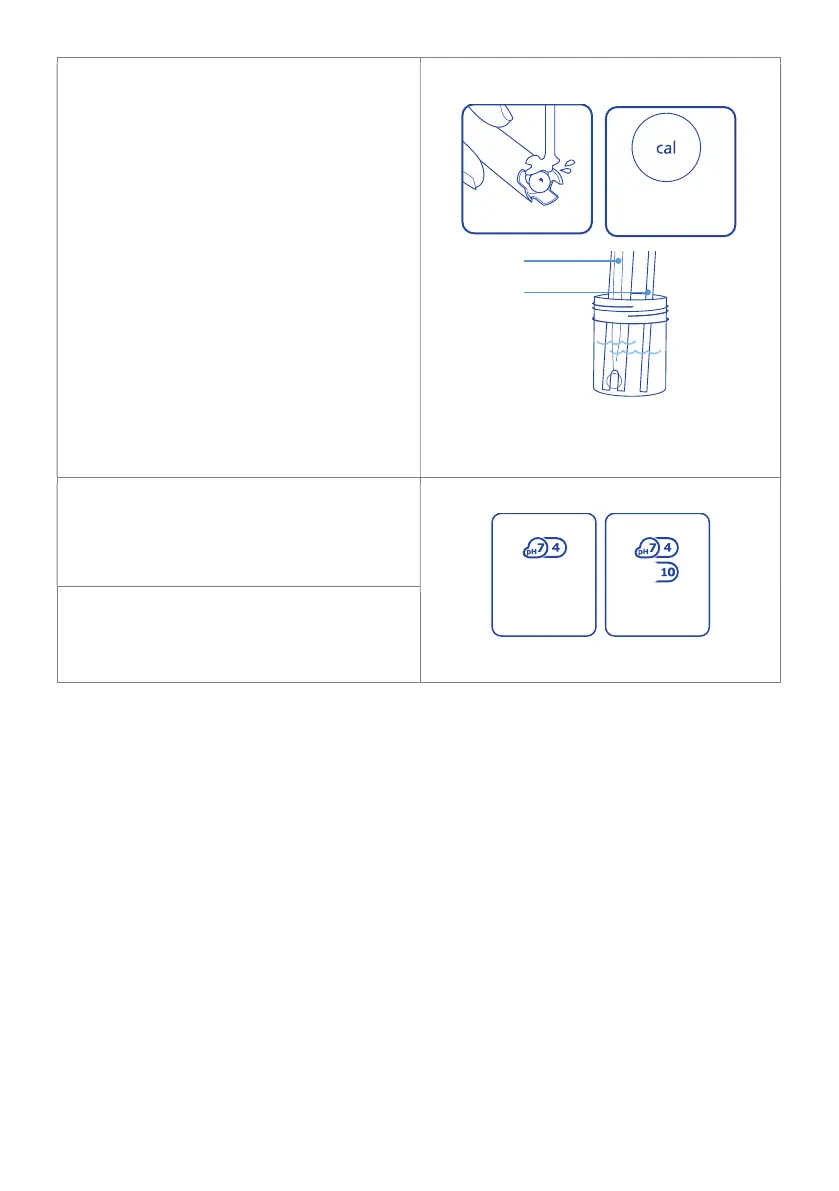
pH 4.0 and/or pH 10.0 calibration
1. Rinse both probe tips in fresh tap
water, shake off excess water. Place
the clean pH probe tip in either pH
4.0 or pH 10.0 calibration solution.
Press ‘CAL’.
2. Calibration is complete when all the
‘’s on the screen become solid. The
screen will display ‘OK’ and the ‘pH 4’
or ‘pH 10’ indicator will appear to
indicate successful pH calibration.
3. If you require three-point calibration,
repeat ‘1’ and ‘2’ using the pH 4.0 or
pH 10.0, whichever solution was not
used.
4.
The pH controller is now calibrated,
and ready for use.
After pH calibration, the pH controller
reverts to ‘Monitor’ mode.
Change to ‘Control’ mode if required.
NOTE: If ‘Failed <¿>’ is displayed on the
screen during calibration, see section 7.1
Troubleshooting.
press cal buttonrinse in tap water
pH 4.0 calibration
solution
Temperature
Probe
pH Probe
successful
pH 7, 4 and pH 10
calibration
successful
pH 7 and pH 4
calibration


 To Next Page