28
Complete User manual
TROUBLESHOOTING
How to solve simple problems
If Pro stops because of an emergency, disconnect it from power and connect it again, or press
calibration button to reset the emergency stop.
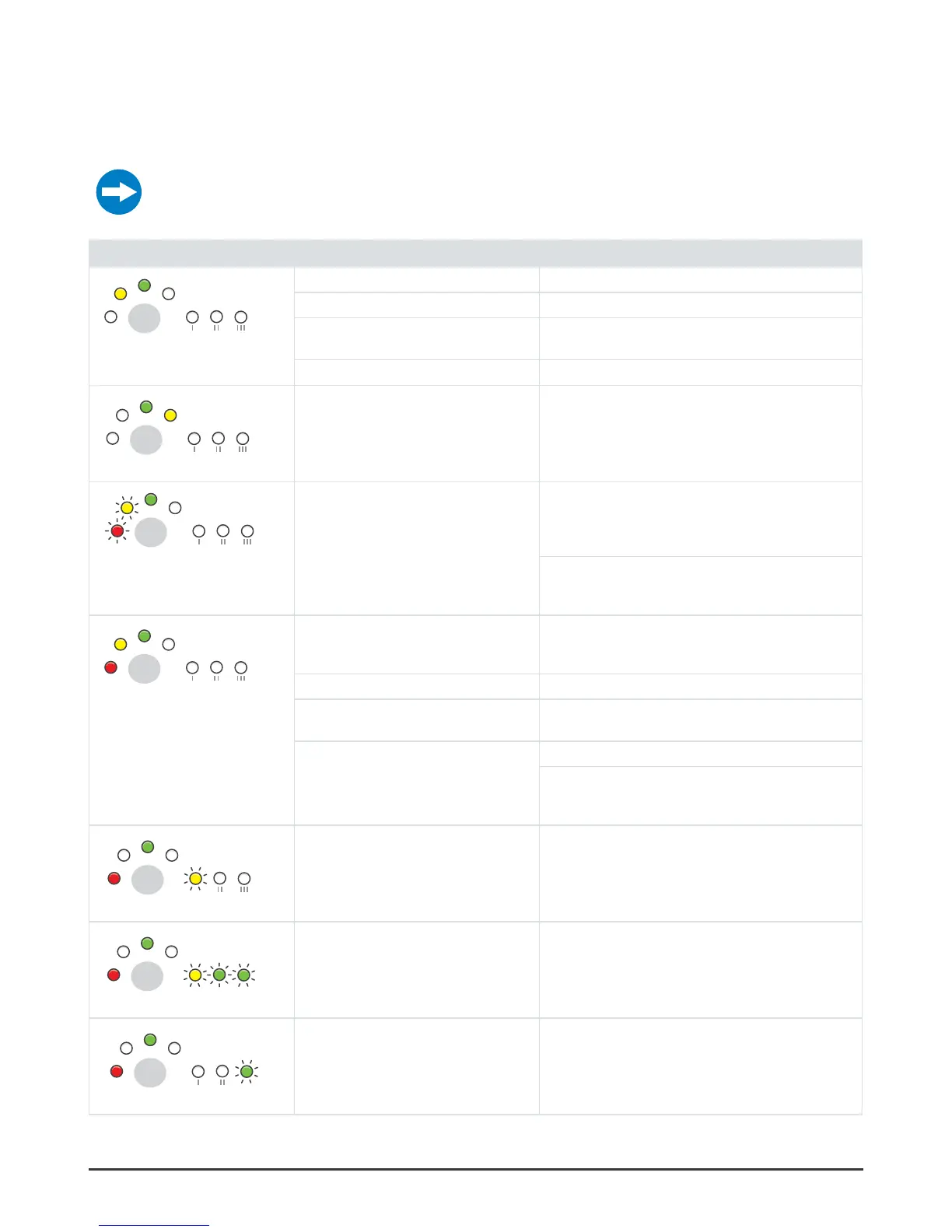
Symptom Cause Solution
Filter I must be replaced. See “Replace prefilter” on page 20.
The grid filter is blocked. See “Clean the grid filter” on page 21.
The feed water pressure is too low. Make sure that the feed water pressure is sufficient. If
necessary, increase the pressure.
The leak protection has been activated. Find the leaks. Repair them.
Filter II must be replaced. See “Replace prefilter” on page 20.
Replace prefilter II. In PRO 600, replace both prefilters.
The feed water pressure is too low. The
water purifier has stopped. It waits and must
be started again.
The water purifier will try to start automatically. Make sure
that the feed water pressure is sufficient. If necessary,
replace the filters.
See “Replace prefilter” on page 20.
Push the calibration button to start the water purifier.
Release the button when the filter I light and the stop light
go out.
filter I or filter II are blocked. Make sure that nothing in the filter makes the water not
flow. If necessary, replace filter I or filter II. See “Replace
prefilter” on page 20.
The grid filter is blocked. See “Clean the grid filter” on page 21.
There is a water leakage or condensation
on the base plate.
Make sure that all connections are water tight. Tilt the water
purifier forward, and dry the base plate with a cloth.
The feed water pressure is too low. Install a pump with increased pressure for the feed water.
Do a check of the parts that have an effect on the feed
water pressure (the water line, the coarse filter, the extra
pre-filter).
The water purifier has stopped. The clean
water quality has become too low.
Disconnect the water purifyer from power. Connect it again
to start the automatic flush. Do this 2 or 3 times.
If the problem is repeated, contact your service dealer.
Calibration not carried out correctly Calibrate again. See “Calibration” on page 16 for
instructions.
Water quality meter does not work correctly. Disconnect the water purifier from power. Connect it again
to start the automatic flush. Do not use the water purifier
for 2 hours.
If the problem is repeated, contact your service dealer.


 To Next Page