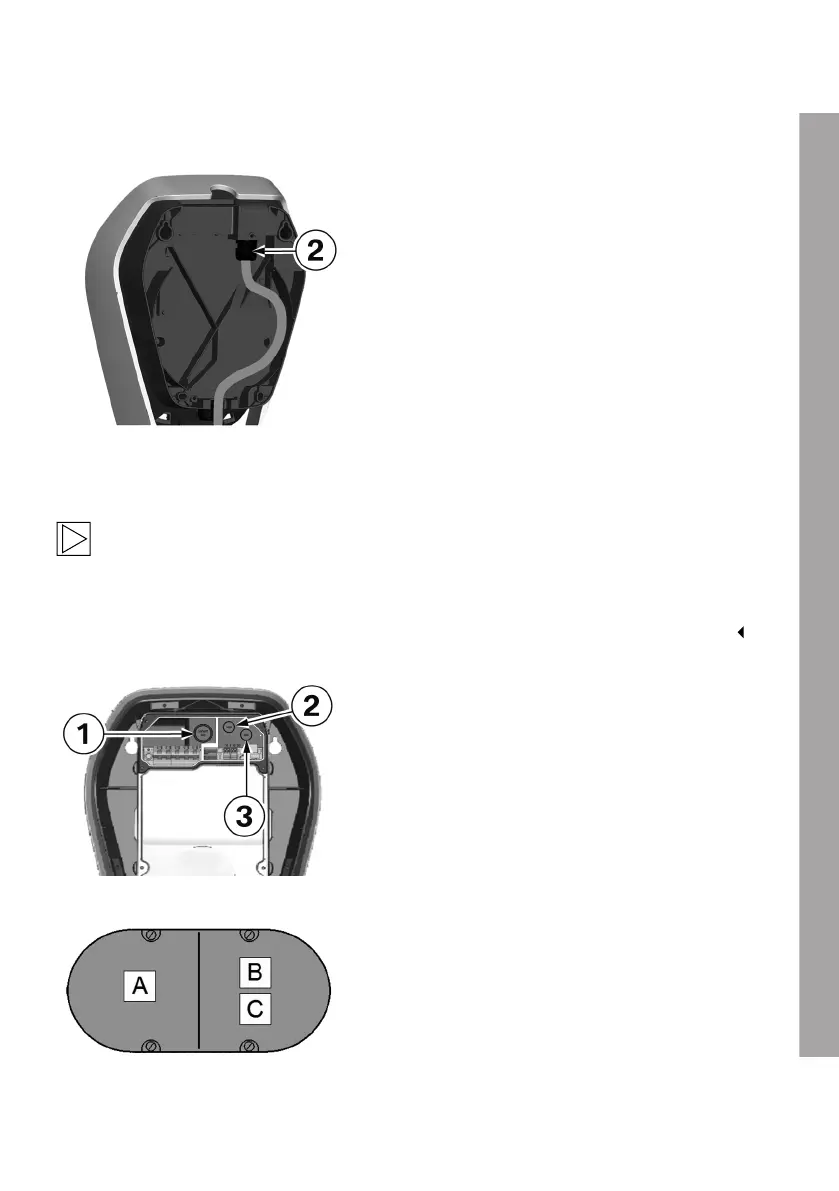
Surface-mounted cable routing - Cable inlet from below
1. Lay the supply line in a loop to the cable gland
2.
Observe the permissible bending radii of the
cable.
Cable inlet from behind – cable in the wall
Note
The cable is to be inserted straight out of the wall into the rear of the device. Ensure that the
Wallbox is correctly positioned so that the cable opening is directly above the cable. Ensure
that you comply with the minimum bending radii. Use the drilling template with the appropriate
punching for the cable to ensure the correct alignment of the Wallbox above the wall outlet.
Cable openings
1 Bushing/Double membrane seal M32, supply
cable
2 and 3 Bushing/Double membrane seal M16, for
control cable/Ethernet
Flush-mounted socket
A double flush-mounted socket with a separating
web may be used for safe separation.
A Supply cable
B Control cable
C Ethernet
EN
25











 To Next Page