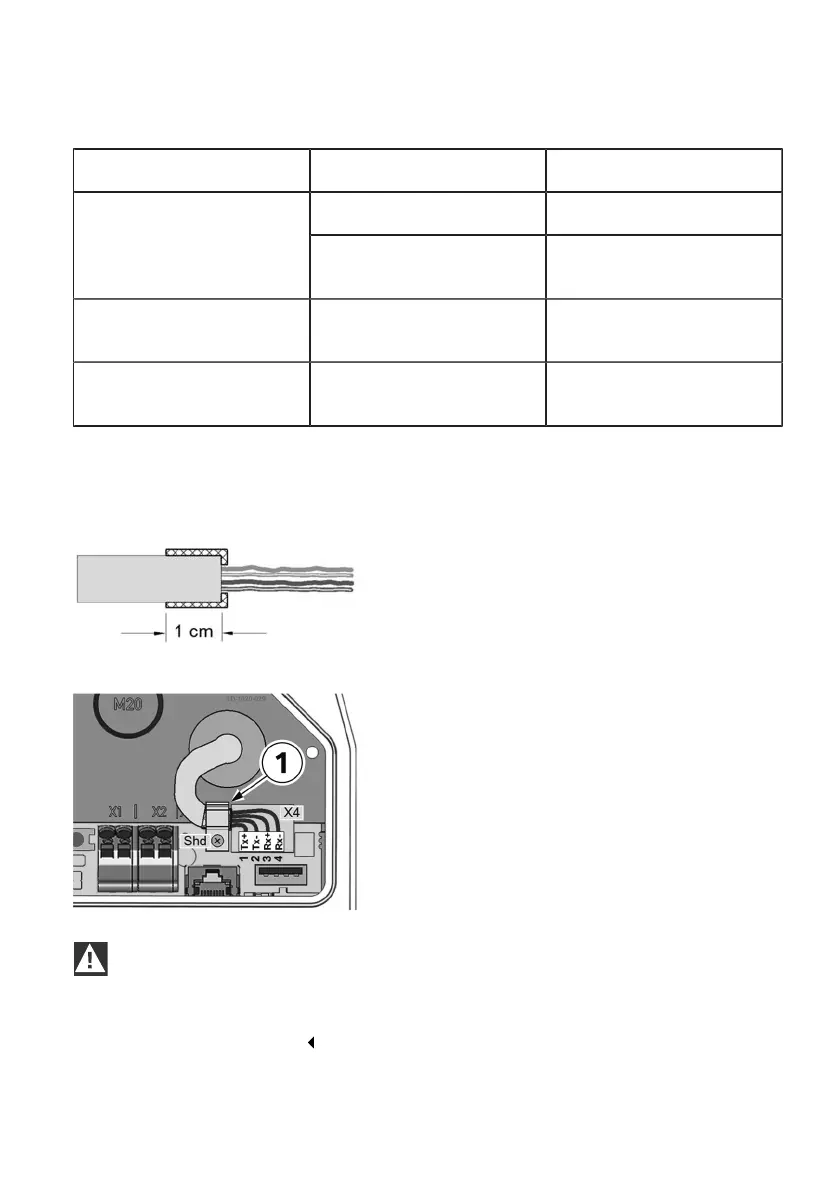
Terminal data:
Category Diameter of wire Diameter of insulation
0.36 mm (AWG 27) 0.7 – 0.75 mmRigid cable
Cat 5e / Cat 6 STP
0.4 – 0.64 mm
(AWG 26 – AWG 22)
0.7 – 1.4 mm
Cat 6 STP 0.51 – 0.81 mm
(AWG 24 – AWG 20)
1.0 – 1.4 mm
Flexible cable
Cat 5e / Cat 6 STP
7 x 0.2 mm
(AWG 24)
1.1 – 1.4 mm
Recommended tool:
KRONE LSA+ ® insertion tool for connecting the wires without solder, screws or stripping whilst at the
same time cutting off the residual length.
Preparing the connection cable
1. Strip the connection cable approx. 6 cm.
2. Fold back the shield braid approx. 1 cm in full,
and wrap it with conductive textile adhesive
tape.
Connecting the cable
1. When using an STP cable, fasten the
connection cable at the place where the shield
braid is wrapped in the cable clamp 1.
The cable clamp must be screwed to the
shield connection Shd of the printed circuit
board.
2. Connect the wires to the Ethernet1 terminal
block X4 using the insertion tool.
IMPORTANT
Danger of damage.
Ensure that the connection area is clean so that no dirt, for example wire residues, can get into
the interior of the Wallbox.
38











 To Next Page