21
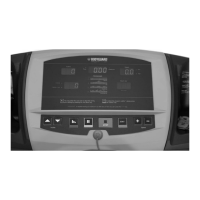
The T280P–T280C–T300 treadmills allow you to perform the following tests:
• NVRAM TEST
• EPROM TEST
• KEYPAD TEST
• DISPLAY TEST
• BEEPER TEST
• HEART RATE TEST
• BELT ALIGNMENT
• MOTOR CHECK
• ELEVATION CALIBRATION
• STATISTICS
• SAFETY KEY TEST
• ERROR LOG
• CURRENT TEST
• SPEED SENSOR TEST
• MAINTENANCE
To perform any one of the above procedures, press the Speed INCREASE or DECREASE keys to select the one you want and press
the JustGo
TM
/ENTER key to accept.
NVRAM Test
The NVRAM (Non-Volatile Random Access Memory) test will not erase all stored information such as user identification, and all saved
programs. The NVRAM is a computer chip that saves information even when the treadmill has been turned off.
1. In the Diagnostics menu, select the “NVRAM TEST” and accept it by pressing the JustGo
TM
/ ENTER key.
2. Press the JustGo™/ENTER key to start the NVRAM test. The NVRAM test will perform automatically.
EPROM Test
The EPROM test allows you to determine if the program stored in the EPROM chip is intact.
1. In the Diagnostics menu, select the ‘‘EPROM TEST’’ and accept it by pressing the JustGo
TM
/ ENTER key.
The EPROM TEST will perform automatically.
• The display will show ‘‘EPROM IS OK’’ if the EPROM is intact and it will display a “CHECKSUM” code (for Bodyguard
®
internal use only).
• The display will show ‘‘EPROM IS NOT OK’’. This means the EPROM might be damaged.
Keypad Test
The keypad test allows you to verify that each key is responding when pressed.
1. Press each key one at a time and verify the confirmed response on the screen.
Example, pressing the Elevation INCREASE key will cause the screen to display “ELEVATION INCREASE” indicating
that the key press was recognized.
2. Press the CLEAR/STOP and JustGo
TM
/ENTER keys simultaneously to terminate the keypad test.
Display Test
The display test allows you to verify that each display light is properly working. If you notice that one or more areas on the screen do not light
up during an exercise, you should perform this test.
1. In the Diagnostics menu, select the “DISPLAY TEST” and accept it by pressing the JustGo
TM
/ ENTER key.
2. Now the display will illuminate a certain way. To proceed to the next display patterns, press any key.
Beeper Test
The beeper test will cause the beeper to sound.
1. In the Diagnostics menu, select the “BEEPER TEST” and accept it by pressing the JustGo
TM
/ENTER key. Listen for a series of “beeps”.
The beeper test will stop automatically when you press the CLEAR/STOP key.
Heart Rate Test
The heart rate test allows you to determine if the heart rate system (chest strap or hand grip) is working properly and that the computer is
displaying your heart rate signal during a program.
1. In the Diagnostics menu, select the “HEART RATE TEST” and accept it by pressing the JustGo
TM
/ ENTER key.
2. The top left display will show the signal received from the chest strap and the bottom window will show the hand grip signal. Attach your
heart rate chest strap. You do not need to step on the treadmill for this test, but simply stand near the computer. Within a few seconds,
your actual heart rate signal will be displayed on the screen. Do the same for the hand grip system; put your hands on the two metal
plates and wait for 10 to 15 seconds.
3. Press the CLEAR/STOP key to terminate the test.


 To Next Page