3
Table of Contents
IMPORTANT SAFETY NOTICE ............................................................................................................................................................................................. 4
1. OPERATING YOUR T280P–T280C–T300 .................................................................................................................................................... 6
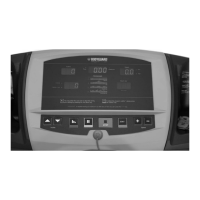
1.1 Getting to Know your T280P–T280C–T300 Computer Display Monitor ............................................................................................. 6
1.2 Pausing During an Exercise ........................................................................................................................................................................................... 8
1.3 Saving an Exercise ............................................................................................................................................................................................................. 8
1.4 Viewing Exercise Parameters ........................................................................................................................................................................................ 9
2. SETTING UP THE COMPUTER TO YOUR ENVIRONMENT .......................................................................................................... 9
2.1 Access to “Settings Menu” ................................................................................................................................................................................................ 9
2.2 Language Feature .................................................................................................................................................................................................................. 9
2.3 Weight Unit Feature ............................................................................................................................................................................................................. 9
2.4 User Identification Feature ................................................................................................................................................................................................ 10
2.5 Distance Unit Feature .......................................................................................................................................................................................................... 11
2.6 Time, Distance or Calories Feature ............................................................................................................................................................................... 11
2.7 Warm Up and Cool Down Feature ...............................................................................................................................................................................11
2.8 Heart Rate Control Options Feature ............................................................................................................................................................................. 12
2.9 Heart Rate Access Options Feature ........................................................................................................................................................................... 12
2.10 Beeper Feature .................................................................................................................................................................................................................... 13
2.11 Speed Limits ......................................................................................................................................................................................................................... 13
2.12 Big Number Option ............................................................................................................................................................................................................. 13
2.13 Learn Program .................................................................................................................................................................................................................... 13
2.14 Heart Rate Recovery ......................................................................................................................................................................................................... 14
2.15 Max Duration ....................................................................................................................................................................................................................... 14
2.16 Pause Time ............................................................................................................................................................................................................................ 14
3. T280P–T280C–T300 EXERCISE PROGRAMS ......................................................................................................................................... 14
4. HEART RATE RECEIVER .................................................................................................................................................................................................... 19
Possible Chest Strap, Heart Rate Problems ..................................................................................................................................................................... 20
Possible Contact Heart, Rate Problems ............................................................................................................................................................................ 20
5. COMPUTER DIAGNOSTICS
Acess to”Diagnostics” menu .....................................................................................................................................................................................................20
6. MAINTENANCE INFORMATIONS
General Care ..................................................................................................................................................................................................................................... 24
Belt and Running Deck .............................................................................................................................................................................................................. 25
Lubricant Application. ................................................................................................................................................................................................................... 26
Quick Troubleshooting Check List .......................................................................................................................................................................................... 26
Error Codes ....................................................................................................................................................................................................................................... 27


 To Next Page