33
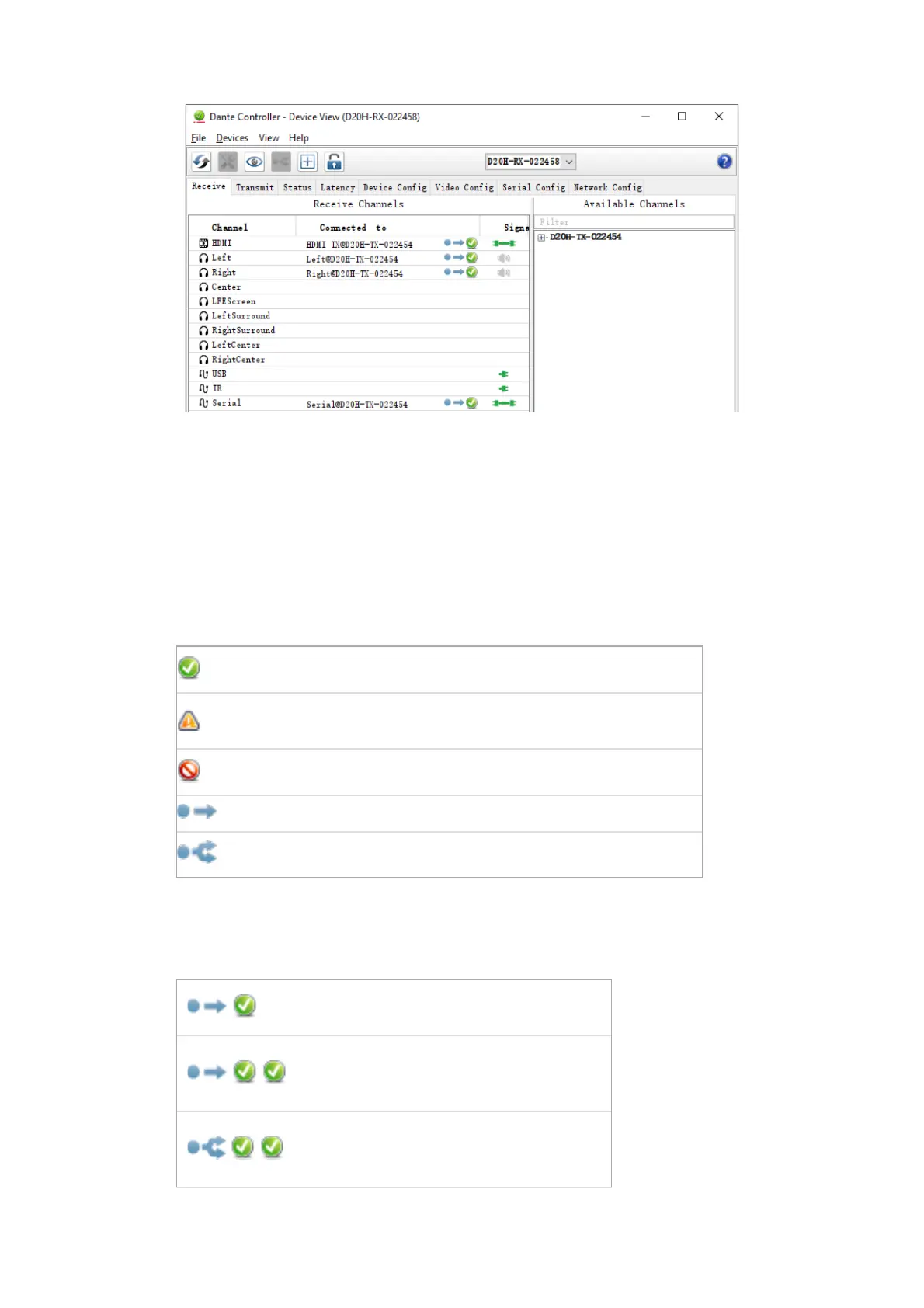
Receive Tab with Bolin Dante AV decoder
The tab is split into two panes: Receive Channels, and Available Channels.
Receive Channels
The Receive Channels pane contains three columns:
■
Channel: Lists the receive channel names for the current device. These can be edited here to
rename the channel.
■
Connected To: Lists the Tx channel that the receive channel is currently subscribed to, plus the
status of both primary and secondary subscriptions, using the following icons:
Subscription is OK and media should be flowing
Subscription is unresolved - usually because the transmitting device
has been removed from the network, or is switched off
No subscription, or a subscription error
Subscription is via unicast connection
Subscription is via multicast connection
Subscriptions can show several symbols in the Status column. Common status icon combinations and
their meanings are as follows:
Unicast device successfully subscribed to a
transmitter
Redundant device successfully
subscribed on both primary and
secondary via unicast
Redundant device successfully
subscribed on both primary and
secondary via multicast


 To Next Page