46
Dante Redundancy / Switch Configuration
Depending on the manufacturer's configuration of a device, it may be possible to toggle the device
between Redundant and Switched modes, or to select a Switch Configuration.
• Redundant
When a device is set to Redundant, the device will duplicate Dante media traffic to both Ethernet ports,
allowing the implementation of a redundant network via the secondary port. Not all devices support
redundancy.
• Switched
When a device is set to Switched, the secondary Ethernet port will behave as a standard switch port,
allowing daisy-chaining through the device.
• Switch Configuration
Certain devices support specialist switching and/or redundancy configurations for the Ethernet ports. For
these devices, the top pane of the Network Config tab will be titled 'Switch Configuration'. Please refer
to the manufacturer's technical documentation for information on the supported switching
configurations for the device.
Addresses
Dante devices obtain IP addresses automatically by default, and in most circumstance, there is no need to
change the Addresses settings. However, static IP addresses can be assigned if necessary.
To assign a static IP address:
1. Select 'manually configure an IP Address' for the appropriate Ethernet port.
2. Enter the IP Address and Netmask.
3. Click Apply.
The DNS Server and Gateway settings are optional - the device will use network defaults if they are not
specified.
Click Revert to revert to the previous settings.
Note: Assigning static IP addresses requires a device reboot.
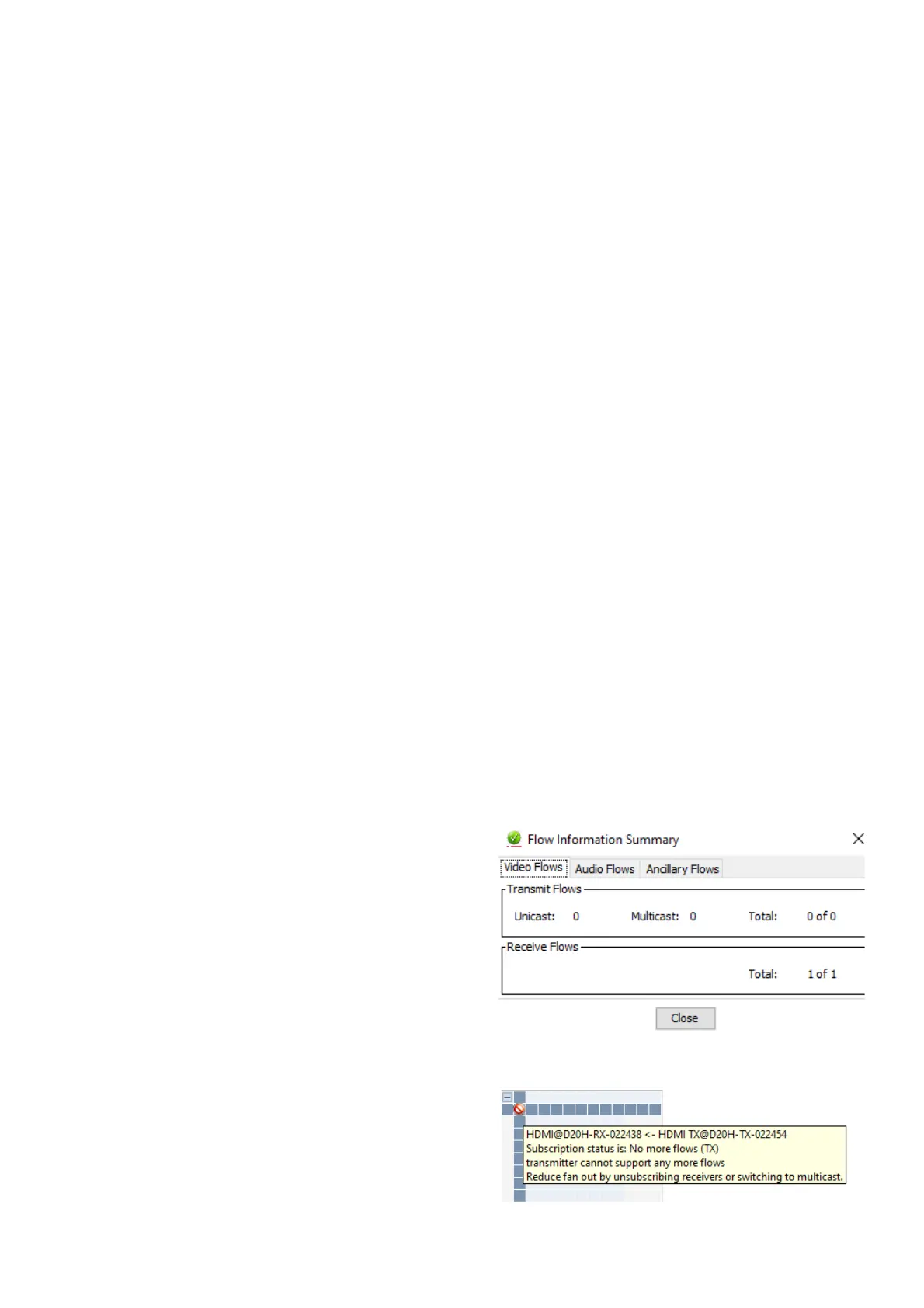
Flow Information
The Flow Information dialog displays any audio, video,
or ancillary flows to and from the device.
To open the Flow Information dialog, open the Device
View for the device and select View > View Flow
Information.
It shows the number of transmitting flows and receiving
flows of the device in question. It lists Unicast number,
Multicast number, and Total number. This is necessary
information, because there is a limit to the number of
flows for transmitters and receivers. For example, Bolin
decoder D20H is only meant to receive one video flow. Knowing this information can help troubleshoot certain
concerns when routing errors or warnings occur.
Bolin Dante AV PTZ encoder has 1 video, so when a
second decoder tries to request HDMI routing from the
same encoder it caused a subscription error, with the
status of no more flows from TX. If there is an easy
method to resolve this concern it will be noted in the
information box when hovering over the failed
subscription. In this case, it suggests unsubscribing receivers or switching to multicast instead.


 To Next Page