47
Unicast / Multicast Transmit Flow Configuration
Information regarding Unicast
• 1 to 1 transmission, data sent is unique
• The data will have to be completely duplicated if want to unicast to multiple recipients
• Dante AV default is unicast
Information regarding Multicast
• Created immediate via user intervention with the Dante Controller software
• When utilized correctly can help optimize network bandwidth
• When unmanaged it is like broadcast, where data is transmitted to every recipient, which greatly impacts the
network negatively. As such, we recommend using IGMP snooping, so the data is delivered only to the intended
recipients
o Note: There should be only one IGMP querier for each VLAN
o Note: All switch should have IGMP snooping
When to use Unicast and when to use Multicast
Unicast is recommended when application requires the following:
• video needs to be transmitted beyond a router
• when only one transmitting and receiving end point is needed
Multicast is recommended when application requires the following:
• when video needs to be transmitted to multiple receivers
• to fix fan out errors
How to change from Unicast to Multicast
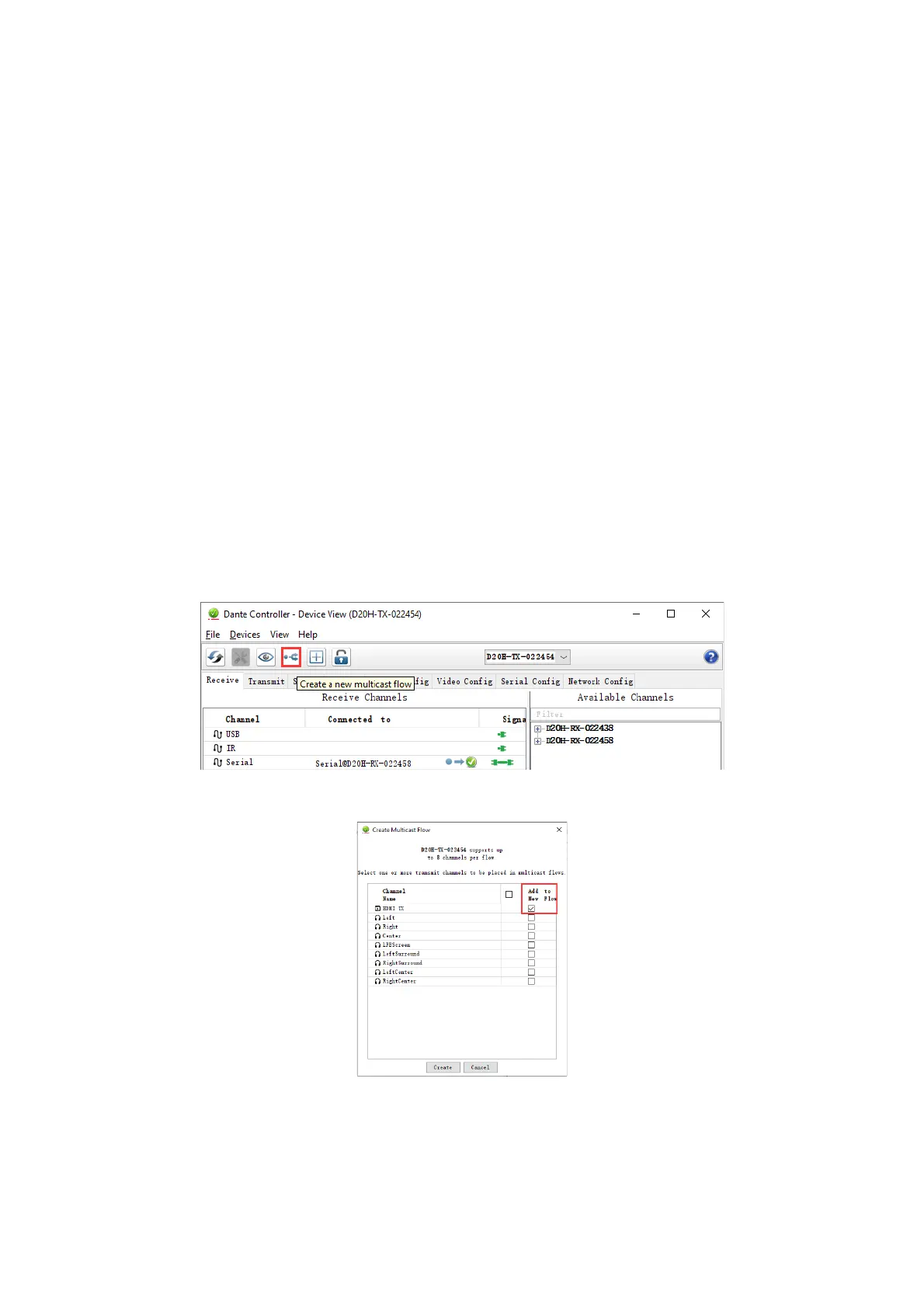
1. Open device view of the transmitter device (encoder)
2. Click the 'Create a new multicast flow' button in Device View to open the Create Multicast Flow dialog.
3. Check the items to include in the multicast and then click Create on the bottom left.


 To Next Page