35
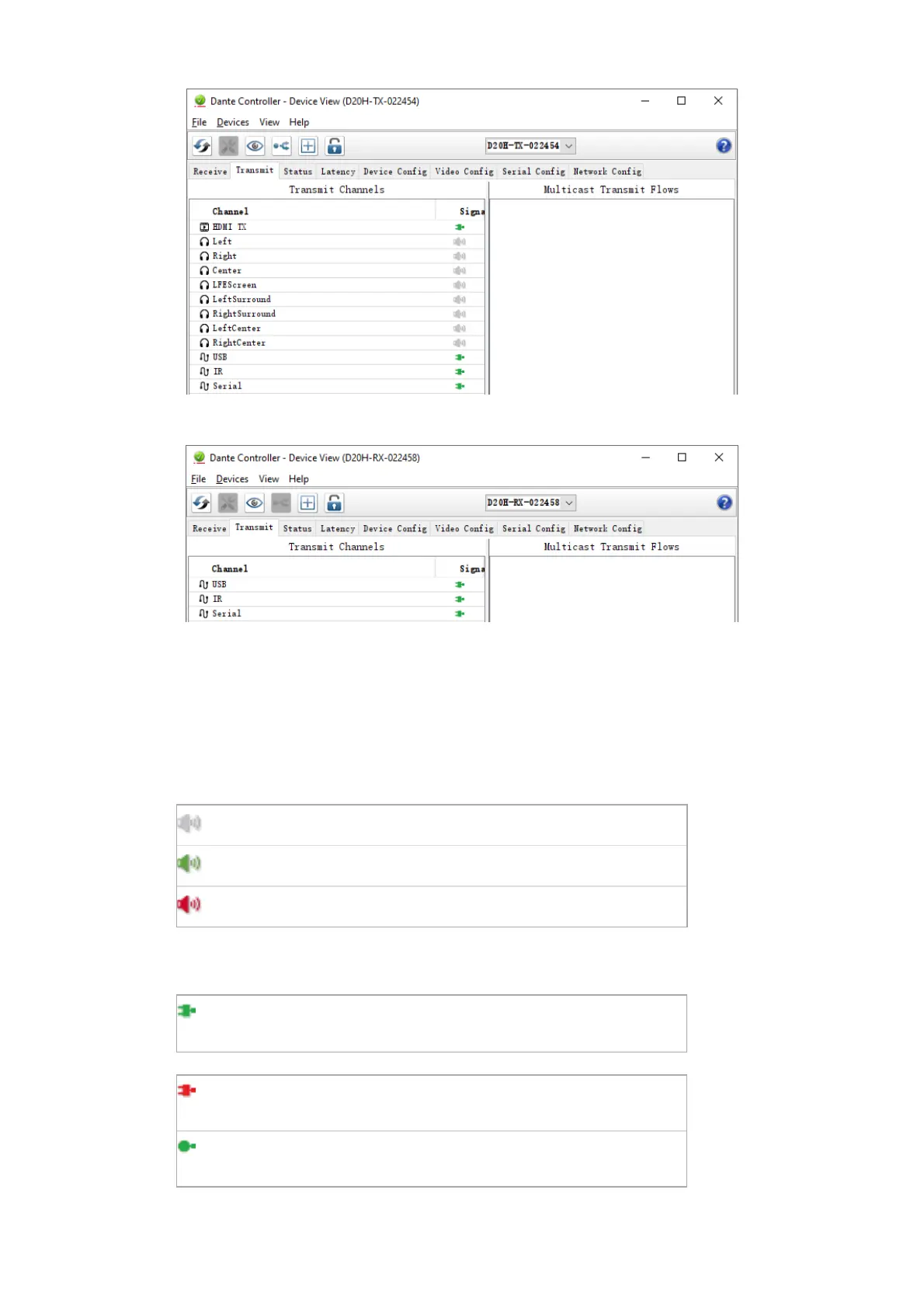
Transmit Tab with Bolin Dante AV encoder
Transmit Tab with Bolin Dante AV decoder
The Transmit Tab is arranged into two areas:
■
Transmit Channels: The area on the left pane of the tab shows the TX channels for the device. It
allows you to edit channel names for transmit channels. Input to the table is filtered to prevent
illegal characters from being used in channel names.
Supported devices will also show the following channel metering icons in the Signal column,
indicating the presence of audio on subscribed channels:
Channel is either muted, or receiving audio at less than -61dbFS
Channel is receiving audio between -61dbFS and 0dbFS
For video, ancillary and privately encoded audio channels, supported devices may also show the
following status icons in the Signal column:
Indicates there are no external connectivity problems with the TX
device
Indicates there is an external connectivity problem with the TX
device
Dante Controller cannot ascertain if there are any external
connectivity problems with the Tx device
■
Multicast Transmit Flows: The area on the right pane of the tab shows the multicast transmit flows
that have been configured on the device.


 To Next Page