Functions and operation
EN
16 bora.com
5
Functions and
operation
u
Observe all safety and warning information (see"2Safety").
5.1
Switching the appliance on and
off
The sensor button reacts to finger contact. You switch the
appliance on and off with this button.
u
Long press on .
T
When turned off, the appliance is temporarily switched to sleep
mode and after 15 minutes the software is completely shut down.
When the appliance is operated, the drain filter must be fitted.
Large food residues can block the water drainage pipe and
the pump.
5.2
Opening/closing the door
Opening the door
u
Tap
T
The door opens slightly.
u
Use both hands to open the door as far as it will go.
If you do not do this within 10 seconds of the door opening, it
will close again automatically.
Closing the door
When the door is fully open:
u
use both hands to tilt the door upwards until the automatic
function closes the door.
When the door has been pre-opened:
u
Use both hands to open the door as far as it will go.
u
use both hands to tilt the door upwards until the automatic
function closes the door.
do not push the door closed when pre-opened; this may
damage the appliance.
5.3
Using the food supports
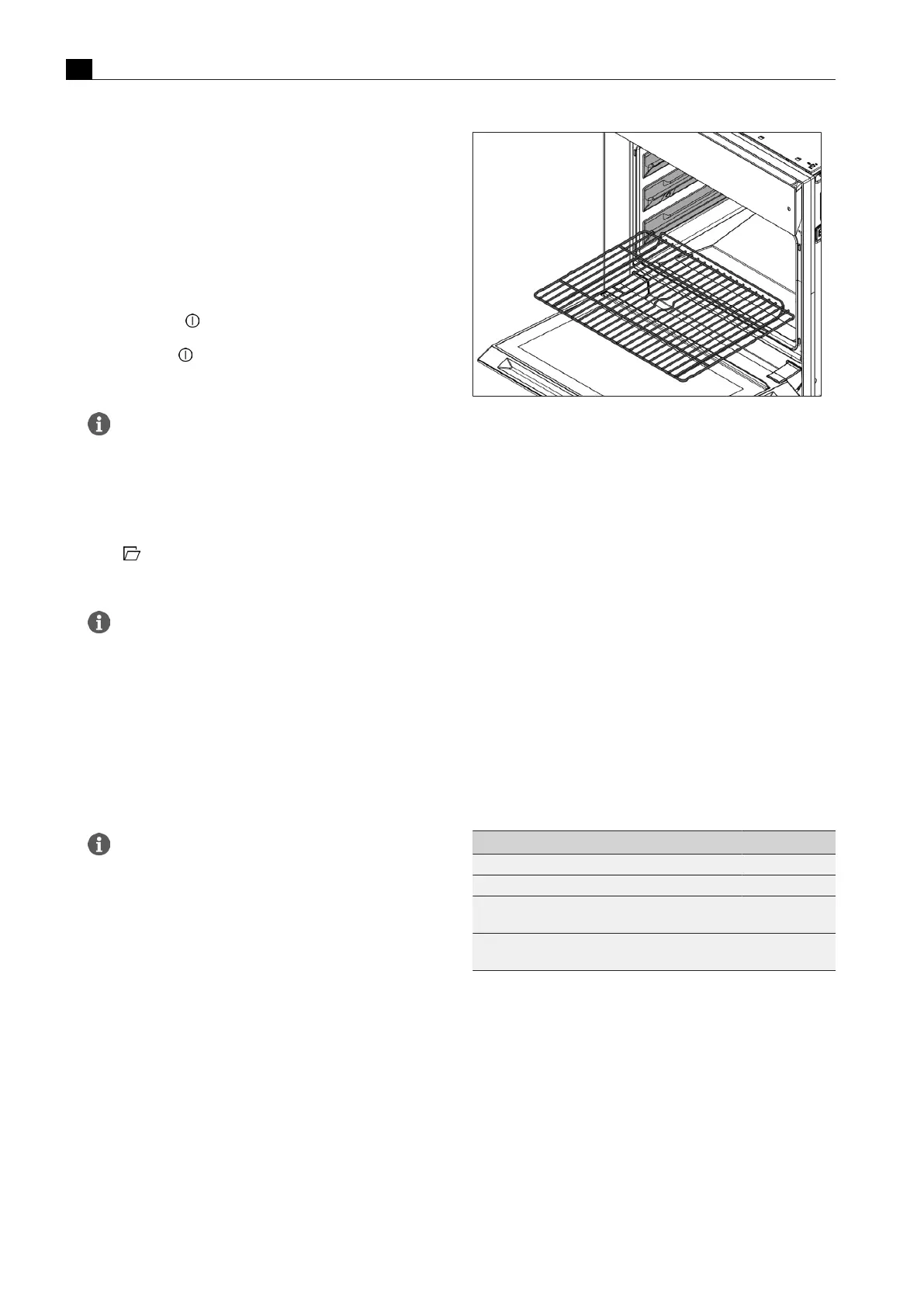
Inserting/removing food supports
u
Place the food support on the shelf guides at the required level and
push until it comes to a stop in the oven chamber.
Fig.5.1
Inserting food supports
The food supports have a protection mechanism that prevents them
from sliding out of the front of the shelf guide.
u
Lift the food support to take it out.
How to use food supports carefully and correctly
u
Do not use knives on the food supports.
u
Do not use any metal or sharp objects to turn or remove food.
u
Only use plastic or wooden kitchen utensils.
Food supports may expand when heated (thermal behaviour). If
heated unevenly, the metal will expand to different extents. The
measures below can be taken to prevent warping:
u
Preheat the X BO without the food supports.
u
Load the food supports evenly.
u
Use the food supports as instructed.
u
Use a suitable tray or tin for pizzas, round cakes and similar and
place this on the oven rack.
u
Avoid placing cold food or water directly on hot food supports.
u
Use the universal tray for searing and roasting.
5.4
Operating the touch display
The touch display reacts to finger contact. It recognises different
touch commands:
Touch command Contact Duration
Touch Brief touch 0.5s
Long press Longer contact 1–8 s
Swipe Swiping motion
(vertical + horizontal)
0.1–8 s
Number scroll wheel Vertical swiping motion over the number scroll
wheel (until the desired value is in the centre)
Tab.5.1
Touch commands
u
Only touch the display with your fingers.
u
Make sure that your fingers are clean and dry before using the
touch controls.
u
Ensure that no other parts of your hand are touching the display
when using the controls.
u
Keep the contact area as small as possible when using the touch
zones.
A scroll bar on the bottom edge of the display shows the area that is
currently visible in the menu.
u
Swipe left or right across the display to show other areas in the
menu.



 To Next Page