Functions and operation
EN
bora.com 17
5.4.1
How it works
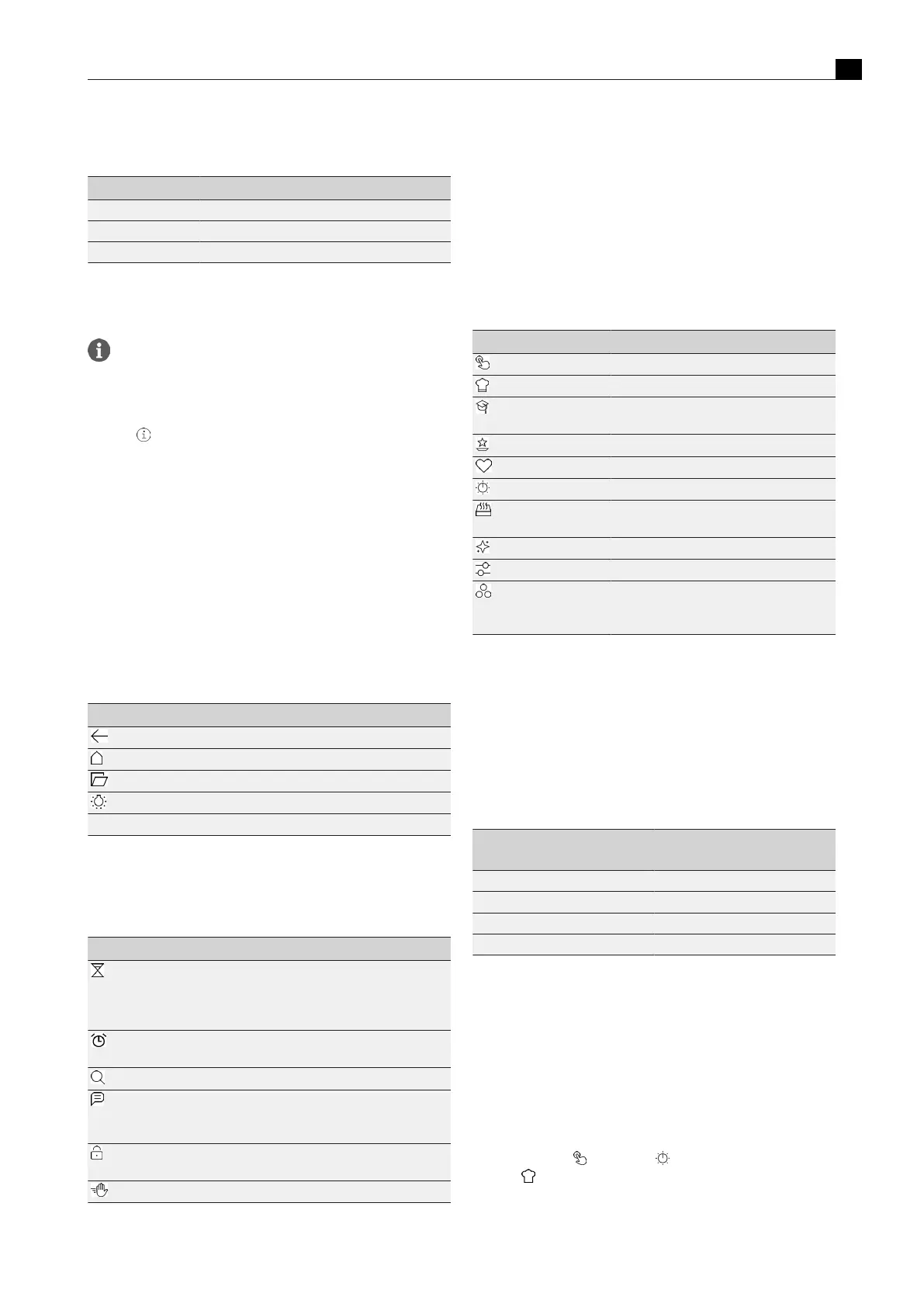
Operation Command
Touch Select a function, button or menu item
Long press Activate additional options
Swipe Set value, navigation
Tab.5.2
Operating principle
5.5
Info, tips and instructions
The menu item “First steps” contains helpful videos on how to
operate and handle the XBO steam oven.
Information and tips
The programmes provide practical information and tips:
u
Touch in the presets
u
Touch the “Info” button under “Special programmes”
u
Touch the “Pro tip” button under “Automatic programmes”
Instructions
When you press the “Instructions” button, an animation will explain
how to do certain things (e.g. inserting the BORA cleaning cartridge).
Status messages
Shown on the top edge of the display.
u
Please take note of status messages.
5.6
Standard functions
Standard functions are available on every menu level and are shown
at the edge of the display.
Symbol/function Meaning
Back one menu level
The next menu up is displayed
Main menu
The main menu is displayed
Open the door
The door is opened automatically
Oven chamber lighting
Oven chamber lighting on/off
Time Hour:minute
Tab.5.3
Standard functions
5.7
Global functions
Global functions can be used at any time.
Symbol/function Meaning
Egg timer
Countdown in seconds, acoustic and
visual signal when the time lapses; the
time will then continue to run in minus
figures
Alarm
Acoustic signal at a certain time; the time
will then continue to run in minus figures
Search
Free text search with suggestion function
Message
Information for other people, message on
the display (e.g. Do not stop the cooking
session)
Operating lock
Prevents unintentional or unauthorised
operation
Cleaning lock
The display is locked for 10 seconds
Tab.5.4
Global functions
Accessing global functions
u
Swipe downwards from the top edge of the display.
Closing global functions
u
Swipe upwards.
5.8
Main menu
The different functions and settings are selected from the main menu.
Other options are displayed under some of the menu points or
settings can be made.
Symbol/function Meaning
Manual
Manual cooking
Automatic
Automatic programmes
First steps
Learn how to use the oven
(can be hidden under “Settings”)
Special
Other useful programmes
Favourites
Favourite automatic programmes
Classic
Classic cooking
Multi-drawer
BORA multi-drawer control
(only if a multi-drawer is connected)
Maintenance
Maintenance programmes and filter changes
Settings
Appliance settings
Basics
Simple automatic programmes
(function only found in guest mode – see
“Settings”)
Tab.5.5
Main menu
5.8.1
Manual
The target humidity and temperature as well as the cooking time can
be precisely preset using two selectable views (slider or scroll wheel).
The optional manual burst of steam can also be activated separately.
Temperature specifications that refer to conventional oven functions
(e.g. top/bottom heat, grill) and are not available on the appliance
can be adapted according to the following rules of thumb:
Temperature range of
conventional ovens
Manual cooking setting
120–140 °C 5 °C lower
140–160 °C 10 °C lower
160–180 °C 15 °C lower
180–230 °C 20 °C lower
Tab.5.6
Conversion table
5.8.2
Presets
Under the “Manual” and “Classic” menu items, presets have been
saved with cooking parameters that can be changed manually if
necessary.
A range of presets is available such as “Crisp up rolls”, “Steam
vegetables”, “Braise joint”, etc. There is practical info on each preset.
Selecting presets
u
Touch “Manual” or “Classic” .
u
Touch .
u
Touch the desired preset.
u
Change the settings if necessary.



 To Next Page