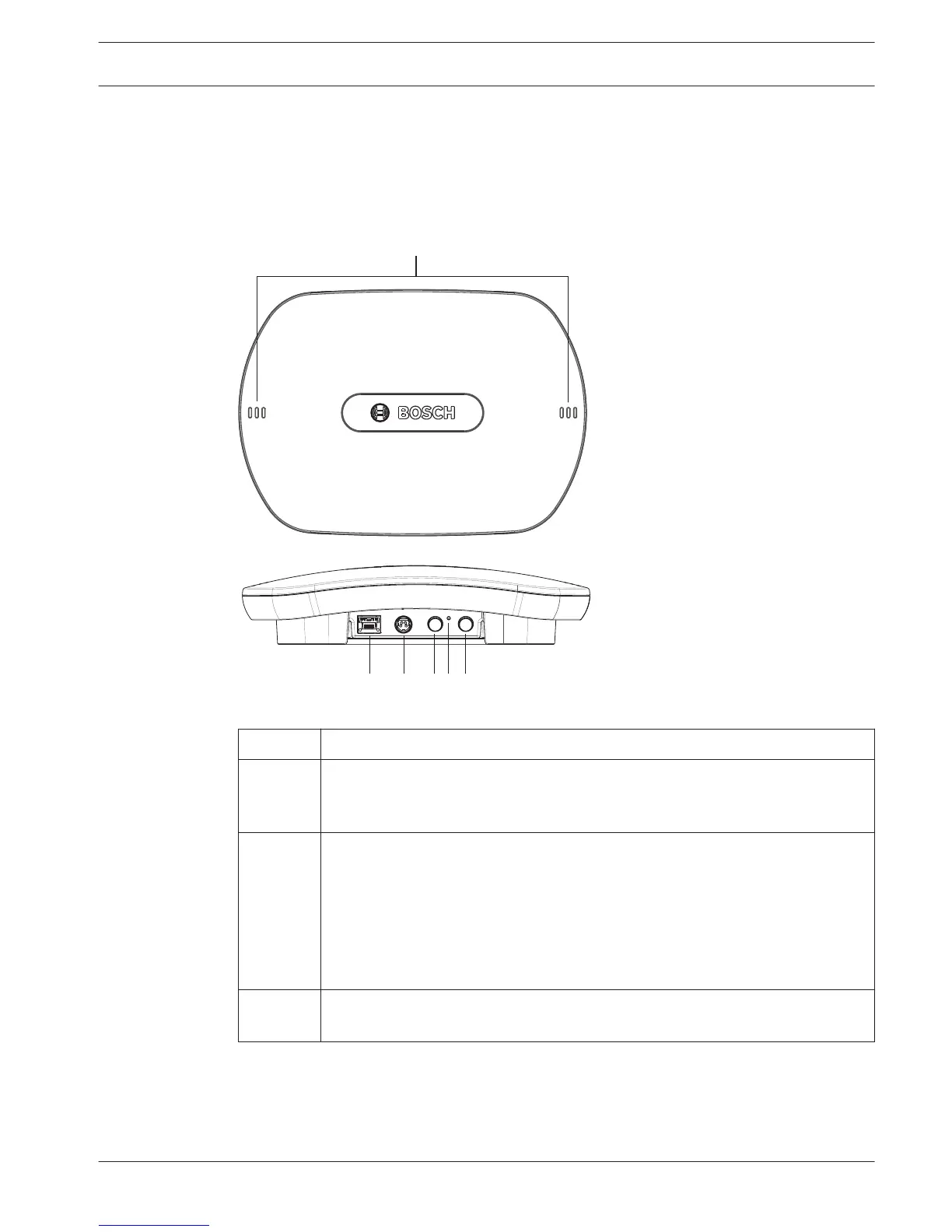
4) Power on / connections and indicators
The DCNM-WAP is powered via one of the three power supply sources marked with an * in the
table below. As soon the power supply is provided, the Wireless Access Point is powered on,
and the six LEDs (1) on the front side are all on.
– To configure the DCNM-WAP, refer to the software configuration manual of the DICENTIS
Wireless Conference System.
Figure 5.5: DCNM WAP front and bottom view
Item
Description
1 2x 3 status LED: Gives detailed information about the condition of the Wireless
Access Point and the wireless network. Refer to the software configuration
manual of the DICENTIS Wireless Conference System.
2 Network / DCN multimedia / PoE socket. Powered with:
– * DCN multimedia System Network Cable (48VDC) from DCNM‑(A)PS, or:
– * Standard Power over Ethernet cable (POE 802.3at Type1)”.
– Also standard Ethernet cable can be used (e.g. for camera or wired
connection with PC/Laptop).
Connects the Wireless Access Point point to the wired Ethernet network. For
DCN multimedia System Network Cable, see Additional components, page 12.
3 – * AC/DC power supply 48VDC socket (Power supply adapter supplied with
the DCNM-WAP).
DICENTIS Installation Wireless Access Point | en 17
Bosch Security Systems B.V. Installation Manual 2015.03 | V1.01 |















 To Next Page