11
Bowflex
®
TreadClimber
®
Service Manual
MECHANICAL SERVICE GUIDE
4.0 - ROC Cable Replacement Instructions
(TC6000 Only)
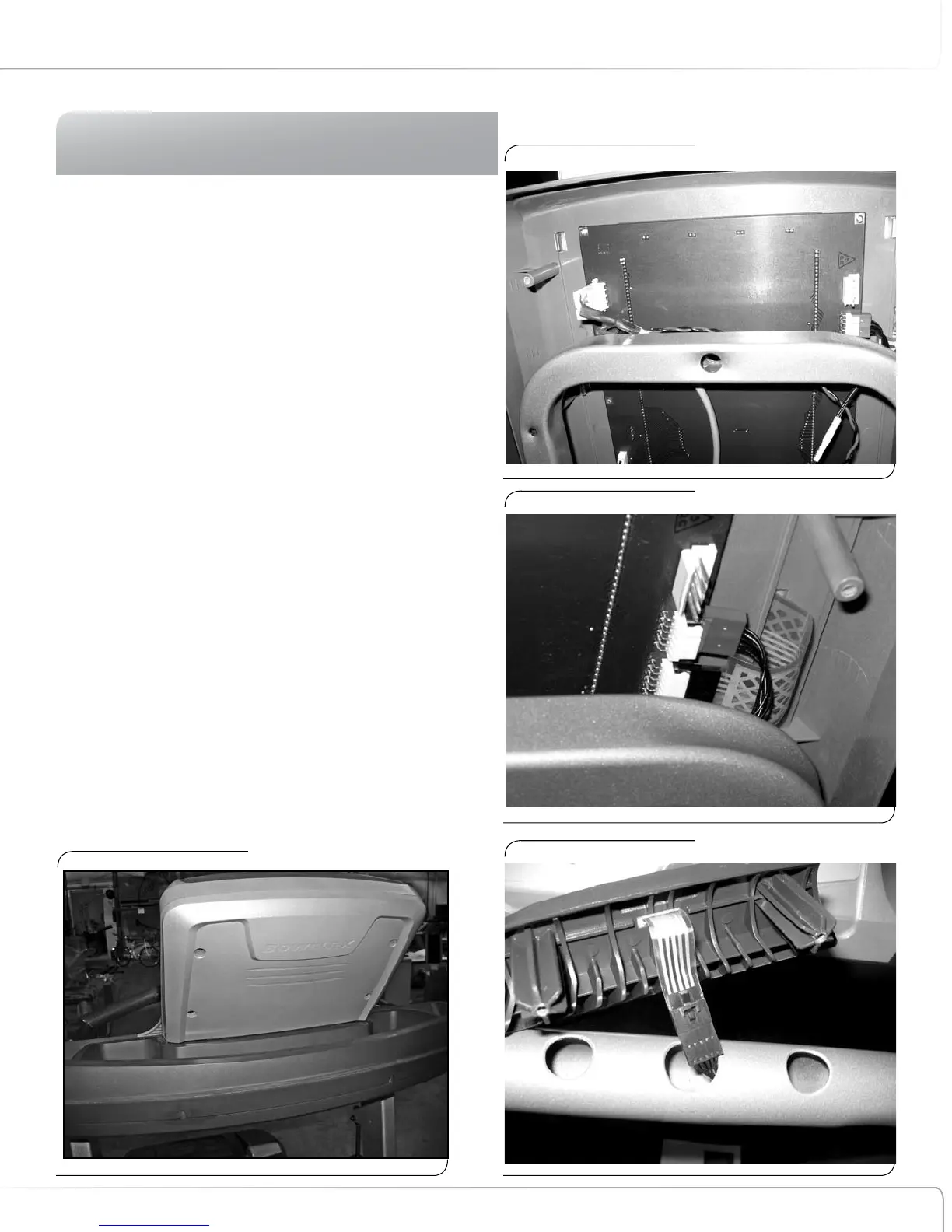
4-1 Remove the console back. (Fig. 1)
4-2 Disconnect the remote HR wire from the lower left
side of the printed circuit board (viewed from front).
Red, black, white wires. (Fig. 2)
4-3 Remove the console bottom.
4-4 Locate the connector on upper right, and unplug it
from the console Printed Circuit Board. Cut the zip ties
and let the wire hang free. (viewed from front) .
4-5 Tie the black plug of new cable to the brown plug of
defective cable using included wire tie.
4-6 Carefully pull the defective cable out through the
ROC hole,and pull new wire into place.
4-7 Remove the defective cable and discard.
4-8 Connect the black plug to the ROC and re-attach to
control plate. Be careful not to pinch new cable during
assembly.(Fig. 4)
4-9 Connect the brown plug to the back of the Printed
Circuit Board and test the unit.
4-10 Re-attach the lower console.
4-11 Re-connect remote HR plug.
Figure 1:
Figure 2:
Figure 3:
Figure 4:












 To Next Page