Note! When using more than one FF command, make sure to have a space between them to keep them
separated. E.g. FF FF FF.
To have one sheet (two pages) printed, one of the following sequences must be executed:
Double-sided printing:
A) Two pages full of text.
B) More than one page of text and one FF.
C) Less than one page of text and two FF.
D) Two FF-commands.
E) Less than one/two pages and depress Dump Buffer.
Single-sided printing:
A) One page full of text.
B) Less than one page of text and one FF.
C) Less than one page of text and depress Dump Buffer.
Connecting the Printer to the Mains and Computer.
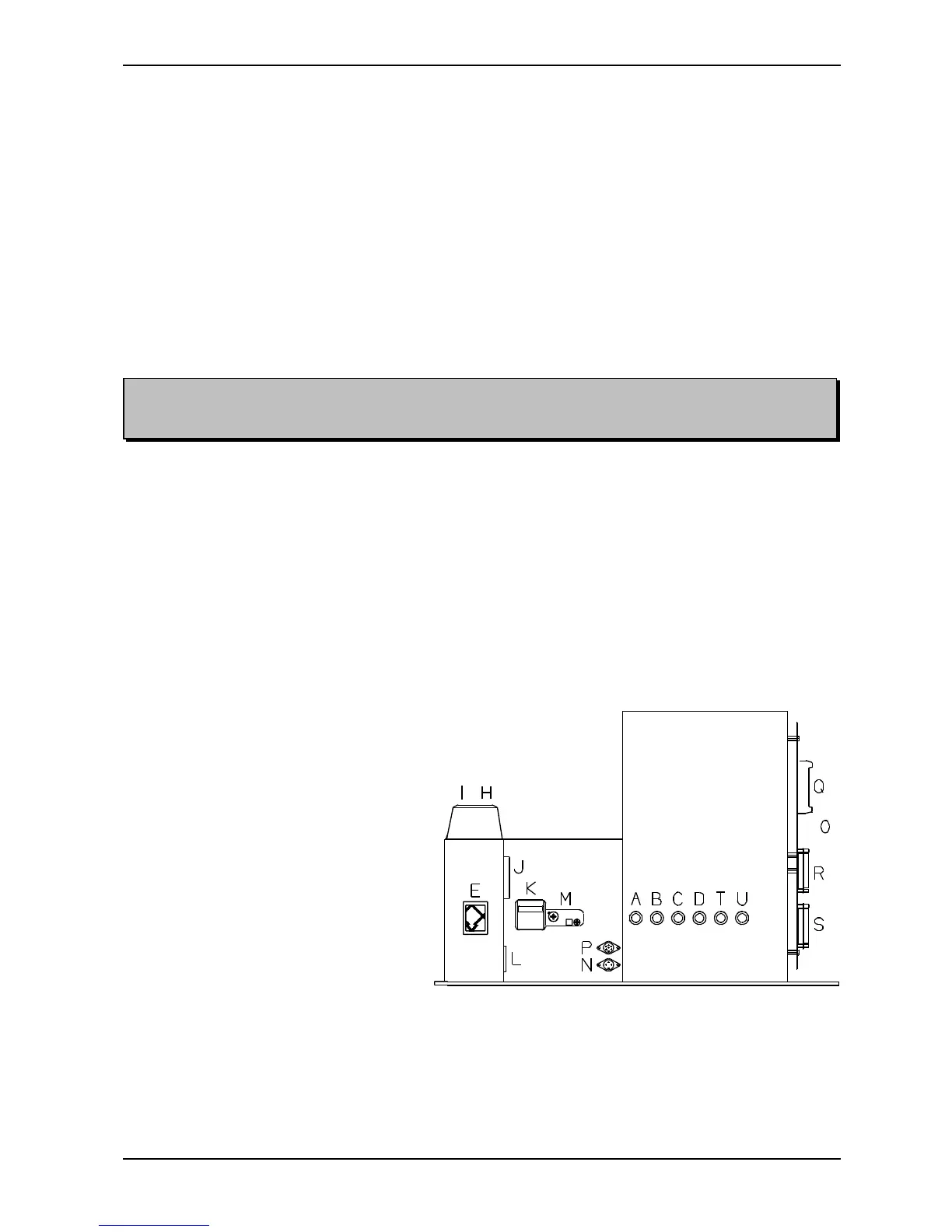
See the figure below.
Connect the enclosed mains power cable to the inlet (L). If the plug on the mains power cable is to be
replaced, observe that the yellow/green wire is the ground (earth) wire.
With parallel communication, use connector (R). With serial communication, use connector (S).
A: Fuse, magnet rack A
B: Fuse, magnet rack B
C: Fuse, magnet rack C
D: Fuse, magnet rack D
E: Main switch
H: Outlet, fan
I: Outlet, motor
J: Hour counter
K: Main fuse
L: Power inlet
M: Reset switch, motor fuse
N: Connector, ext. alarm
O: Motherboard
P: Connector, Braillo Cut
Q: Connector, operating panel
R: Parallel port
S: Serial port
T: Fuse, stepping motor
U: Fuse, relays


 To Next Page