74
UM25001C
4 6 Differential Control4 6 Differential Control
In certain applications it is desirable to control a second process such that its
process value always deviates from the first process with a constant value. To
achieve this, set the following parameter in the Setup menu.
In certain applications it is desirable to control a second process such that its
process
value always deviates from the first process with a constant value. To
achieve
this, set the following parameter in the Setup menu.
FUNC=FULL
IN1,IN1L,IN1H are set according to input 1 signal
IN2,IN2L,IN2H are set according to input 2 signal
IN1U, DP1, IN2U, DP2, are set according to input 1 and input 2 signal
PVMD=P1-2 or P2-1
SPMD=SP1.2
FUNC=FULL
IN1,IN1L,IN1H
are set according to input 1 signal
IN2,IN2L,IN2H
are set according to input 2 signal
IN1U,
DP1, IN2U, DP2, are set according to input 1 and input 2 signal
PVMD=P1-2
or P2-1
SPMD=SP1.2
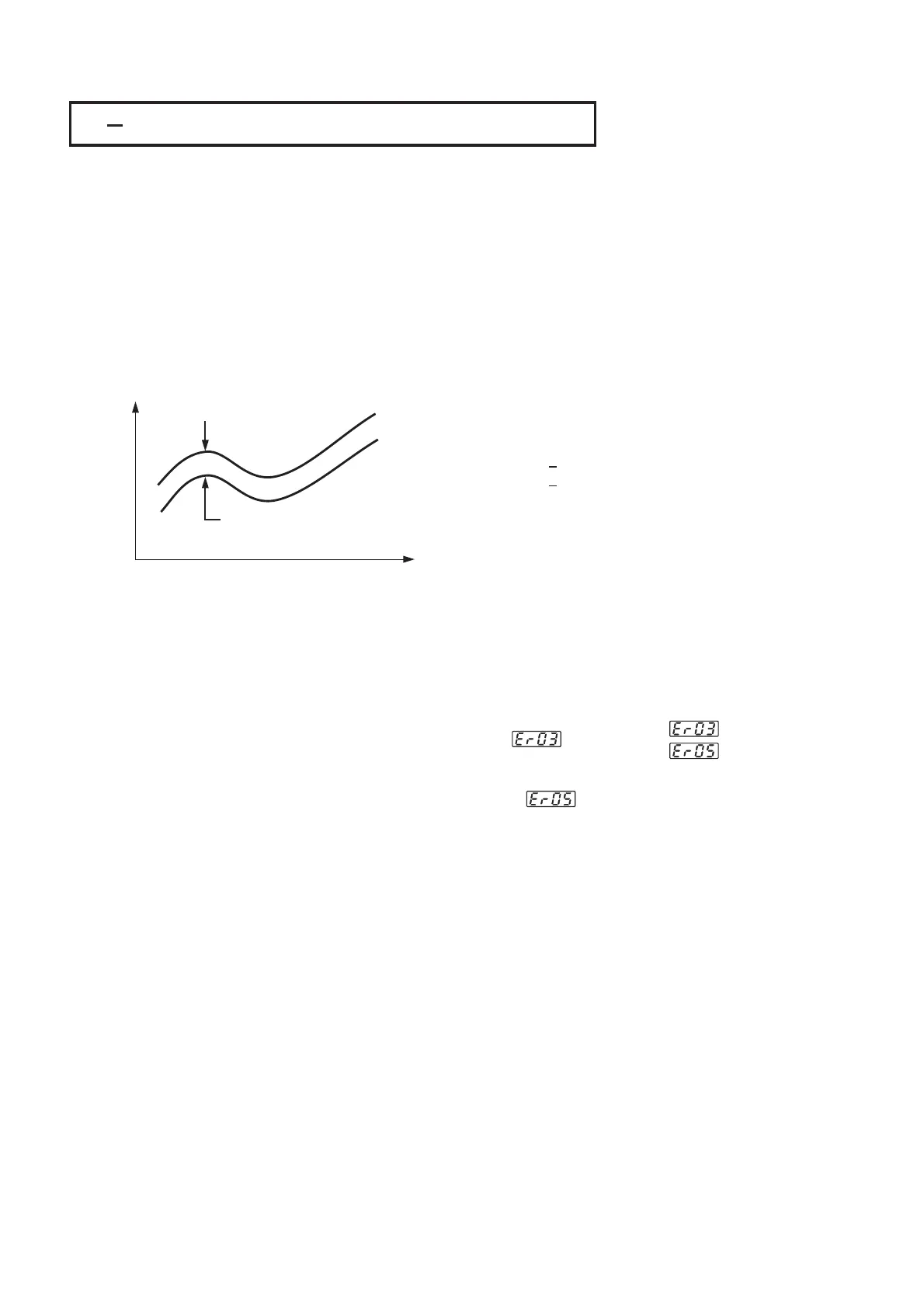
The response of PV2 will be parallel to PV1 as shown in the following diagramThe response of PV2 will be parallel to PV1 as shown in the following diagram
Time
PV
=Set point=Set point
PV1
PV2
PV=PV1 PV2
or PV2 PV1
Set point=SP1 or SP2
PV=PV1 PV2
or
PV2 PV1
Set
point=SP1 or SP2
The PV display will indicate PV1-PV2 value if P1-2 is chosen for PVMD, or
PV2-PV1 value if P2-1 is chosen for PVMD. If you need PV1 or PV2 to be
displayed instead of PV, you can use the Display Mode to select PV1 or PV2 to
be viewed. See Section 3-24.
The PV display will indicate PV1-PV2 value if P1-2 is chosen for PVMD, or
PV2-PV1
value if P2-1 is chosen for PVMD. If you need PV1 or PV2 to be
displayed
instead of PV, you can use the Display Mode to select PV1 or PV2 to
be
viewed. See Section 3-24.
Setup
PVMD=P1-2
or PVMD=P2-1
PVMD=P1-2
or
PVMD=P2-1
Error MessageError Message
Figure 4.4
Relation between PV1 and PV2
for a Differential Control
Figure 4.4
Relation
between PV1 and PV2
for
a Differential Control
If PVMD selects P1-2 or P2-1, while SPMD selects PV1 or PV2, an
Error Code will appear.
If PVMD selects P1-2 or P2-1, while SPMD selects PV1 or PV2, an
Error
Code will appear.
SPMD=SP1.2
In this case the signals used for input 1 and input 2 should be the same unit
and same decimal point, that is, IN1U=IN2U, DP1=DP2, otherwise
Error Code will appear.
In this case the signals used for input 1 and input 2 should be the same unit
and
same decimal point, that is, IN1U=IN2U, DP1=DP2, otherwise
Error
Code will appear.
Error MessagesError Messages


 To Next Page