O1
O2
A1
C
UM25001C
5 8 Differential Control5 8 Differential Control
In certain applications it is desirable to control a second process such that its
process value always deviates from the first process with a constant value.
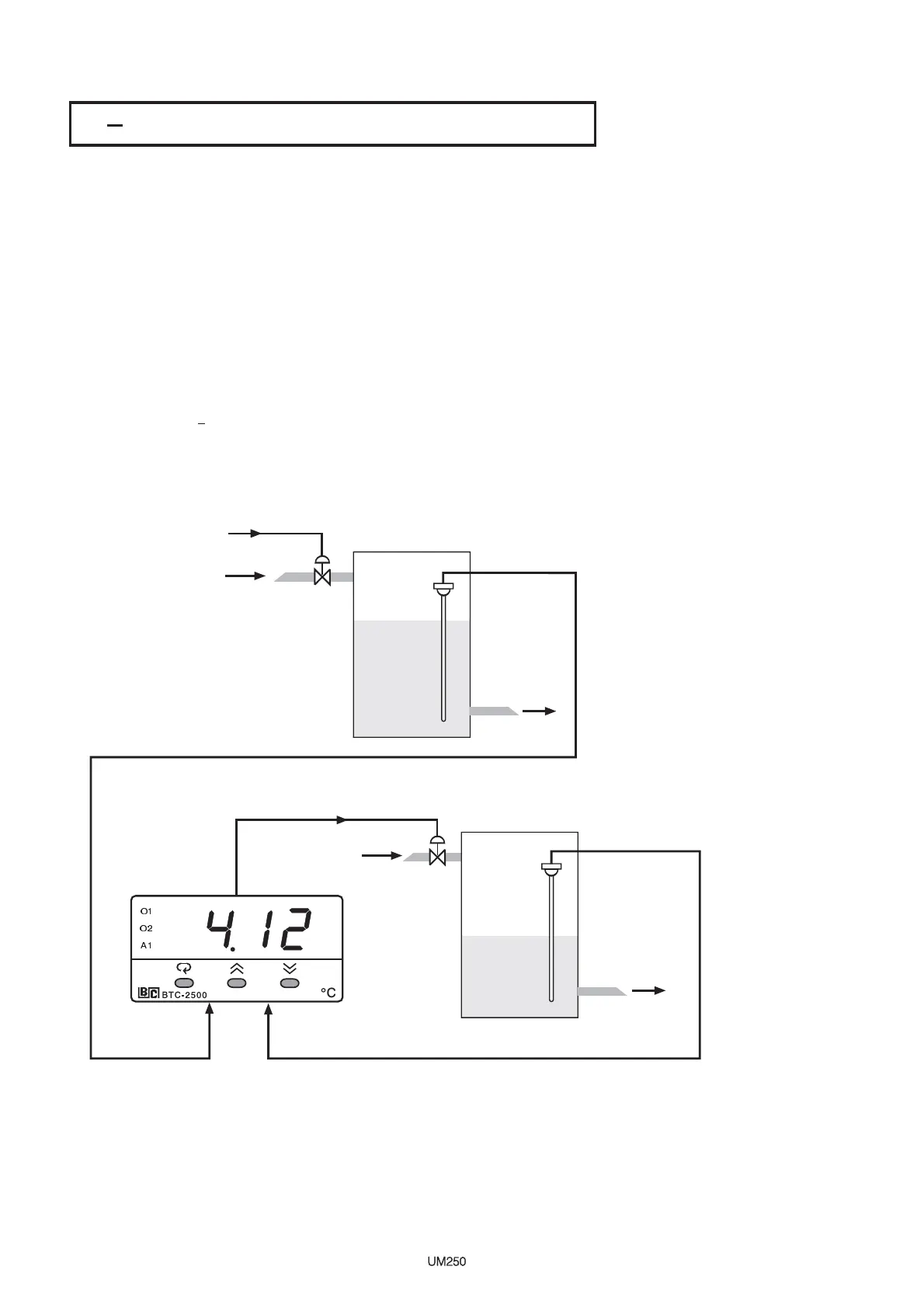
Water tank 1 is 5.12 meters height and water tank 2 level is desirable to be
maintained at 1 meter lower than tank 1 level.
In certain applications it is desirable to control a second process such that its
process
value always deviates from the first process with a constant value.
Water
tank 1 is 5.12 meters height and water tank 2 level is desirable to be
maintained
at 1 meter lower than tank 1 level.
Set the following parameters in the setup menu:
FUNC= FULL
IN1, IN1L, IN1H : According to Sensor 1 signal
IN1U= PU
DP1= 2-DP
IN2, IN2L, IN2H : According to Sensor 2 signal
IN2U= PU
DP2= 2-DP
OUT1= REVR
O1TY= 4 20
PVMD= P1-2
SPMD=SP1.2
( Current signal has to be converted to a voltage
signal through a shunt resistor before sending to the controller input)
FUNC= FULL
IN1,
IN1L, IN1H : According to Sensor 1 signal
IN1U=
PU
DP1=
2-DP
IN2,
IN2L, IN2H : According to Sensor 2 signal
IN2U=
PU
DP2=
2-DP
OUT1=
REVR
O1TY=
4 20
PVMD=
P1-2
SPMD=SP1.2
(
Current signal has to be converted to a voltage
signal
through a shunt resistor before sending to the controller input)
Outlet
Outlet
From Controller Output
From Controller Output
4-20 mA Valve Control Output4-20 mA Valve Control Output
Water Tank 1Water Tank 1
Water Tank 2Water Tank 2
Level Sensor 1Level Sensor 1
Level Sensor 2Level Sensor 2
5.12 M Height5.12 M Height
4.12 M Height4.12 M Height
IN1 IN2
SV=1.00
PV=1.00
PV1=5.12
PV2=4.12
SV=1.00
PV=1.00
PV1=5.12
PV2=4.12
OUT1
Figure 5.13Figure 5.13
Differential Control ExampleDifferential Control Example
Adjust SP1( here is 1.00 ) to control the difference between PV1 and PV2.
Choosing P1-2 for PVMD, the PV display will show the difference value ( PV1-
PV2 ) between PV1 and PV2, and this value will be stabilized to the set point (
hereis1.00).
If you need PV1 or PV2 instead of PV, you can use the Display Mode to select
PV1 or PV2 to be displayed. See . The above diagram indicates
PV2 instead of PV.
Section 3-24
Adjust SP1( here is 1.00 ) to control the difference between PV1 and PV2.
Choosing
P1-2 for PVMD, the PV display will show the difference value ( PV1-
PV2
) between PV1 and PV2, and this value will be stabilized to the set point (
here
is 1.00 ).
If
you need PV1 or PV2 instead of PV, you can use the Display Mode to select
PV1
or PV2 to be displayed. See . The above diagram indicates
PV2
instead of PV.
Section
3-24
93


 To Next Page