76
UM25001C
4 8 Data Communication4 8 Data Communication
Two types of interface are available for Data Communication. These are
and interface. Since RS-485 uses a differential architecture to
drive and sense signal instead of a single ended architecture which is used for
RS-232, RS-485 is less sensitive to the noise and suitable for a longer
distance communication. RS-485 can communicate without error over 1 km
distance while RS-232 is not recommended for a distance over 20 meters.
RS-485 RS-232
Tw o types of interface are available for Data Communication. These are
and interface.
Since RS-485 uses a differential architecture to
drive
and sense signal instead of a single ended architecture which is used for
RS-232,
RS-485 is less sensitive to the noise and suitable for a longer
distance
communication. RS-485 can communicate without error over 1 km
distance
while RS-232 is not recommended for a distance over 20 meters.
RS-485 RS-232
Using a PC for data communication is the most economic way. The signal is
transmitted and received through the PC communication Port ( generally RS-
232 ). Since a standard PC can't support RS-485 port, a network adaptor (
such as ) has to be used to convert RS-485 to RS-232 for a
PC if RS-485 is required for the data communication. But there is no need to
be sad. Many RS-485 units ( up to 247 units ) can be connected to one RS-
232 port; therefore a PC with 4 comm ports can communicate with 988 units. It
is quite economic.
SNA10A, SNA10B
Using a PC for data communication is the most economic way. The signal is
transmitted
and received through the PC communication Port ( generally RS-
232
). Since a standard PC can't support RS-485 port, a network adaptor (
such
as ) has to be used to convert RS-485 to RS-232 for a
PC
if RS-485 is required for the data communication. But there is no need to
be
sad. Many RS-485 units ( up to 247 units ) can be connected to one RS-
232
port; therefore a PC with 4 comm ports can communicate with 988 units. It
is
quite economic.
SNA10A,
SNA10B
RS-485 Benefits:RS-485 Benefits:
Long distanceLong distance
RS-232 Benefits:RS-232 Benefits:
Direct Connection to a PCDirect Connection to a PC
Order BTC-2500-XXXXX2Order BTC-2500-XXXXX2
for RS-232for RS-232
Order BTC-2500-XXXXX1Order BTC-2500-XXXXX1
for RS-485for RS-485
Setup
Enters the setup menu.
Select FULL ( Full function ) for FUNC.
Select 485 for COMM if RS-485 is required, or 232 if RS-232 is required. Select
RTU ( ie. Modbus protocol RTU mode ) for PROT. Set individual address as
for those units which are connected to the same port.
Set the Baud Rate ( BAUD ), Data Bit ( DATA ), Parity Bit ( PARI ) and Stop Bit (
STOP ) such that these values are accordant with PC setup conditions.
Enters the setup menu.
Select
FULL ( Full function ) for FUNC.
Select
485 for COMM if RS-485 is required, or 232 if RS-232 is required. Select
RTU
( ie. Modbus protocol RTU mode ) for PROT. Set individual address as
for
those units
which are connected
to the same port.
Set
the Baud Rate ( BAUD ), Data Bit ( DATA ), Parity Bit ( PARI ) and Stop Bit (
STOP
) such that these values are accordant with PC setup conditions.
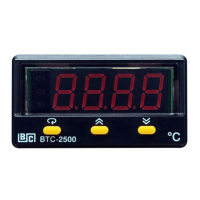
NOTE: If the BTC-2500 is configured for RS-232 communication, the EI ( Event
Input ) and input 2 are disconnected internally. The unit can no longer perform
event input function ( EIFN ) and other input 2 functions.
NOTE: If the BTC-2500 is configured for RS-232 communication, the EI ( Event
Input
) and input 2 are disconnected internally. The unit can no longer perform
event
input function ( EIFN ) and other input 2 functions.
RS-485 SetupRS-485 Setup
RS-232 SetupRS-232 Setup
FUNC=FULL
COMM=485
PROT=RTU
ADDR=Address
BAUD=Baud Rate
DATA=Data Bit Count
PARI=Parity Bit
STOP=Stop Bit Count
FUNC=FULL
COMM=485
PROT=RTU
ADDR=Address
BAUD=Baud
Rate
DATA=Data
Bit Count
PARI=Parity
Bit
STOP=Stop
Bit Count
FUNC=FULL
COMM=232
PROT=RTU
ADDR=Address
BAUD=Baud Rate
DATA=Data Bit Count
PARI=Parity Bit
STOP=Stop Bit Count
FUNC=FULL
COMM=232
PROT=RTU
ADDR=Address
BAUD=Baud
Rate
DATA=Data
Bit Count
PARI=Parity
Bit
STOP=Stop
Bit Count
RS-485 TerminalsRS-485 Terminals
12
13
TX1
TX2
RS-232 TerminalsRS-232 Terminals
12
13
11
TX1
TX2
COM
Multi-units
When you insert a RS-232 module (CM94-2) to the connectors on CPU board
(C250), you also need to modify the jumper J51 and J52 according to
If you use a conventional 9-pin RS-232 cable instead of CC94-1, the cable
should be modified for proper operation of RS-232 communication according
to
Section
2-16.
Section 2-16.
When you insert a RS-232 module (CM94-2) to the connectors on CPU board
(C250),
you also need to modify the jumper J51 and J52 according to
If
you use a conventional 9-pin RS-232 cable instead of CC94-1, the cable
should
be modified for proper operation of RS-232 communication according
to
Section
2-16.
Section
2-16.


 To Next Page