10
Programming
Change
Programming
Code
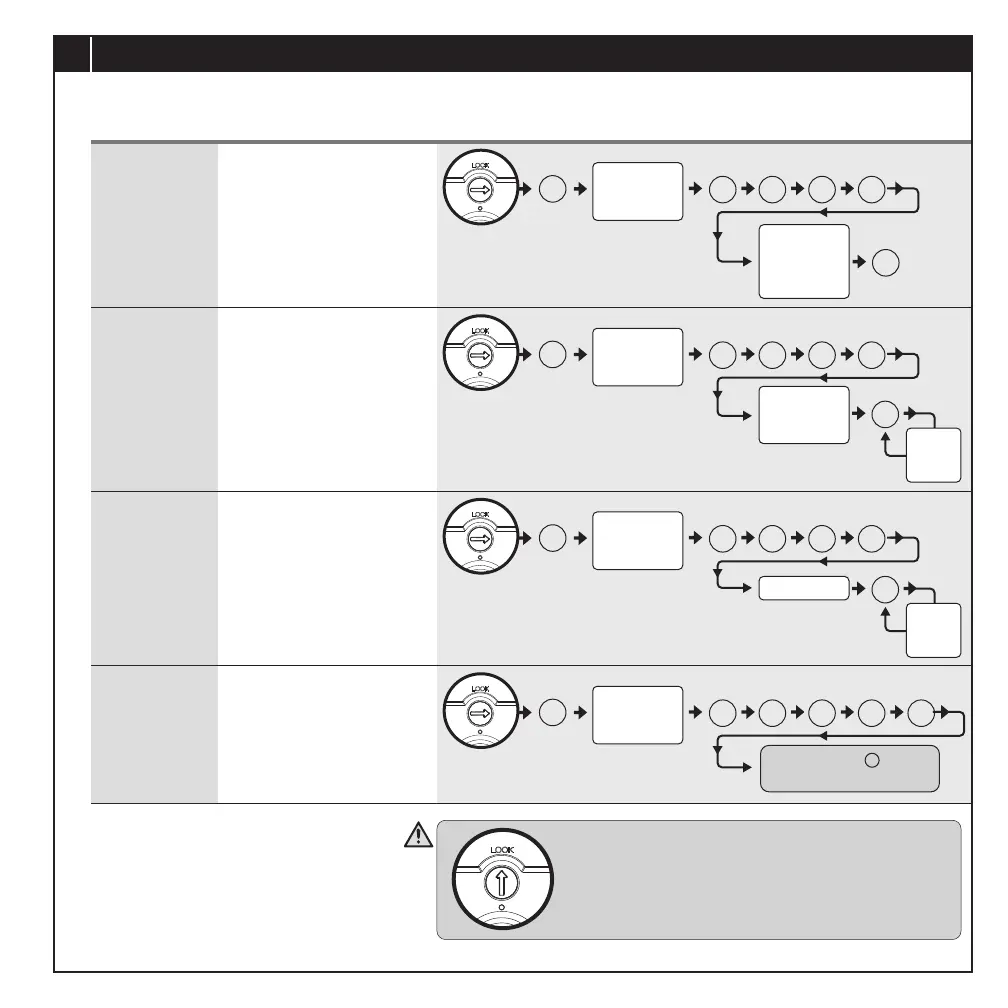
Add a User
Code(s)
• Programming Code can be
used to program or unlock
the lockset.
• The default Programming
Code is “123456”.
• User Code can be used
to unlock the lockset.
• User Code capacity:
99 sets (4-8 digits).
Delete
individual User
Code(s)
• Delete individual User
Code(s).
BASIC SETTINGS
Delete ALL
User Codes
• Delete ALL User Codes
at once.
# 1 0 #
#
Remember to turn the interior turn switch to
vertical position to enable auto-lock mode after
programming.
#
#
Press and Hold button
until a short beep is heard.
C
#
# 2 0 #
Add
another
code
Programming
Code
(6 digits)
New
Programming
Code
(6 digits)
Programming
Code
(6 digits)
New
User Code
(4-8 digits)
#
#
# 3 0 #
Delete
another
code
Programming
Code
(6 digits)
User Code
#
# 4 0 # C
Programming
Code
(6 digits)
PAGE 11


 To Next Page