9
How to Lock / Unlock / Program the Lockset
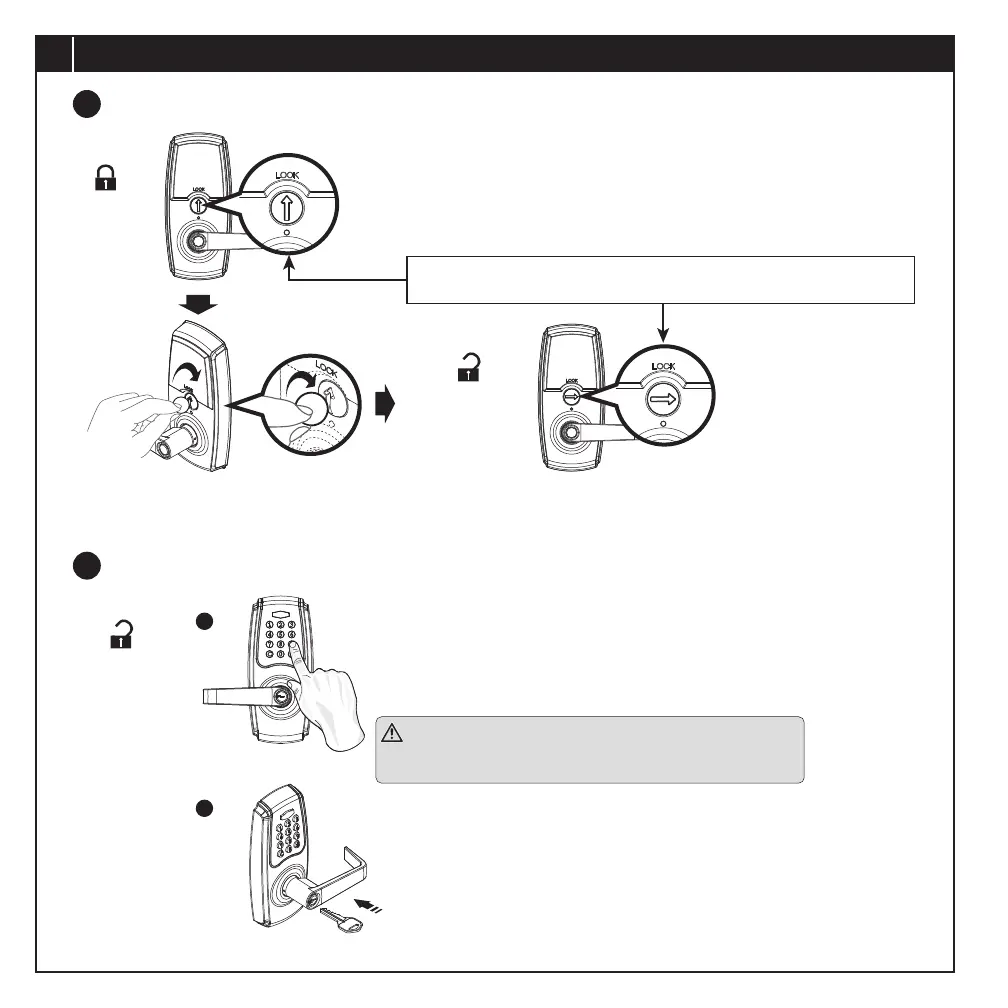
AUTO-LOCK / PASSAGE MODE
Auto-lock
Passage mode
HOW TO UNLOCK THE LOCKSET
To unlock
A
B
Use a mechanical key to lock or unlock.
When using the key, the lever functions as a Storeroom function lock in
which the exterior lever must remain locked when the key is removed.
Use a at tool to turn the slotted interior turn switch clockwise as shown from
vertical position to horizontal position to deactivate auto-locking mode. The device
then serves as a passage lever and is in programming mode.
After programming, turn the interior turn switch back to vertical to exit
programming mode and record programming changes.
Enter the correct user code or programming code.
Upon the green indicator light on and a short beep heard, turn the outside lever
to unlock.
When the green indicator light turns on and a short beep is heard, turn the
exterior lever to unlock.
Rotate interior turn switch
clockwise to horizontal
position as shown to
deactivate auto-locking
mode.
The keypad is temporarily disabled after 4 consecutive incorrect entries.
An alarm beep will sound for 10 seconds followed by a 60 second
lockout while the indicator light blinks red.
2
1
PAGE 10


 To Next Page