10
Programming (continued)
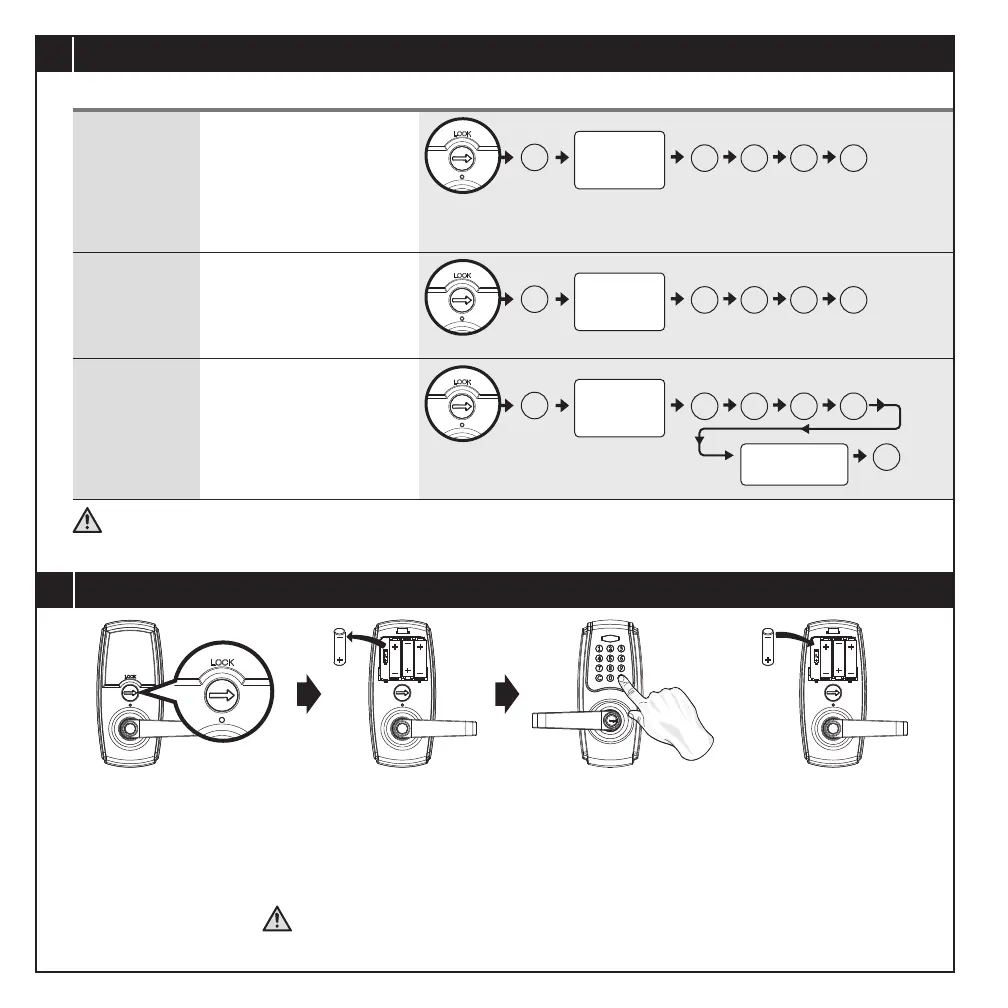
Vacation Mode
(Start/End)
Volume Control
• Start vacation mode to
temporarily disable ALL
User Codes.
• Redo the following steps
to end vacation mode and
recover User Code access.
• Turn on / off door lock
operation volume.
• Volume is always on in
the programming mode.
Auto-lock
Delay Timer
• Default Auto-lock Delay
Timer : 5 seconds
• Auto-lock Delay Timer
range: 5 -90 seconds
ADVANCED SETTINGS
# 5 0 #
#
• Remember to turn the interior turn switch to vertical position to enable auto-lock mode after programming.
• The lockset will exit the programming mode and revert to the stand-by status if no input is made in 10 seconds.
• 3 Beeps means something was entered incorrectly. Please redo the step again.
1. This will erase all stored information.
2. The Programming Code will be restored to default 1-2-3-4-5-6.
#
# 6 0 #
Programming
Code
(6 digits)
Programming
Code
(6 digits)
#
#
# 7 0 #
Programming
Code
(6 digits)
Enter New
Amount (5 - 90)
11
Restoring to Factory Settings
• Press and hold # until all batteries are installed again.
• Successful reset is veried by a 3 second beep
followed by a short beep.
• Rotate the interior turn switch back to vertical to lock
in changes and return to auto-lock mode.
• Remove one battery• Rotate interior turn switch
to horizontal position.
AA
AA
AA
AA
AA
AA
AA
AA
PAGE 12


 To Next Page