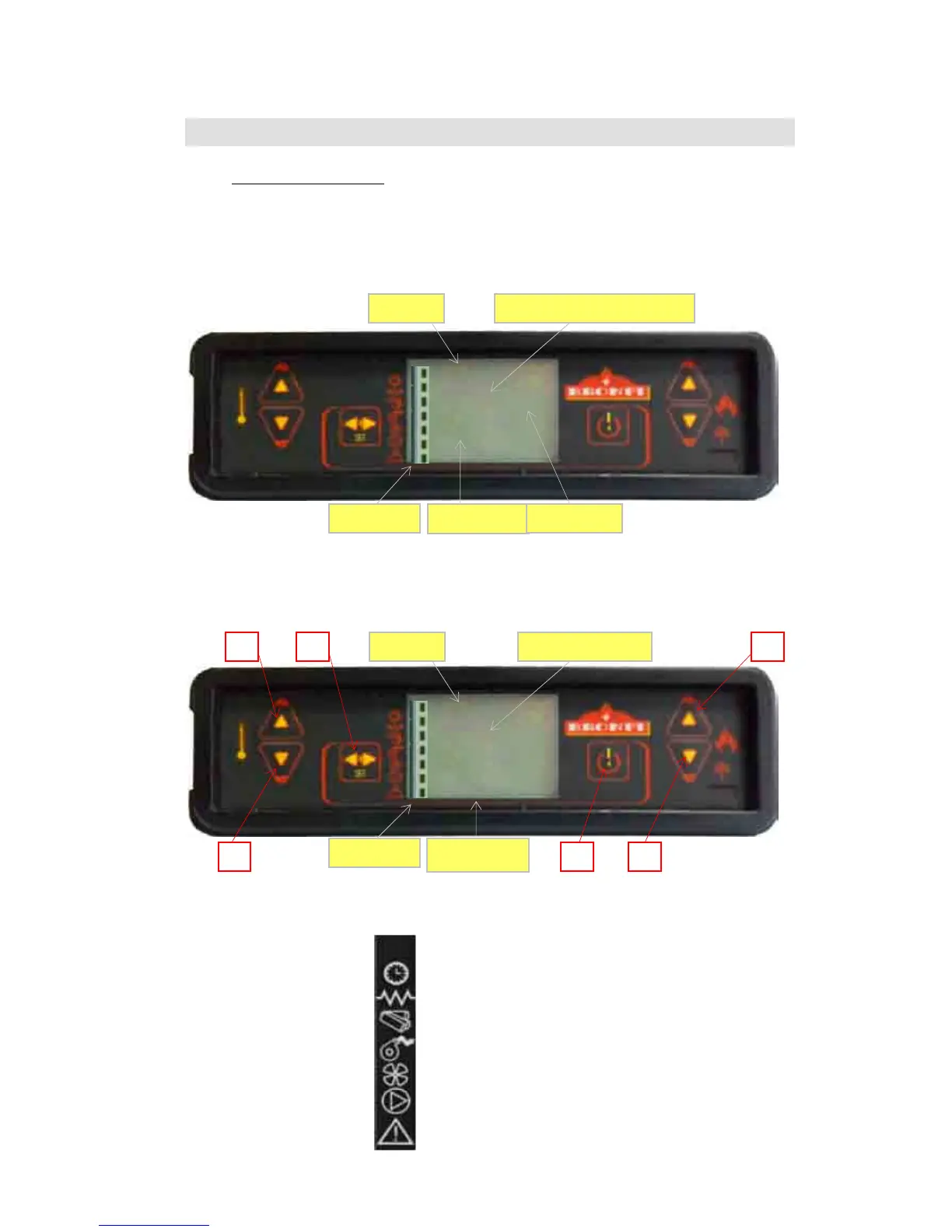
CLOCK
RESISTENCE
WORM SCREW
SMOKE ASPITATOR
INTERCHANGER
WITHOUT USE
ALARM
9
99
9 DISPLAY
DISPLAYDISPLAY
DISPLAY
OPERATION
OPERATIONOPERATION
OPERATION
9.1
9.19.1
9.1
Display general information
Display general informationDisplay general information
Display general information
The display shows information about the appliance operation. When you access to the menu different types
of screen can be obtained and fit the available configuration according to the access level.
Depending on the operating way, the visualization can take different meanings depending on the position on
the screen.
In the figure 14 appears an example of the heater turned on or off.
Figure14.
On the 15 picture you will see how messages are shown during the phase of programming or configuration
the operating parameters. I. e.:
1.
The screen zone “Value” shows the value introduced.
2.
The screen zone “Menu Level” shows the current menu level.
See menu chapter.
Figure15.
On the 16 picture all symbols significance are shown at the left part of the screen. The screen illumination En
la
figura 16
aparece el significado de los símbolos que hay en la izquierda de la pantalla. The screen lighting
on the “stage” paragraph indicates the corresponding device activation in accordance with the list as follows.
Figure 16.


 To Next Page