~
""
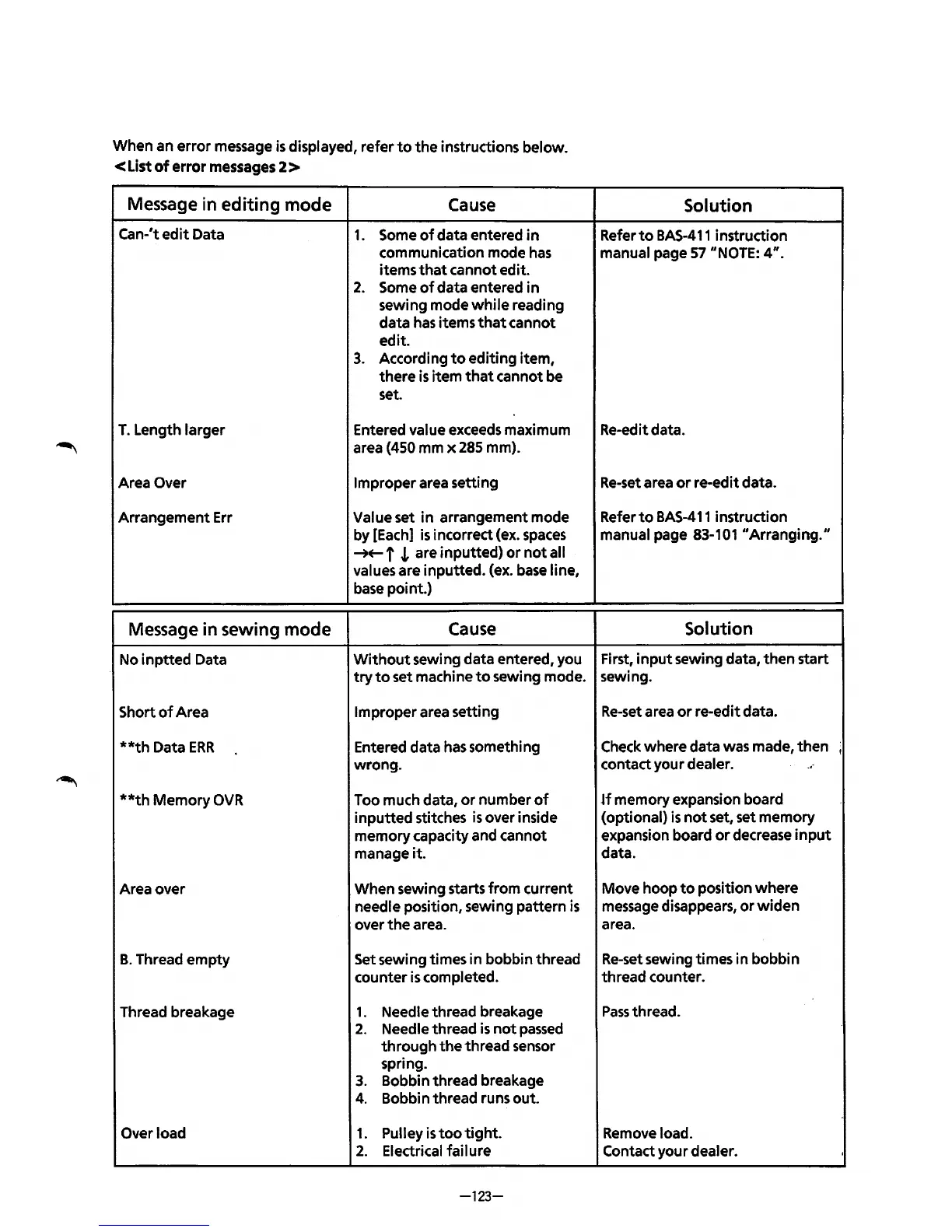
When an
error
message
is
displayed, refer
to
the
instructions below.
<List
of
error messages 2 >
Message
in editing mode
Cause
Can-'t
edit
Data
1.
Some
of
data entered
in
T.
Length larger
Area Over
Arrangement Err
Message
in sewing mode
No
inptted
Data
Short
of
Area
**th
Data
ERR
**th
Memory
OVR
Area over
B.
Thread
empty
Thread breakage
Overload
communication mode
has
items
that
cannot edit.
2.
Some
of
data entered
in
sewing mode
while
reading
data
has
items
that
cannot
edit.
3.
According
to
editing
item,
there
is
item
that
cannot be
set.
Entered value exceeds maximum
area (450 mm x 285 mm).
Improper area setting
Value set
in
arrangement mode
by [Each]
is
incorrect (ex.
spaces
-++- f
.L
are inputted)
or
not
all
values are inputted. (ex.
base
line.
base
point.)
Cause
Without
sewing data entered, you
try
to
set machine
to
sewing mode.
Improper area setting
Entered data
has
something
wrong.
Too much data,
or
number
of
inputted
stitches
is
over inside
memory capacity and cannot
manage it.
When sewing starts
from
current
needle position, sewing pattern
is
over
the
area.
Set sewing times in bobbin thread
counter
is
completed.
1.
Needle thread breakage
2.
Needle thread is
not
passed
through
the
thread sensor
spring.
3.
Bobbin thread breakage
4.
Bobbin thread runs out.
1.
Pulley
is
too
tight.
2.
Electrical failure
-123-
Solution
Refer
to
BAS-411
instruction
manual page
57
··NoTE:
4".
Re-edit data.
Re-set
area
or
re-edit data.
Refer
to
BAS-411
instruction
manual page 83-101 ••Arranging."
Solution
First,
input
sewing data,
then
start
sewing.
Re-set
area
or
re-edit data.
Check where data was made,
then
,
contact your dealer.
...
~f
memory expansion board
(optional)
is
not
set, set memory
expansion board
or
decrease
input
data.
Move hoop
to
position
where
message disappears,
or
widen
area.
Re-set
sewing times in bobbin
thread counter.
Pass
thread.
Remove load.
Contact your dealer.
'



 To Next Page