EasyManua.ls Logo

Brother BAS-415 - Page 130

Brother BAS-415
134 pages
Print Icon
To Next Page IconTo Next Page
To Previous Page IconTo Previous Page
Loading...
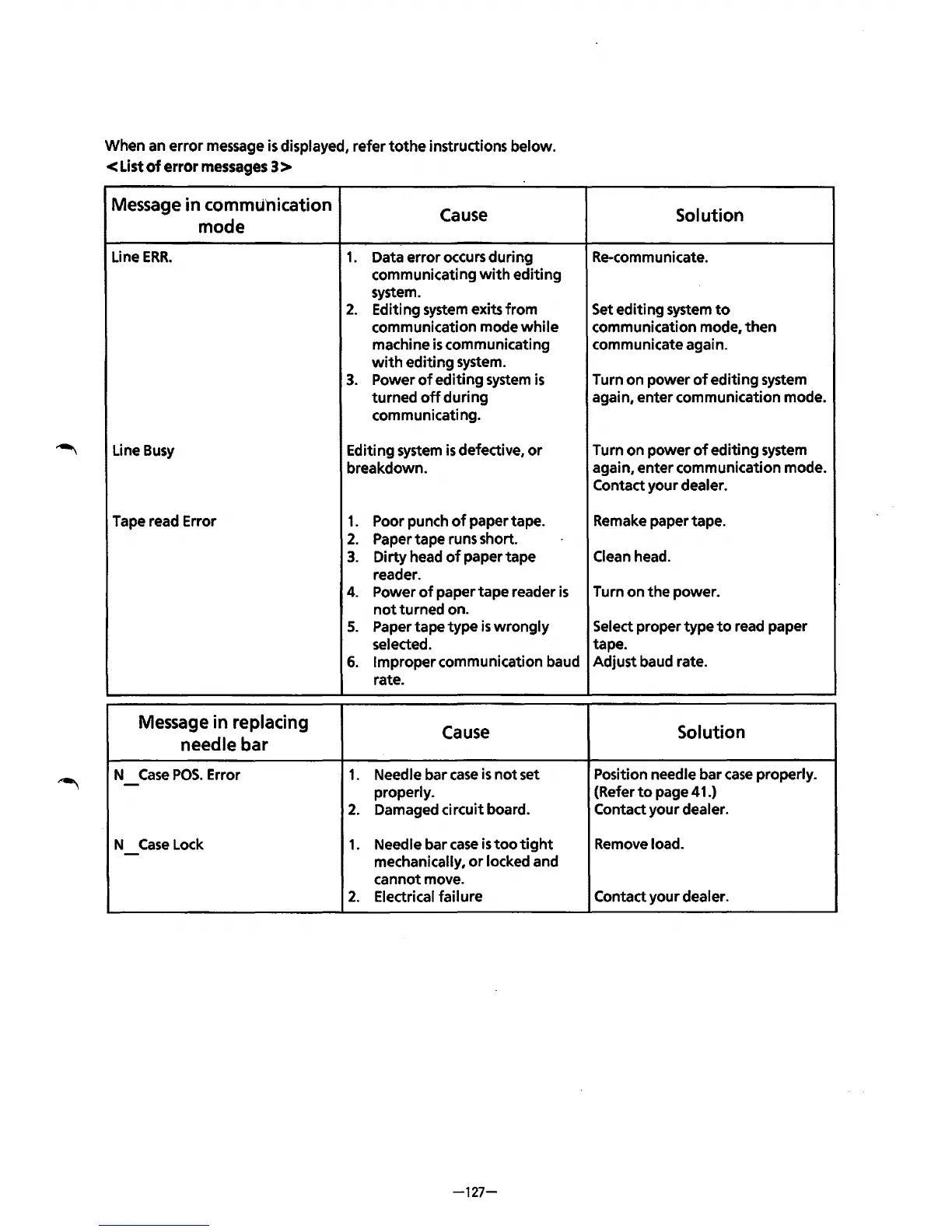
When an
error
message is displayed,
refertothe
instructions below.
<List
of
error
messages
3 >
Message
in
commtl'nication
Cause
mode
Line
ERR.
1.
Data
error
occurs
during
communicating
with
editing
system.
2.
Editing system exits
from
communication mode
while
machine
is
communicating
with
editing
system.
3.
Power
of
editing
system
is
turned
off
during
communicating.
Line Busy
Editing system
is
defective,
or
breakdown.
Tape read Error
1.
Poor punch
of
paper tape.
2.
Paper tape runs short.
3.
Dirty
head
of
paper
tape
reader.
4.
Power
of
paper
tape
reader
is
not
turned on.
5.
Paper tape
type
is
wrongly
selected.
6.
Improper communication baud
rate.
Message
in
replacing
Cause
needle
bar
N
Case
POS.
Error
1.
Needle bar
case
is
not
set
-
properly.
2.
Damaged circuit board.
N
Case
Lock
1.
Needle bar
case
is
too
tight
-
mechanically,
or
locked and
cannot move.
2.
Electrical failure
-127-
Solution
Re-communicate.
Set
editing
system
to
communication mode,
then
communicate again.
Turn
on
power
of
editing
system
again,
enter
communication mode.
Turn
on
power
of
editing
system
again,
enter
communication mode.
Contact your dealer.
Remake paper tape.
Clean head.
Turn
on
the
power.
Select proper
type
to
read paper
tape.
Adjust baud rate.
Solution
Position needle bar
case
properly.
(Refer
to
page 41.)
Contact your dealer.
Remove load.
Contact
your
dealer.
From the library of: Superior Sewing Machine & Supply LLC

Table of Contents