EasyManua.ls Logo

Brother BAS-415 - Page 129

Brother BAS-415
134 pages
Print Icon
To Next Page IconTo Next Page
To Previous Page IconTo Previous Page
Loading...
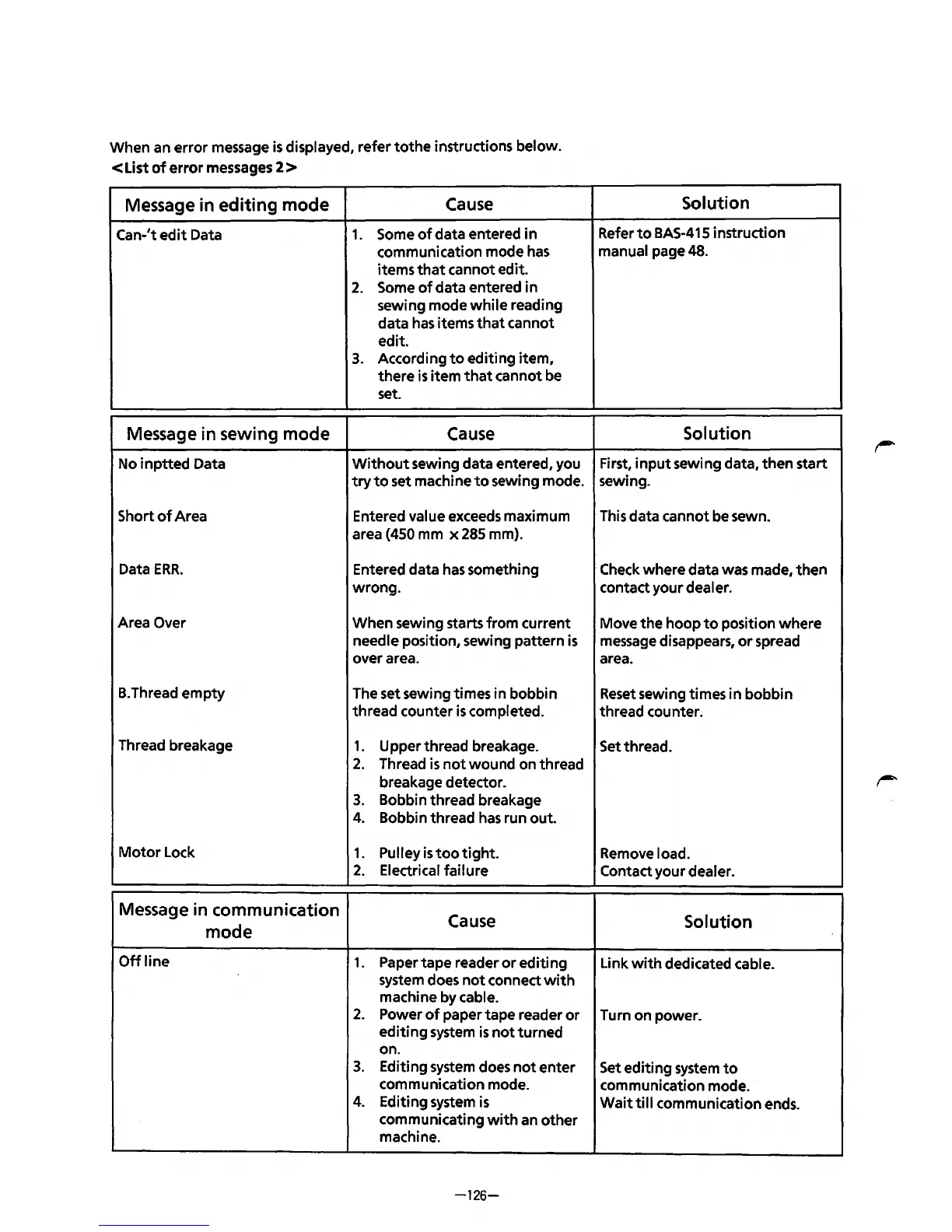
When an
error
message
is
displayed, refer
tothe
instructions below.
<List
of
error messages 2 >
Message in
editing
mode
Cause
Can-'t
edit
Data
1.
Some
of
data entered
in
communication mode
has
items
that
cannot edit.
2.
Some
of
data entered in
sewing mode
while
reading
data
has
items
that
cannot
edit.
3.
According
to
editing
item,
there
is
item
that
cannot be
set.
Message in sewing mode
Cause
No i
nptted
Data
Without
sewing data entered, you
try
to
set machine
to
sewing mode.
Short
of
Area Entered value exceeds maximum
area
(450 mm
x285
mm).
Data
ERR.
Entered data
has
something
wrong.
Area Over
When
sewing starts
from
current
needle position, sewing pattern
is
over area.
B.
Thread
empty
The set sewing times in bobbin
thread counter
is
completed.
Thread breakage
1.
Upper thread breakage.
2.
Thread
is
not
wound
on thread
breakage detector.
3.
Bobbin thread breakage
4.
Bobbin thread
has
run
out.
Motor
Lock
1.
Pulley
is
too
tight.
2.
Electrical
failure
Message in communication
Cause
mode
Offline
1.
Paper tape reader
or
editing
system does
not
connect
with
machine by cable.
2.
Power
of
paper
tape
reader
or
editing
system
is
not
turned
on.
3.
Editing system does
not
enter
communication mode.
4.
Editing system
is
communicating
with
an
other
machine.
-126-
Solution
Refer
to
BAS-415 instruction
manual page 48.
Solution
First,
input
sewing data,
then
start
sewing.
This data cannot be sewn.
Check where data was made,
then
contact
your
dealer.
Move
the
hoop
to
position
where
message disappears,
or
spread
area.
Reset
sewing times
in
bobbin
thread counter.
Set thread.
Remove load.
Contact
your
dealer.
Solution
Link
with
dedicated cable.
Turn on power.
Set
editing
system
to
communication mode.
Wait
till
communication ends.
From the library of: Superior Sewing Machine & Supply LLC

Table of Contents