(
BAS-415
)
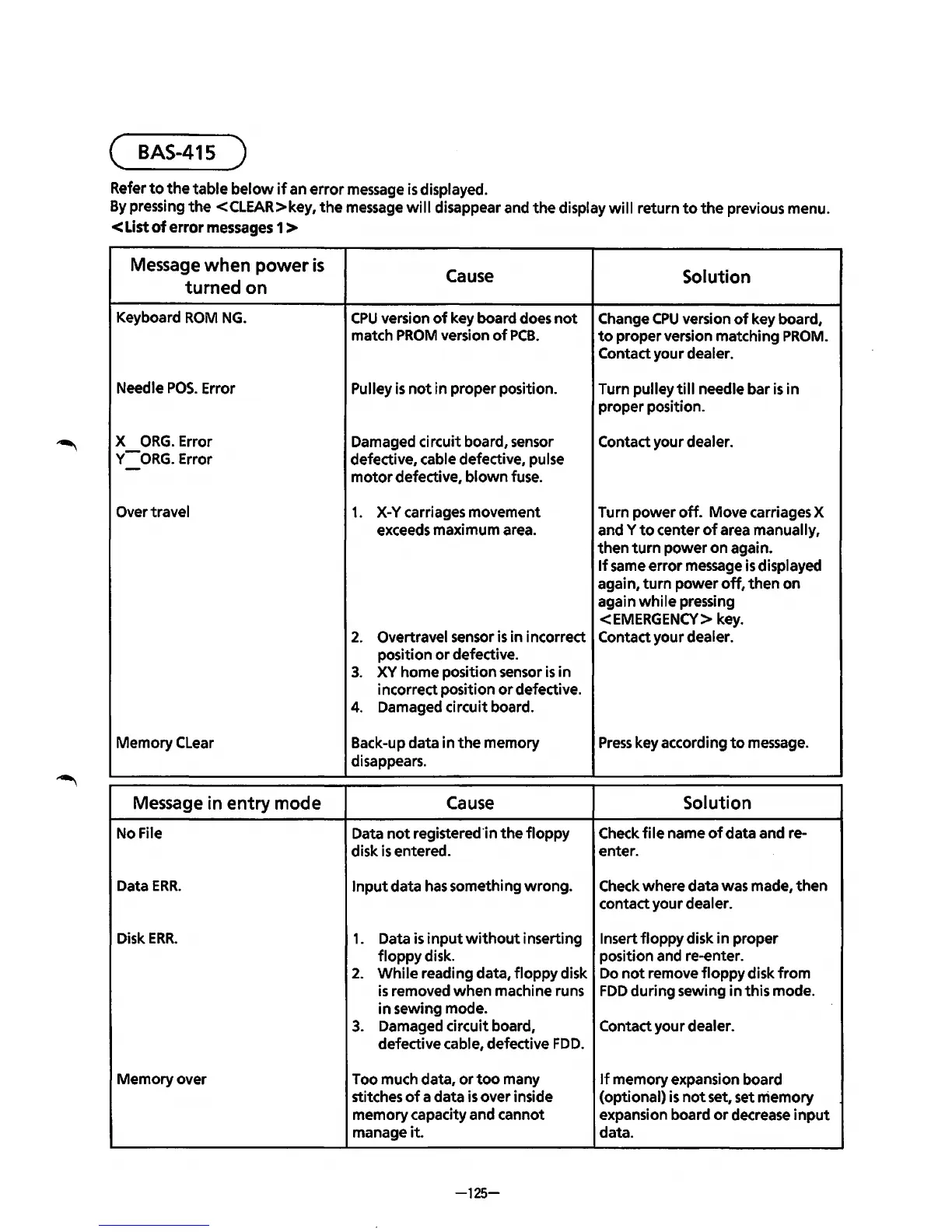
Refer
to
the
table
below
if
an
error
message
is
displayed.
By
pressing
the
<CLEAR>key,
the
message
will
disappear and
the
display
will
return
to
the
previous menu.
<List
of
error
messages
1 >
Message when
power
is
turned on
Keyboard
ROM
NG.
Needle
POS.
Error
X
ORG.
Error
v-
ORG.
Error
Over travel
Memory
Clear
Message in entry mode
No File
Data
ERR.
Disk
ERR.
Memory
over
Cause
Solution
CPU
version
of
key board does
not
Change
CPU
version
of
key board,
match
PROM
version
of
PCB.
to
proper version matching
PROM.
Contact your dealer.
Pulley
is
not
in proper position. Turn pulley
till
needle bar
is
in
proper position.
Damaged circuit board, sensor
defective, cable defective, pulse
motor
defective,
blown
fuse.
1.
X-Y
carriages movement
exceeds maximum area.
2. Overtravel sensor
is
in incorrect
position
or
defective.
3.
XY
home position sensor
is
in
incorrect position
or
defective.
4. Damaged circuit board.
Back-up data
in
the
memory
disappears.
Cause
Data
not
registered·in
the
floppy
disk
is
entered.
Input
data
has
something
wrong.
1.
Data
is
input
without
inserting
floppy
disk.
2.
While
reading data,
floppy
disk
is
removed
when
machine runs
in
sewing mode.
3. Damaged circuit board,
defective cable, defective
FDD.
Too much data,
or
too
many
stitches
of
a data
is
over inside
memory capacity and cannot
manage
it.
-125-
Contact your dealer.
Turn
power
off.
Move carriages X
and Y
to
center
of
area manually,
then
turn
power
on again
..
If
same error message
is
displayed
again,
turn
power
off,
then
on
again
while
pressing
<EMERGENCY> key.
Contact your dealer.
Press
key according
to
message.
Solution
Check
file
name
of
data and re-
enter.
Check where data was made,
then
contact your dealer.
Insert
floppy
disk
in
proper
position and re-enter.
Do
not
remove
floppy
disk
from
FDD
during sewing
in
this mode.
Contact your dealer.
If
memory expansion board
(optional)
is
not
set, set memory
expansion board
or
decrease
input
data.



 To Next Page