EasyManua.ls Logo

Brother BAS-415 - Page 35

Brother BAS-415
134 pages
Print Icon
To Next Page IconTo Next Page
To Previous Page IconTo Previous Page
Loading...
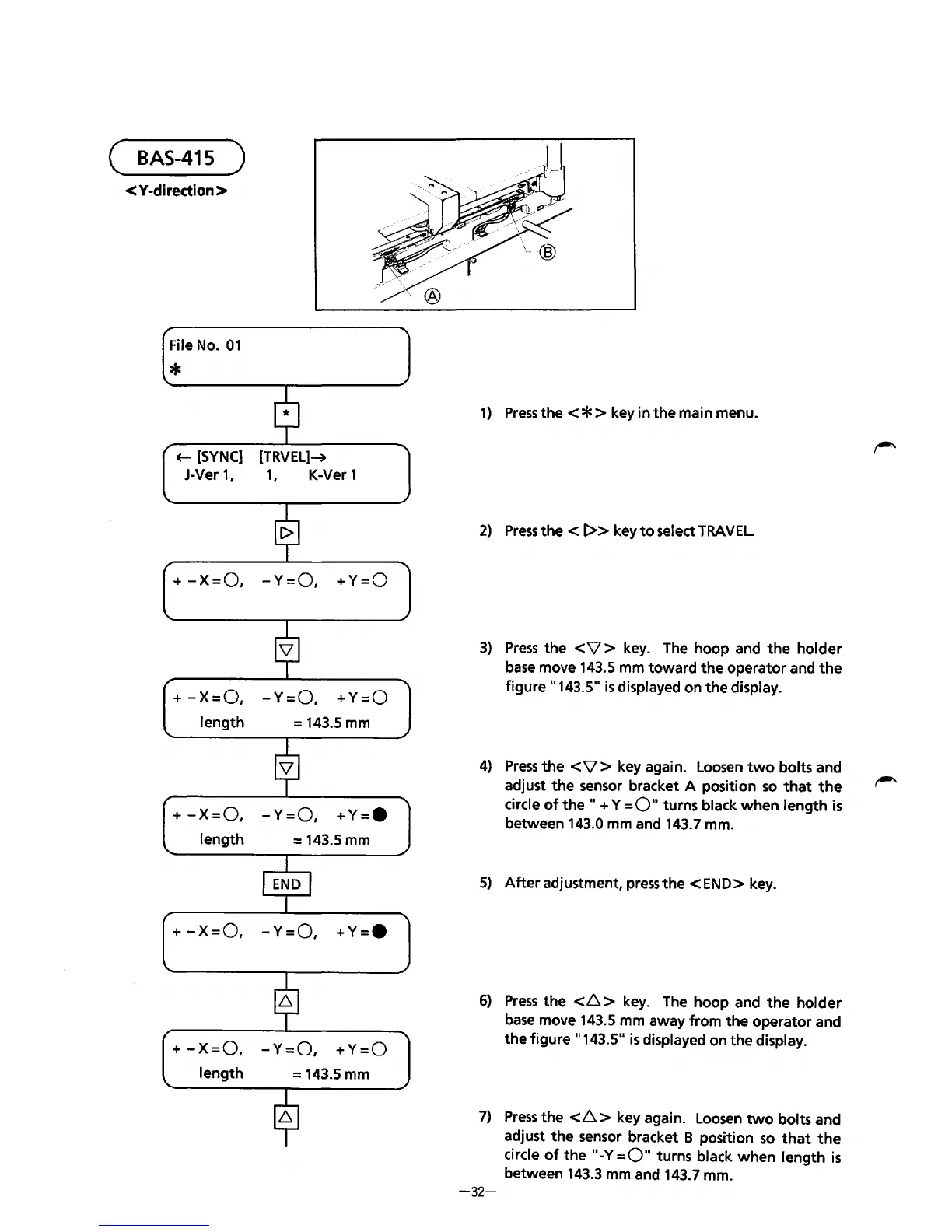
( BAS-415 )
<Y-diredion>
File No.
01
*
+--
[SYNC]
[TRVEL]-+
J-Ver
1, 1,
K-Ver 1
+
-X=O, -Y=O,
+Y=O
+
-X=O,
-Y=O,
+Y=O
length
= 143.5 mm
+
-X=O,
-Y=O,
+Y=•
length
= 143.5 mm
+
-X=O,
-Y=O,
+Y=•
+
-X=O, -Y=O,
+Y=O
length
= 143.5 mm
1)
Press
the
< * > key in
the
main menu.
2)
Press
the<
I>> keytoselectTRAVEL.
3)
Press
the
<V
> key. The hoop and
the
holder
base
move 143.5 mm
toward
the
operator and
the
figure
11
143.5
11
is
displayed on
the
display.
4)
Press
the
<V
> key again. Loosen
two
bolts and
adjust
the
sensor bracket A position
so
that
the
circle
of
the
..
+ Y
=0"
turns black
when
length is
between 143.0 mm and 143.7 mm.
5)
After
adjustment,
press
the<
END> key.
6)
Press
the
<6
> key.
The
hoop and
the
holder
base
move 143.5 mm away
from
the
operator and
the
figure
11
143.5"
is
displayed on
the
display.
7)
Press
the
<6
> key again. Loosen
two
bolts and
adjust
the
sensor bracket B position
so
that
the
circle
of
the
11
-Y=O
..
turns black
when
length
is
between 143.3 mm and 143.7 mm.
-32-
From the library of: Superior Sewing Machine & Supply LLC

Table of Contents

Related product manuals