EasyManua.ls Logo

Brother BAS-415 - Page 34

Brother BAS-415
134 pages
Print Icon
To Next Page IconTo Next Page
To Previous Page IconTo Previous Page
Loading...
I
<D+X
®-X
®+Y
®-Y
r
""'
t--c_oo_E
N_o.
--~OJ~
8][5]
_
SPEED
rpm.~
I
END
I
<D+X
®-X
®+Y
®-Y
I
END
I
(j)SYNCH
®Ov
TRVL
P-ROM
J-Ver * MO,
SO
*
ROM
K-Ver. *
I
END
I
[ENTER]
[EDIT]
[COMMUNICATE]
[START(sewi
ng)]
\..
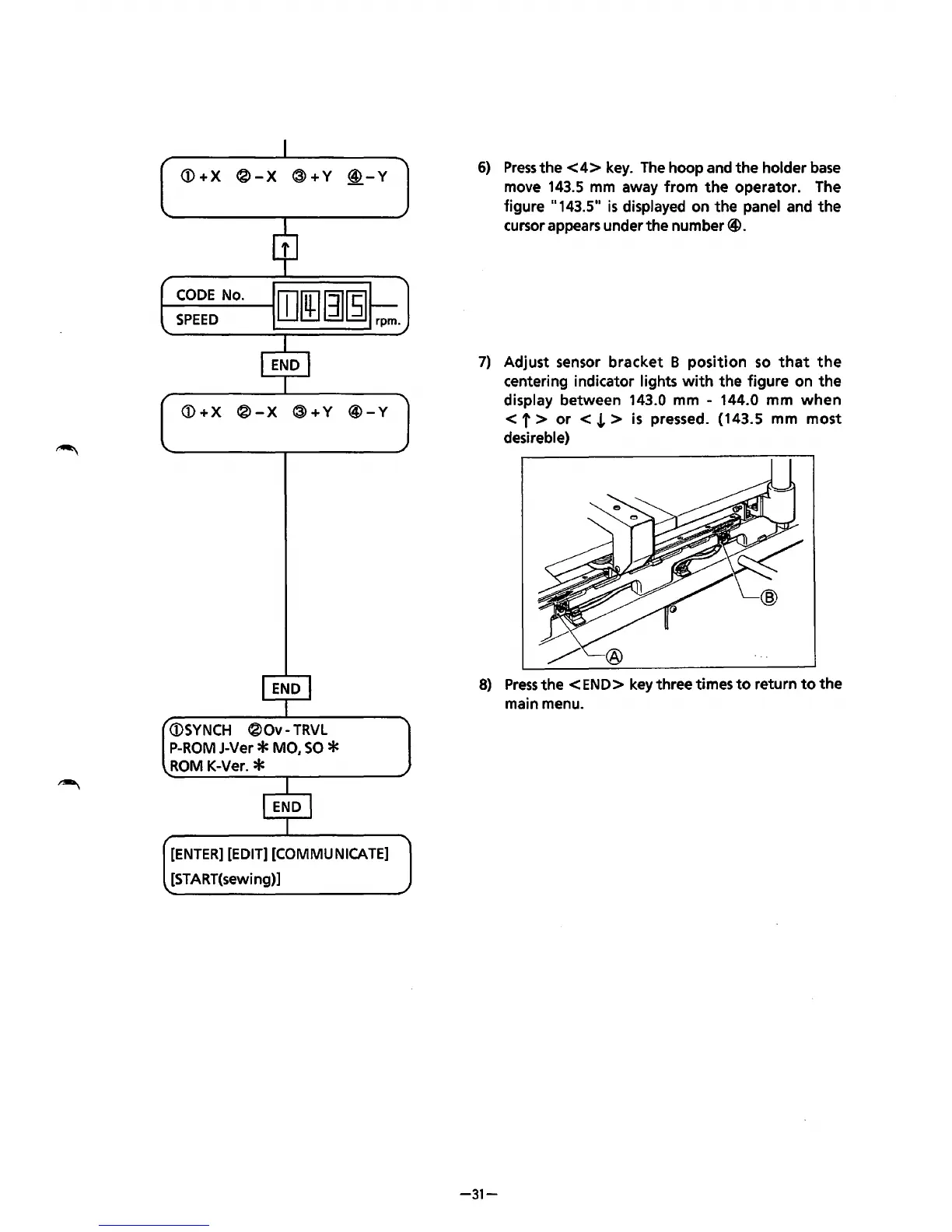
6)
Press
the
<4>
key.
The
hoop and
the
holder
base
move
143.5
mm
away
from
the
operator. The
figure
11
143.5"
is
displayed on the panel and
the
cursor appears under the number@.
7)
Adjust sensor
bracket
B
position
so
that
the
centering indicator lights
with
the
figure on
the
display between 143.0 mm 144.0 mm
when
< f >
or
<
.L
>
is
pressed. (143.5 mm
most
desireble)
8)
Press
the
<END>
key three times
to
return
to
the
main menu.
-31-
From the library of: Superior Sewing Machine & Supply LLC

Table of Contents

Related product manuals