EasyManua.ls Logo

Brother BAS-415 - Page 52

Brother BAS-415
134 pages
Print Icon
To Next Page IconTo Next Page
To Previous Page IconTo Previous Page
Loading...
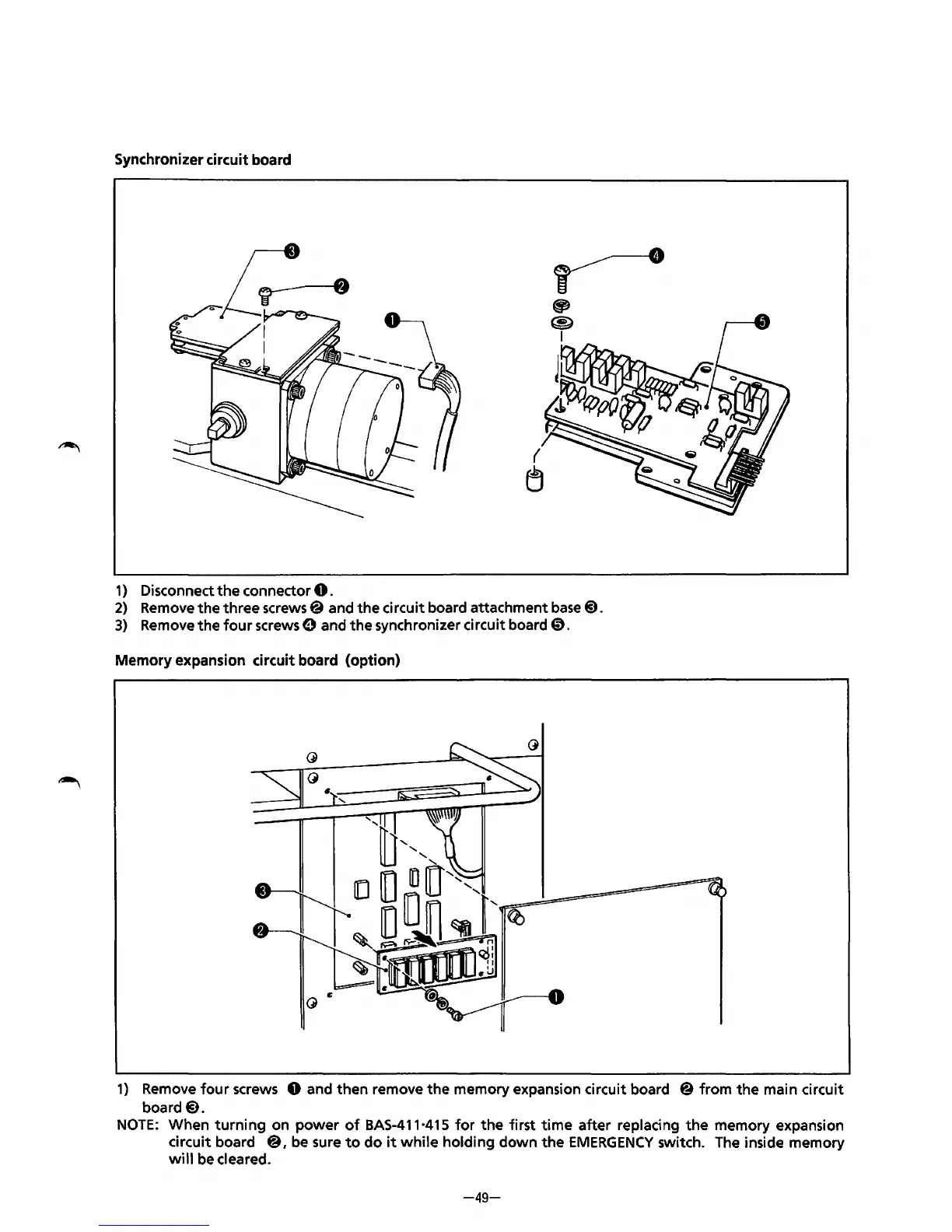
Synchronizer circuit board
1)
Disconnect
the
connector
0.
2)
Remove
the
three screws@ and
the
circuit board attachment
base@).
3)
Remove the
four
screws 0 and the synchronizer circuit board
0.
Memory expansion circuit board (option)
1)
Remove
four
screws 0 and then remove the memory expansion circuit board
@from
the
main circuit
board@.
NOTE:
When
turning
on
power
of
BAS-411·415
for
the
first
time
after replacing
the
memory expansion
circuit board
@,
be
sure
to
do
it
while
holding down
the
EMERGENCY
switch. The inside memory
will
be cleared.
-49-
From the library of: Superior Sewing Machine & Supply LLC

Table of Contents

Related product manuals