6-35 Confidential
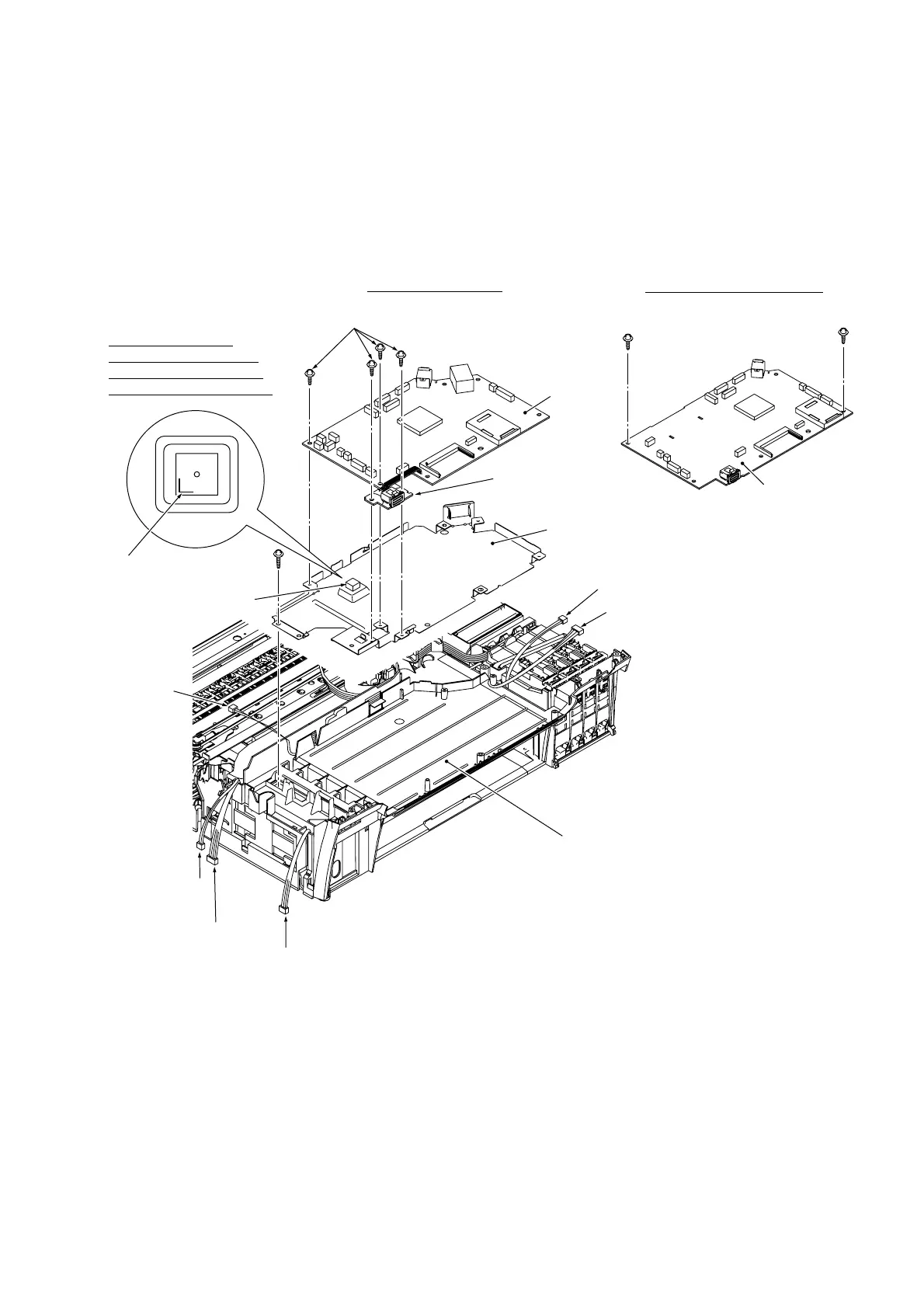
(3) Remove screws "c" (four for models with color LCD, two for models with monochrome LCD)
from the main PCB, then lift up the main PCB together with the PictBridge PCB.
(4) Remove screw "d" from the main PCB shield frame, then lift up the shield frame. (This screw
also secures the MJ/PS shield box.)
(6_36)
Main PCB
Main PCB
"c"
"d"
Carriage motor
harness
Paper feed motor
harness
PF encoder/registration
sensor harness
Power supply harness
Lower cover
Ink cartridge sensor harness
Purge cam switch harness
Main PCB shield frame
PictBridge PCB
"c"
"c"
Thermal conductor
rubber
L-shaped boss
Models with color LCD
Models with monochrome LCD
"c": Taptite, cup S M3x6
"d": Screw, pan (s/p washer) M3x8
Align the edge of the
thermal conductor rubber
with the L-shaped boss on
the main PCB shield frame.



 To Next Page