6-41 Confidential
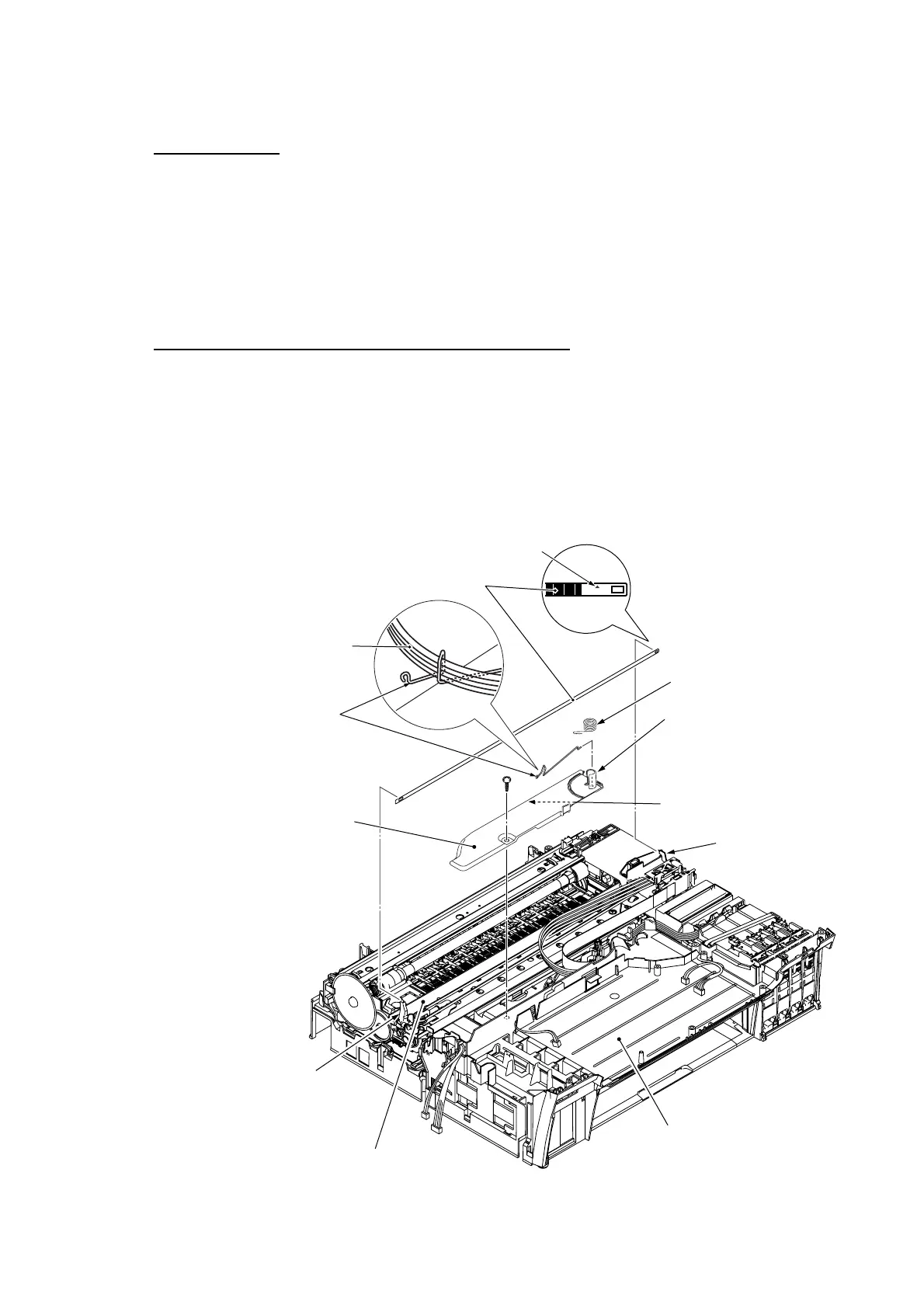
CR encoder strip
(1) While lightly pushing the CR encoder strip support on the left end of the engine unit inwards,
unhook the right end of the CR encoder strip from the hook.
(2) At the left end of the CR encoder strip, align the rectangular hole in the strip with the boss of
the strip support and take the strip off.
NOTE: Take care not to scratch or damage the encoder strip. If it becomes dirty, wipe it with a
soft, dry cloth. If it is stained with ink, replace it.
Flat cable support plate, tube support wire and its spring
(3) Unhook the spring from the tube support wire.
(4) Release the four ink supply tubes from the tube support wire.
(5) Remove the screw from the flat cable support plate.
(6) Unlatch the support plate from the lower cover and remove it together with the tube support
wire and its spring.
(7) Remove the spring and tube support wire from the flat cable support plate.
(6_40)
Taptite, bind B
M4x12
This should point up.
CR encoder strip
Ink supply tubes
Tube support wire
Flat cable support plate
CR encoder strip support
Engine unit
Lower cover
(Front)
Hook
Tube/cable guide
Latch
Spring



 To Next Page