4.1.6.3- pH Adjustment
Go to the main menu, select "pH" and in the pH menu that is displayed, select.
“pH +-”
Use the buttons to adjust the required pH and confirm with "OK".
4.1.6.4- Calibration of the pH probe
To calibrate the probe, prepare a glass of clean water. Remove the probe from the storage liquid, shake
it to remove the liquid, shake it in the water. Shake it again to remove the water. Dry it with a clean
cloth, without rubbing.
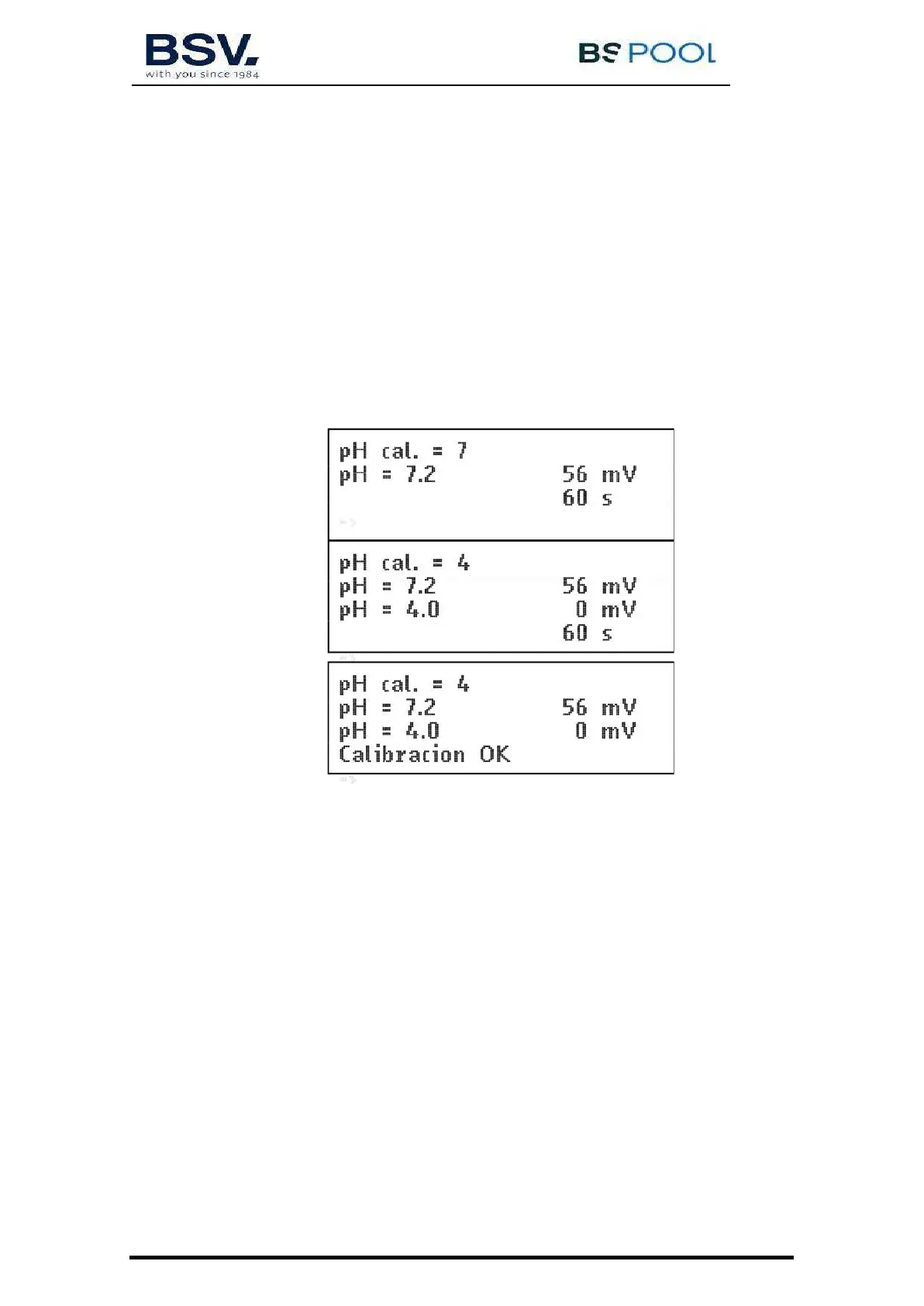
On the control, go to “Menu” – “pH” – Calibration – “S”. The 1st line of the display indicates “pH cal. =
7”. Immerse the probe in the pH7 standard solution and press OK. Wait 60 seconds; the display
indicates the measured value of pH7. After 60 seconds, clean the probe and immerse it in the pH4
standard solution and press OK. Wait 60 seconds; the display indicates the measured value of pH4.
At the end of the 60 seconds, the message “Calibration OK” will appear.
Press “OK”. If an error message appears, it may be due to a dirty (see maintenance) or defective probe,
contaminated standard solutions or a bad connection.
If you have entered the calibration program by mistake, exit it by pressing “OK” several times. The error
message appears, and the previous calibration is not altered.
4.1.6.5- Switching the pH adjustment on and off
To switch off or start-up the pH control again stopping the acid pump, access the main menu, select
"pH" in the last line. In the pH menu select the bottom line. By pressing "OK", it alternatively passes
from "pH ON" to "pH OFF".
When the pH control is off, the 3rd line of the screen displaying the parameters indicates "pH OFF".
4.1.6.5- Switching the pH adjustment on and off
To switch off or start-up the pH control again stopping the acid pump, access the main menu, select
"pH" in the last line. In the pH menu select the bottom line. By pressing "OK", it alternatively passes
from "pH ON" to "pH OFF".
When the pH control is off, the 3rd line of the screen displaying the parameters indicates "pH OFF".


 To Next Page