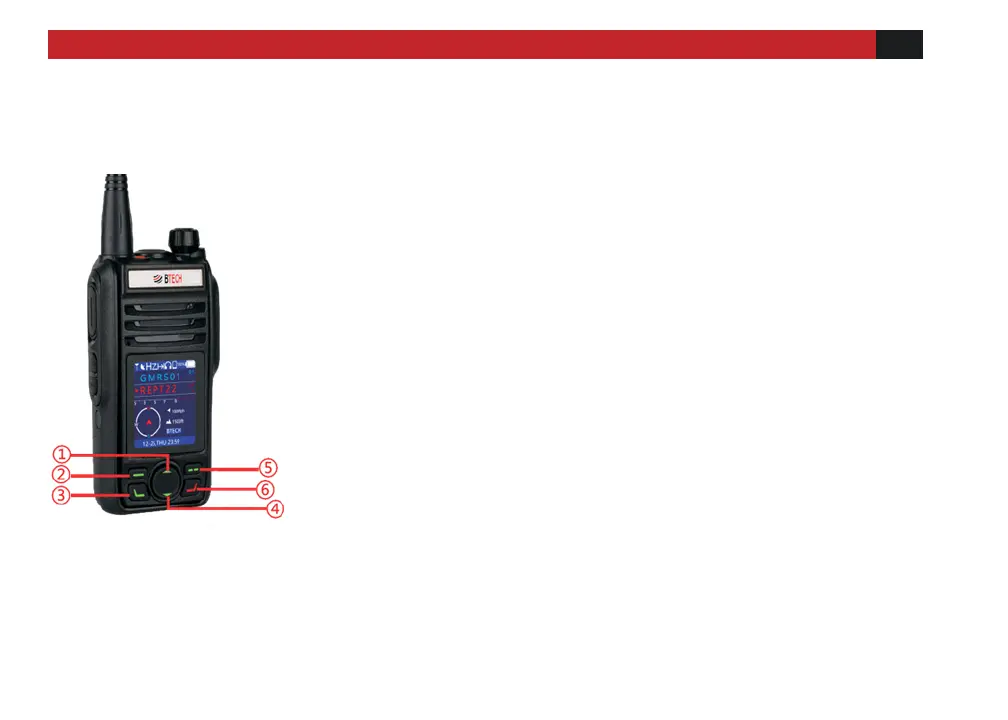
① Up key Page up.
② OK/Enter key
In the menu mode, press this key to enter the menu setting and
to set and accept changes made.
③ Menu key
Turn on the menu function.
④ Down key Page down.
⑤ Back/Change screen key
In the menu mode, it is the return key. In the standby screen
mode, it is the switch screen key. Press this key repeatedly to
switch back and forth between the three screen modes
⑥ Exit/Lock key
Press to exit the current setting and return to main screen, or
lock the keys (all but PTT). Long press the RED key to lock the
keys, long press it again to unlock them.



 To Next Page