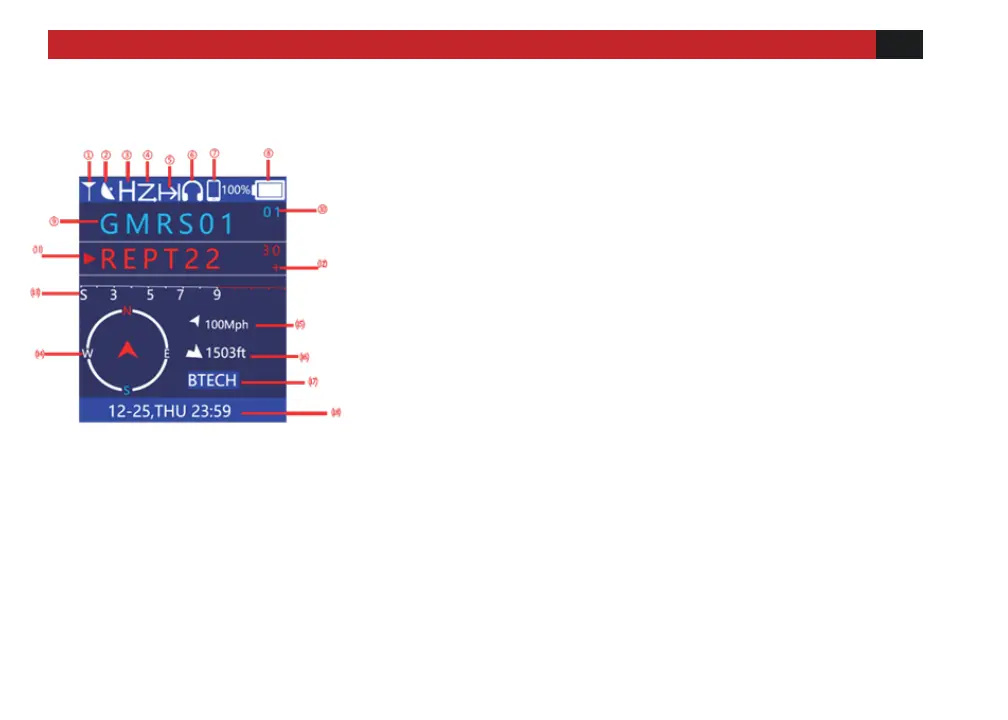
① Radio.
Represents the normal standby state of the radio.
② GPS on.
On behalf of the GPS function. GPS is turned on by default
when powering on.
③ Transmit Power icon.
H stands for high power and L stands for low power
④ Scan. It means the scanning function is on.
⑤ Talk Around
It means the talk around function is on.
⑥ Headset Connected.
The device is connected to wireless headset.
⑦ Connected to mobile phone.
The device is connected to the mobile phone.
⑧ Battery power level.
Battery level display. (The specific battery percentage can be
queried by entering [Status] in the menu)
⑨ Channel Name.
The current memory channel name
⑩ Channel No.
The current channel number for the frequency.



 To Next Page