103
BTU VENTILATION CORPORATION ● OFFICE 888-884-8070 ● FAX 218-346-7485 ●
www.btucorp.com
XT-70 Control Panel 103
From Cure to Ramp Down & Purging:
Once the Cure cycle is done it is time to ramp down to the desired holding temperature. The
Aux 2 switch should be set to off once the cure cycle is complete. The time clock needs
to be set for the desired operation. If refrigeration is available, the time clock should be set to
green. This will allow the system to run in either Cooling or Refrigeration. If refrigeration is
not available, the system would run in either Cooling or Timed. In a Timed run, the fresh air
doors would be closed and the fans would run at a minimum level to circulate the air.
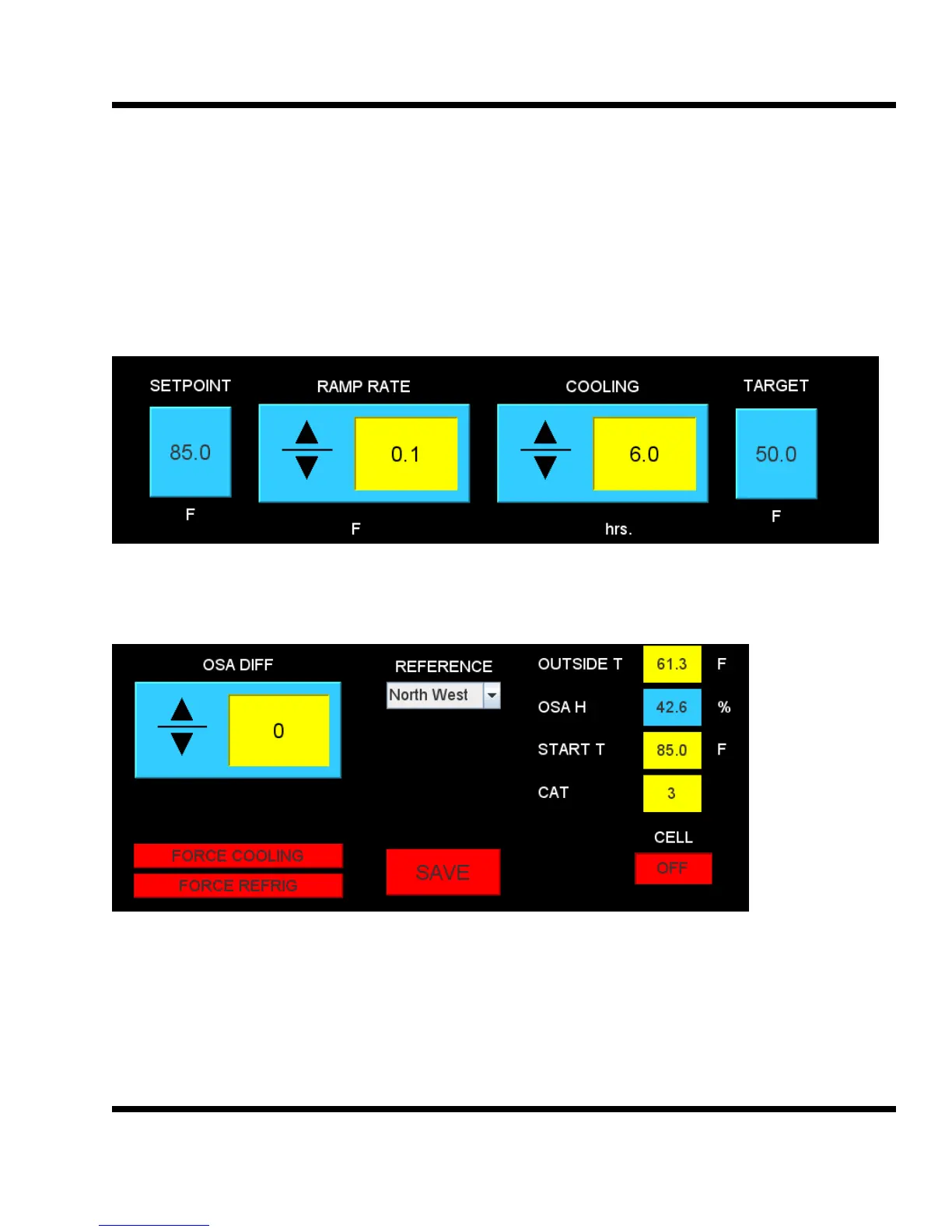
The ramp mode is setup by setting the target to the desired long term storage temperature.
In this example, the Setpoint will be ramped down .1 degrees every 6 hours of Cooling. The
ramp will shut off when the final Target temperature of 50 degrees is reached. Note - any-
time the Setpoint is changed from the main screen, the Target will be reset to the Set-
point and the ramp will turned off.
The outside air control can be referenced to Setpoint or any of the pile sensors. As an exam-
ple, the temperature setpoint is 72 and the North West pile sensor, selected as the reference,
is 85. With the OSA Diff set to zero, the system will start bringing in fresh air when the out-
side air temp is below 85 degrees. If the outside air gets below the 72 degrees, the doors will
start to close and control temperature. This allows the system to bring in air cooler than the
pile but warmer than the setpoint. This will greatly enhance the cooling run time available.
Once the pile is down to the long term storage setpoint, the reference should be
changed to Setpoint.



 To Next Page