BTU VENTILATION CORPORATION ● OFFICE 888-884-8070 ● FAX 218-346-7485 ●
www.btucorp.com
XT-70 Control Panel 20
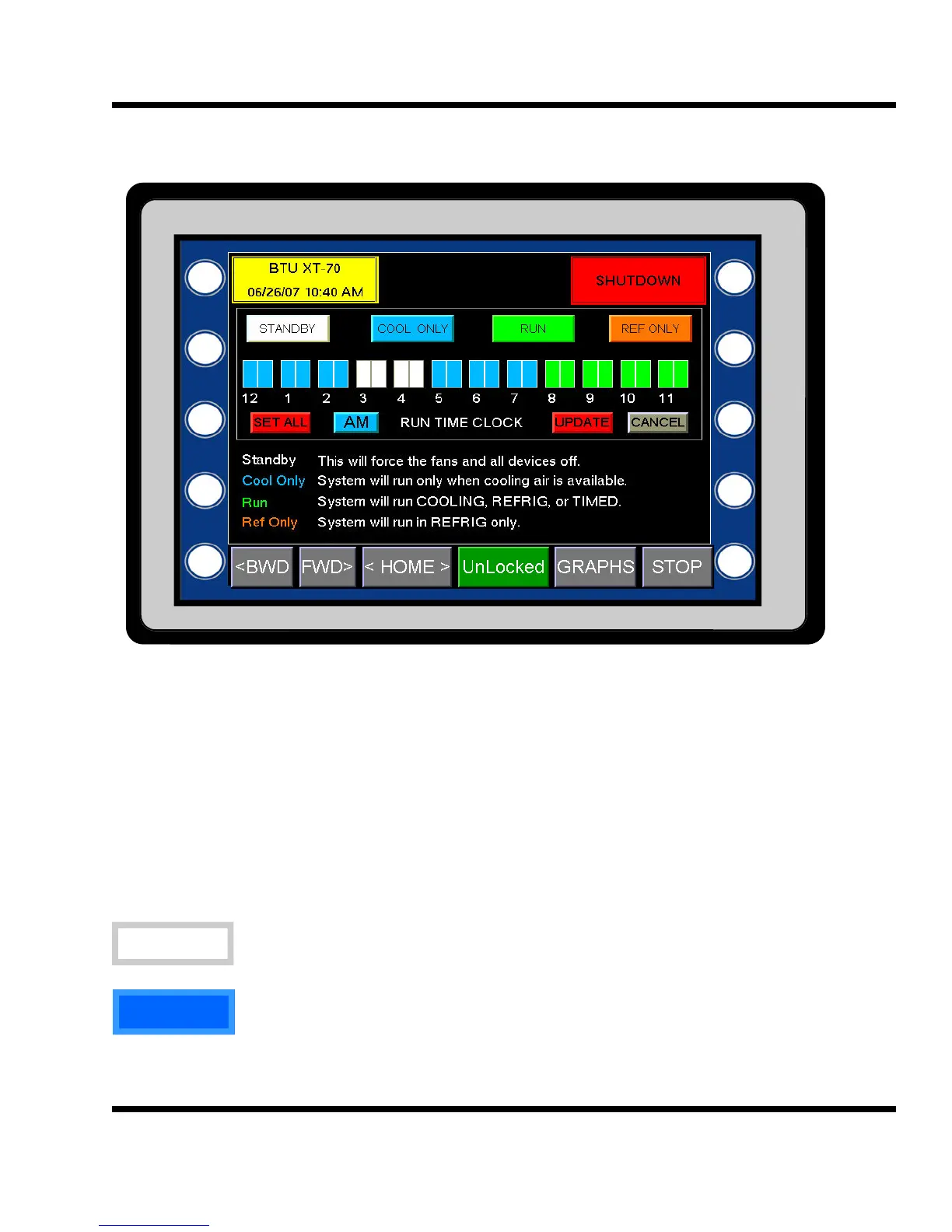
HMI TIME CLOCK:
The XT panel runtime clock is used to designate how the panel is to run. It is the heart of the system and will
determine the amount of runtime your storage will get each 24 hours. The time clock provides a visual aid on
how the panel is set up. If the AM button is pressed, the display will show the PM settings for the time clock.
Pressing the PM button will display the AM settings. Each colored block designates a half hour increment. The
AM time clock starts at midnight and goes to noon. The PM time starts at noon and goes to midnight. To change
a time, press one of the four mode buttons first and then press the desired 30 minute block. Modes can be
changed by pressing the mode button at any time and then the 30 minute blocks. When done, press the pro-
gram button. Pressing the cancel button discards any changes
Once the mode is chosen, press the SET ALL button to save the changes to all time clock slots.
STANDBY
The STANDBY hours in the time clock will force the system to turn off. The fans and all
other devices will be in the Off mode.
COOLING
COOLING hours in the time clock will allow the system to run only when there is cooling air
available. This mode will not run refrigeration or a timed run. If COOLING hours are pro-
grammed and there is no cooling air available, the system will go into Standby mode.
5.5



 To Next Page