BTU VENTILATION CORPORATION ● OFFICE 888-884-8070 ● FAX 218-346-7485 ●
www.btucorp.com
XT-70 Control Panel 36
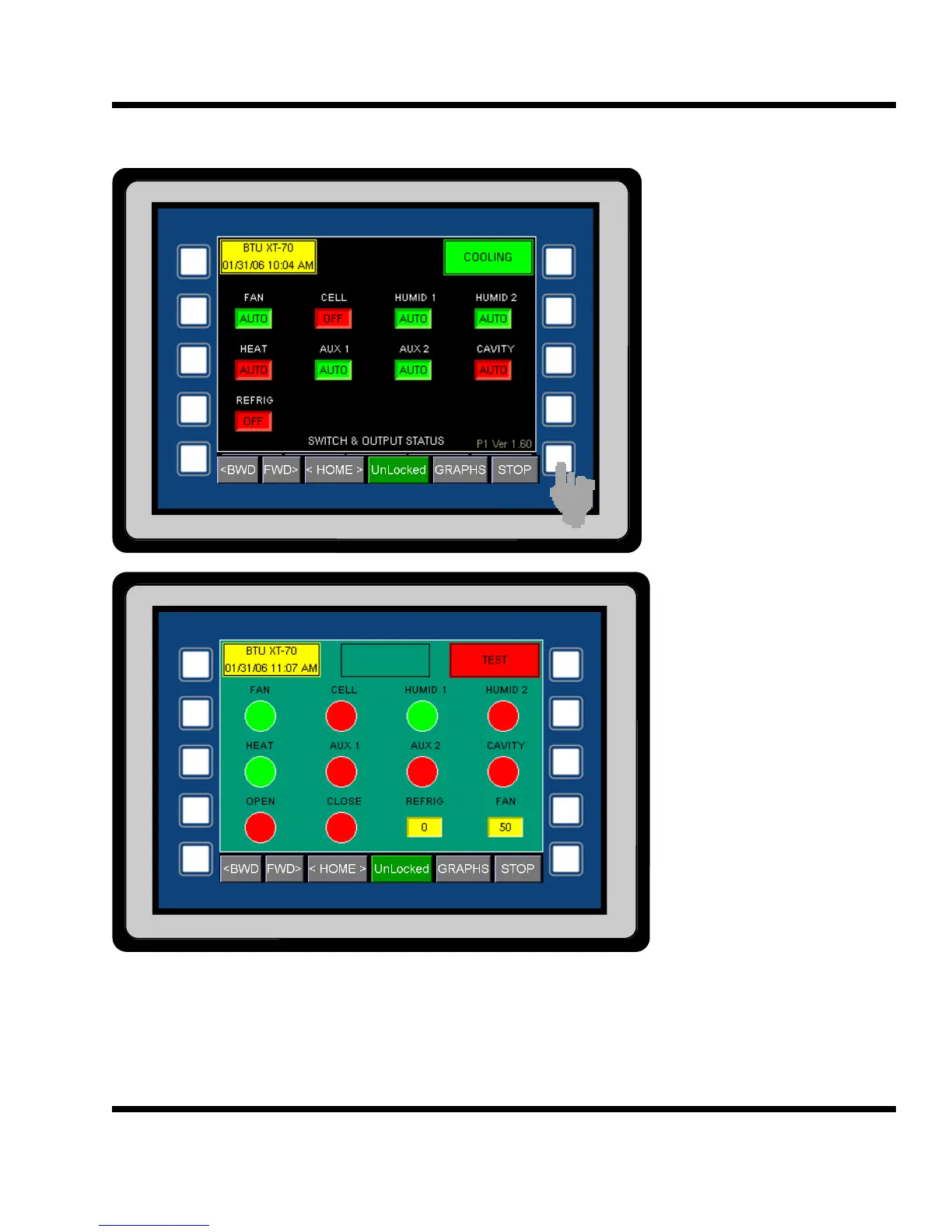
HMI TEST MODE:
In order to place the XT
panel into a test mode,
first go to the SWITCH &
OUTPUT STATUS
screen. Once at this
screen, press the bottom
right outside button.
To leave the test screen,
press the bottom right
outside button again.
5.15
When the XT panels
goes to the Test mode,
all normal operation is
suspended.
Caution: The test mode
allows manual activa-
tion of all of the XT out-
puts. This should be
done by a qualified ser-
vice technician only.
Each of the cells give the
status of each of the out-
puts. A red cell indicates
that the output for that
cell is Off. A green cell
indicates that the output
in On. Note: for the
TEST mode to work, the
MOA switch for each of
the outputs must be in the
Auto position.
To change an output, press the appropriate cell. The fan output must be set to On for the fan speed
and refrigeration level to be active. To change the REFRIG and FAN output, press the button and type
in the appropriate percentage.



 To Next Page