BTU VENTILATION CORPORATION ● OFFICE 888-884-8070 ● FAX 218-346-7485 ●
www.btucorp.com
XT-70 Control Panel 78
General:
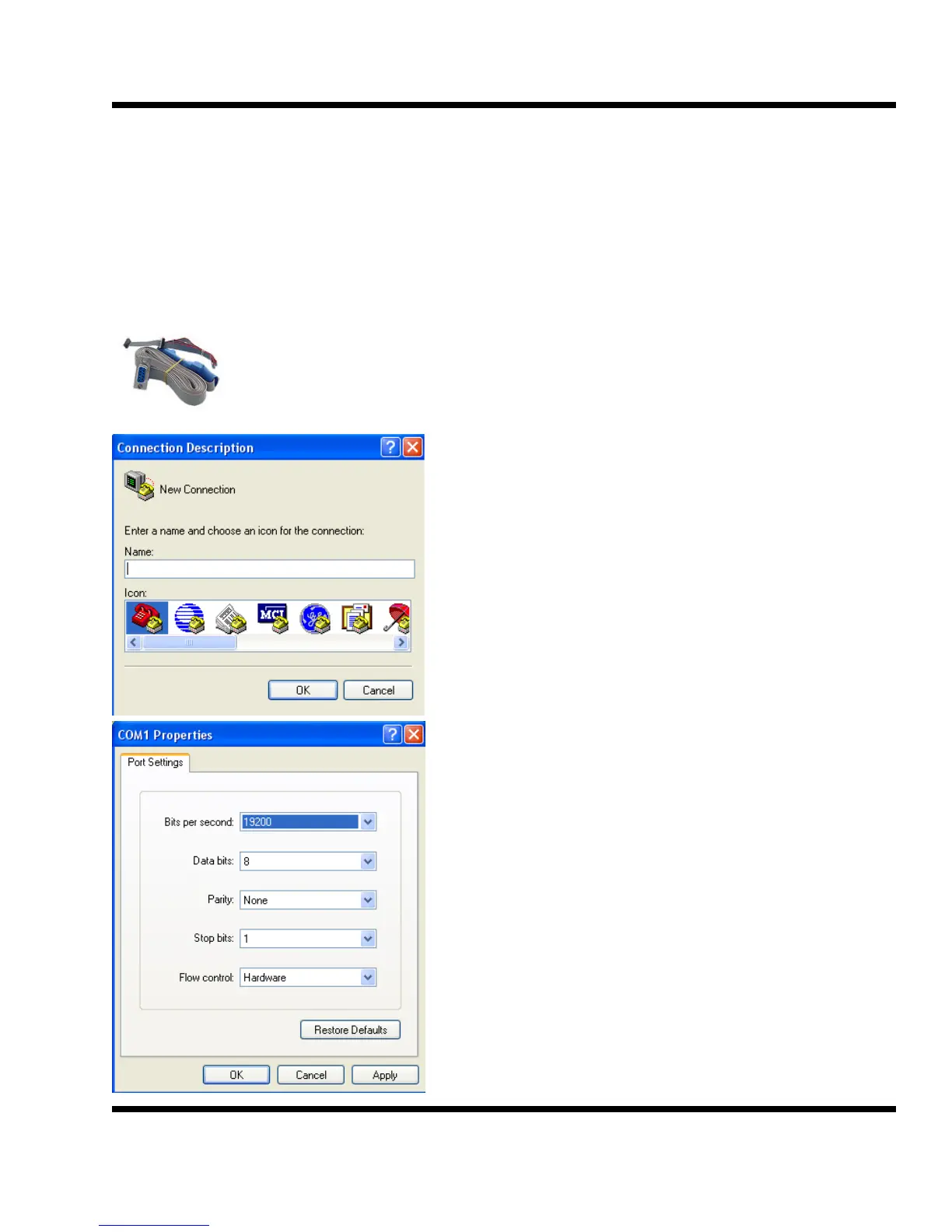
The XT Rabbit now contains a routine for doing a diagnostics on the unit. Use the programming cable
and any terminal emulator to view the data.
Use the same Rabbit programming cable normally used to program the Rabbit.
Normally, the black plug marked PROG is used to plug into the Rabbit and program it.
For this test, use the black plug marked DIAG. Power the panel down and plug it on to
the Rabbit, with the red stripe down. If using an USB to serial converter, the con-
verter’s comport number is needed. Nearly all PC’s and laptops today have a program
called Hyper Terminal installed. It is located under Start>
Programs> Accessories> Communications.
Create a new connection.
Type in a name such as Rabbit Test.
Click on OK
Select the proper Comport for the PC.
Set the Baudrate and other parameters as shown. Rabbit
software above 2.1.0 requires 115kb
Click on OK.
APPENDIX B:
XT DIAGNOSTICS PORT



 To Next Page