5
MA112780_38.6 [Original Instructions] 9/19/2011
Blade Installation
Flanges support the wafering and abrasive blades. Failure to provide adequate flange support may result
in curved cuts and damaged blades. When cutting always select the maximum flange diameter in
proportion with the size of the specimen. (For more details see Accessories and Supplies.)
Installing a Blade
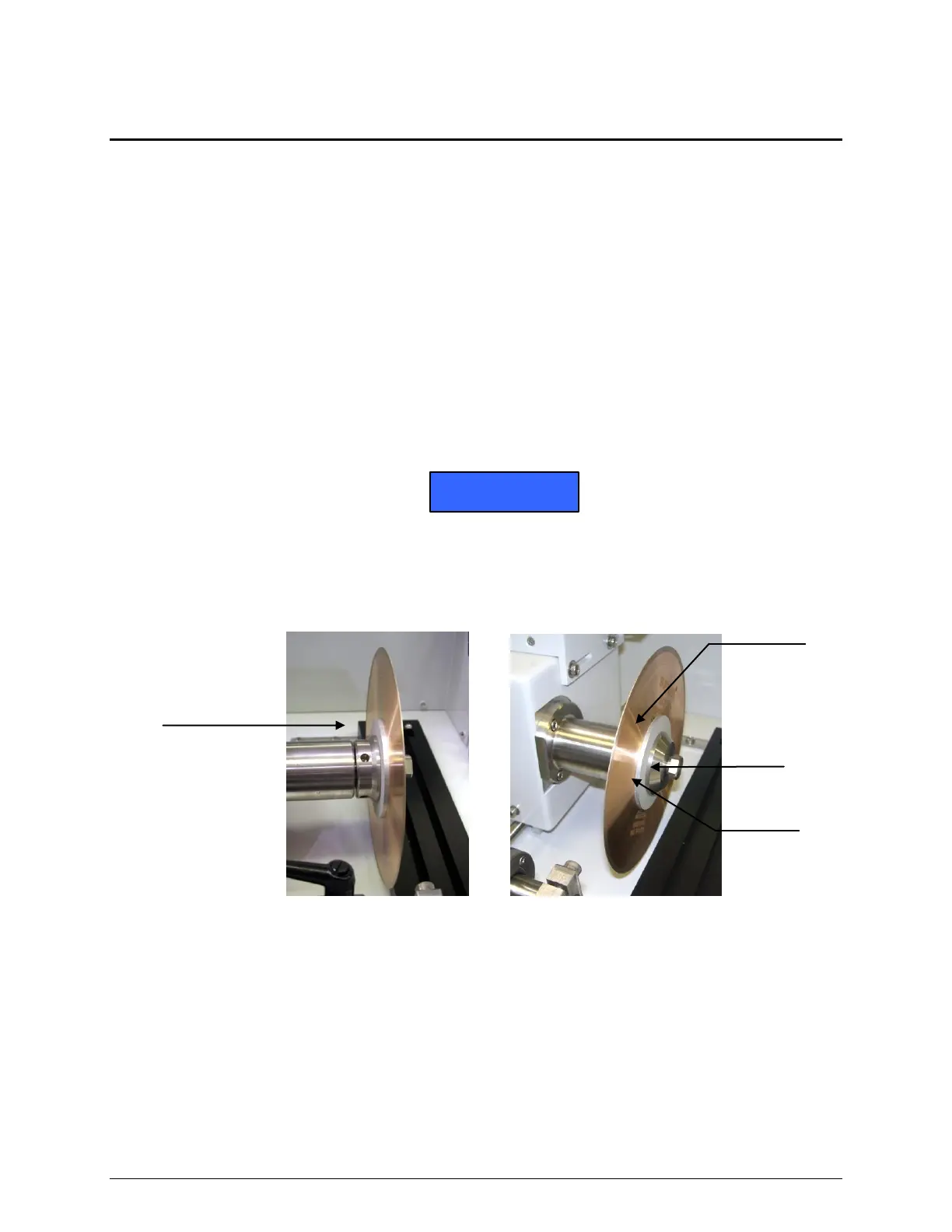
1. Remove the thumbscrew and end cap bushing from drive shaft (see Figure 1).
2. Install the outer flange on the end cap bushing.
3. Install the blade against the outer flange.
4. Slip on the inner flange on the end cap bushing.
5. Tighten thumbscrew to complete the installation.
To prevent misalignment and damage to the blade, clean the end cap bushing, screws,
and flanges in a mild detergent solution to remove particles from prior cuttings before
installing a wafering or abrasive blade.
Figure 1 Blade Installation Diagram


 To Next Page