19
MA112780_38.6 [Original Instructions] 9/19/2011
Positioning a Specimen with a Known Thickness (without the Specimen
Positioning System Installed)
1. Position the specimen in the chuck.
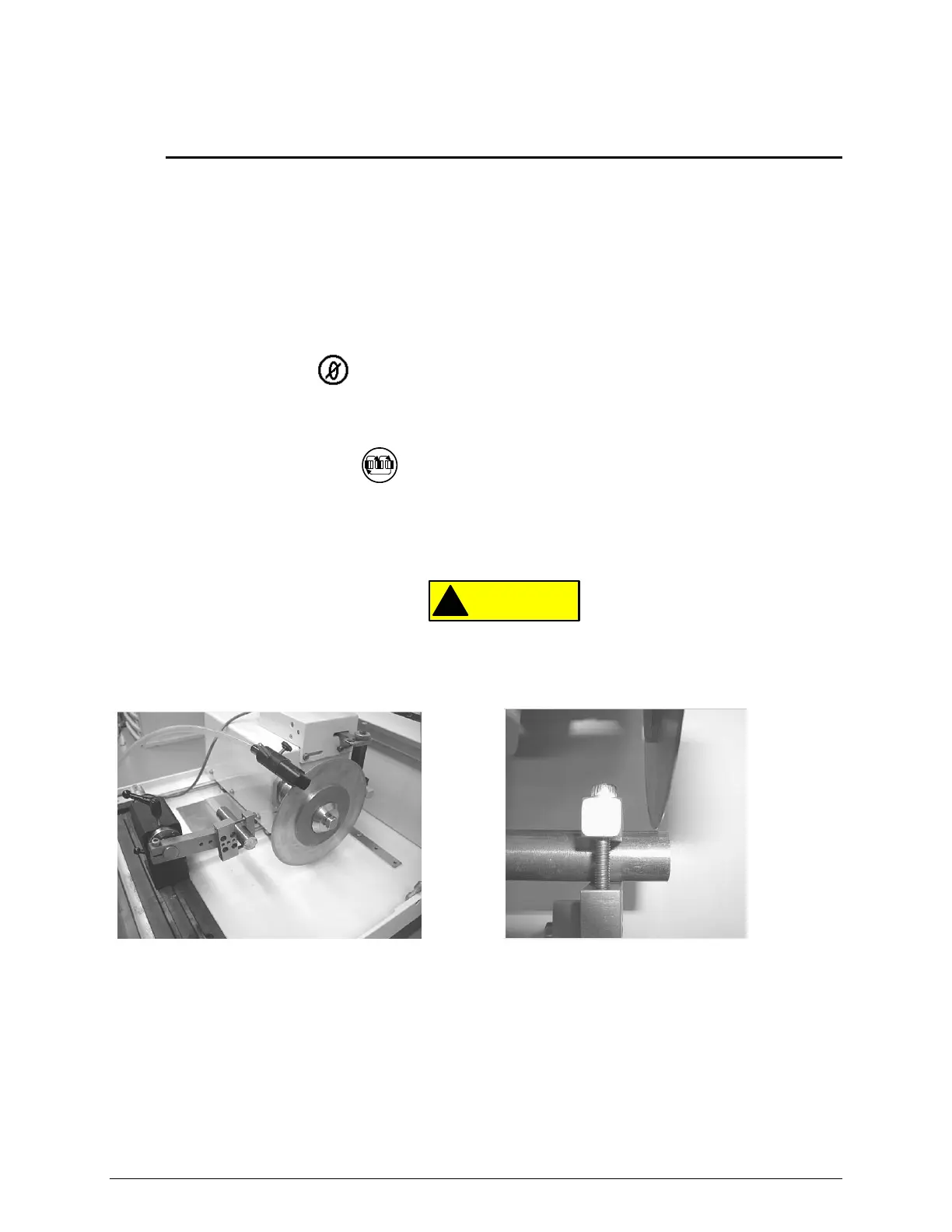
2. Turn the hand crank clockwise until the blade is beyond the chuck position
(see Figure 9).
3. Turn the hand crank counter-clockwise to bring the blade forward until it is just behind the
and almost touching the specimen (see Figure 10).
4. Reposition the specimen and tighten the vise to prevent the specimen from moving.
5. Press the ZERO button on the control panel and the DISTANCE REMAINING field
value will display .00 in (or .00 mm).
6. Program the known distance into the CUTTING LENGTH field.
a. Press the SCROLL button until the CUTTING LENGTH parameter field is
highlighted.
b. Use the INCREASE or DECREASE buttons to change the value to equal the
REMAINING DISTANCE value. The value will automatically be saved.
Equipment Damage. Do not allow the specimen to contact the blade when adjusting
positions. Blade damage may result.
Figure 9 Positioning the specimen Figure 10 Blade almost touching the specimen


 To Next Page