Chapter 3 Useful Functions
LinkStation Setup Manual
4848
5
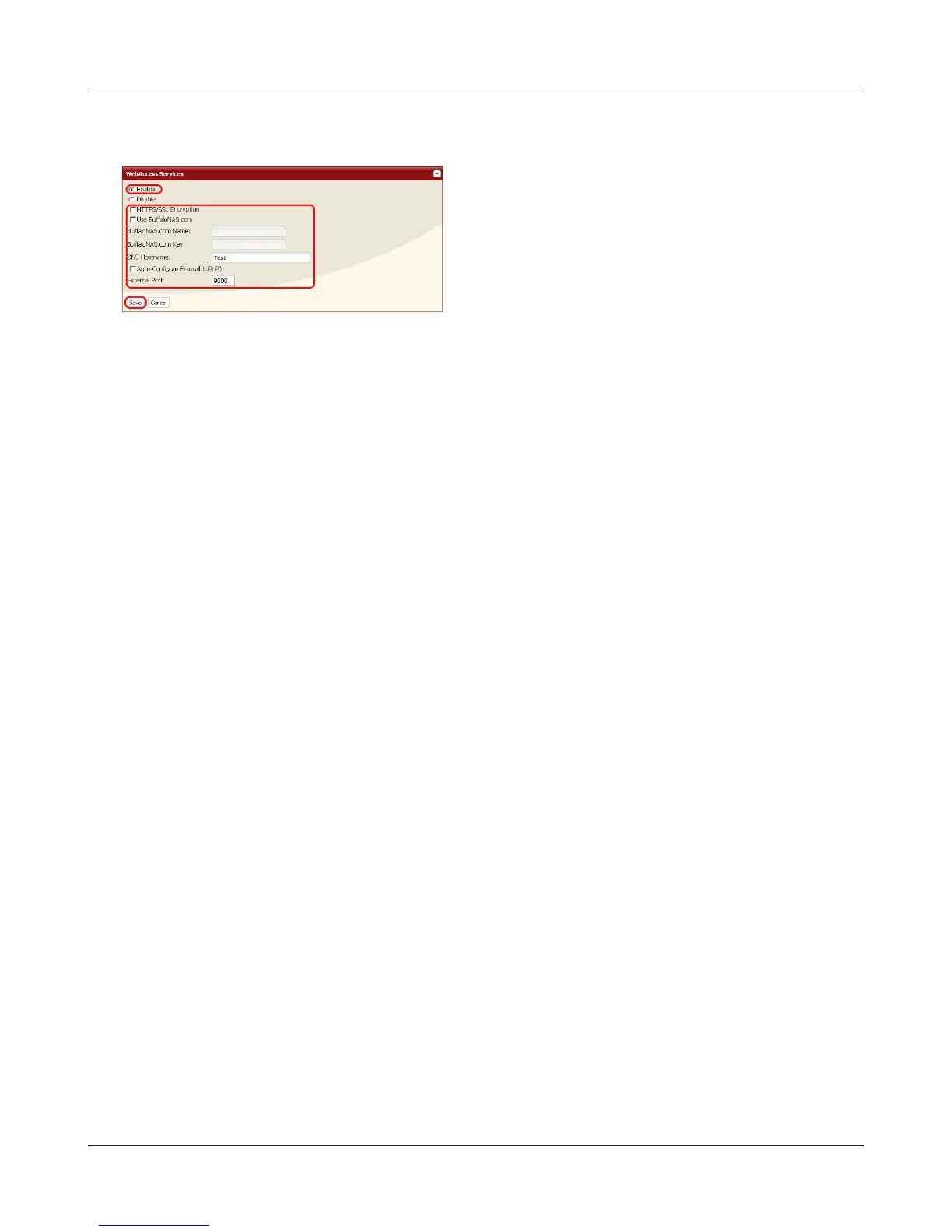
Note: – If you want to transmit data more securely by using SSL encryption, insert a checkmark
[HTTPS/SSL Encryption]. The security alert message will be displayed at this time, pro-
ceed with operation.
• To use the generic DNS service instead of using BualoNAS.com, enter the host name in
[DNS Hostname].
• If conguring manually without using UPnP, enter the external port of a router side. Port
9000 of the LinkStation is default and is used to allow access from the router side the
LinkStation (The port on the LinkStation side is set to 9000).
• If the LinkStation is left unconnected from the Internet a certain period of time, its
name registration will be deleted on the BualoNAS.com server.
Now you have completed the settings for the WebAccess feature.
1 Select [Enable].
2 Click [Use BuffaloNAS.com] to insert a check-
mark.
3 Enter the LinkStation name to be published in
[BualoNAS.com Name].
Note: – This is the name to enter when accessing
BuffaloNAS.com. It does not have to be
the same name as the actual LinkStation.
4 Enter the password to save and use the name
in [BualoNAS.com Key].
5 Click [Auto-Congure Firewall (UPnP)] to insert
a checkmark.
Note: – This does not work unless the router's
UPnP is enabled.
6 Click [Save].















 To Next Page