25
PRODUCT AND RECIPE SETUP
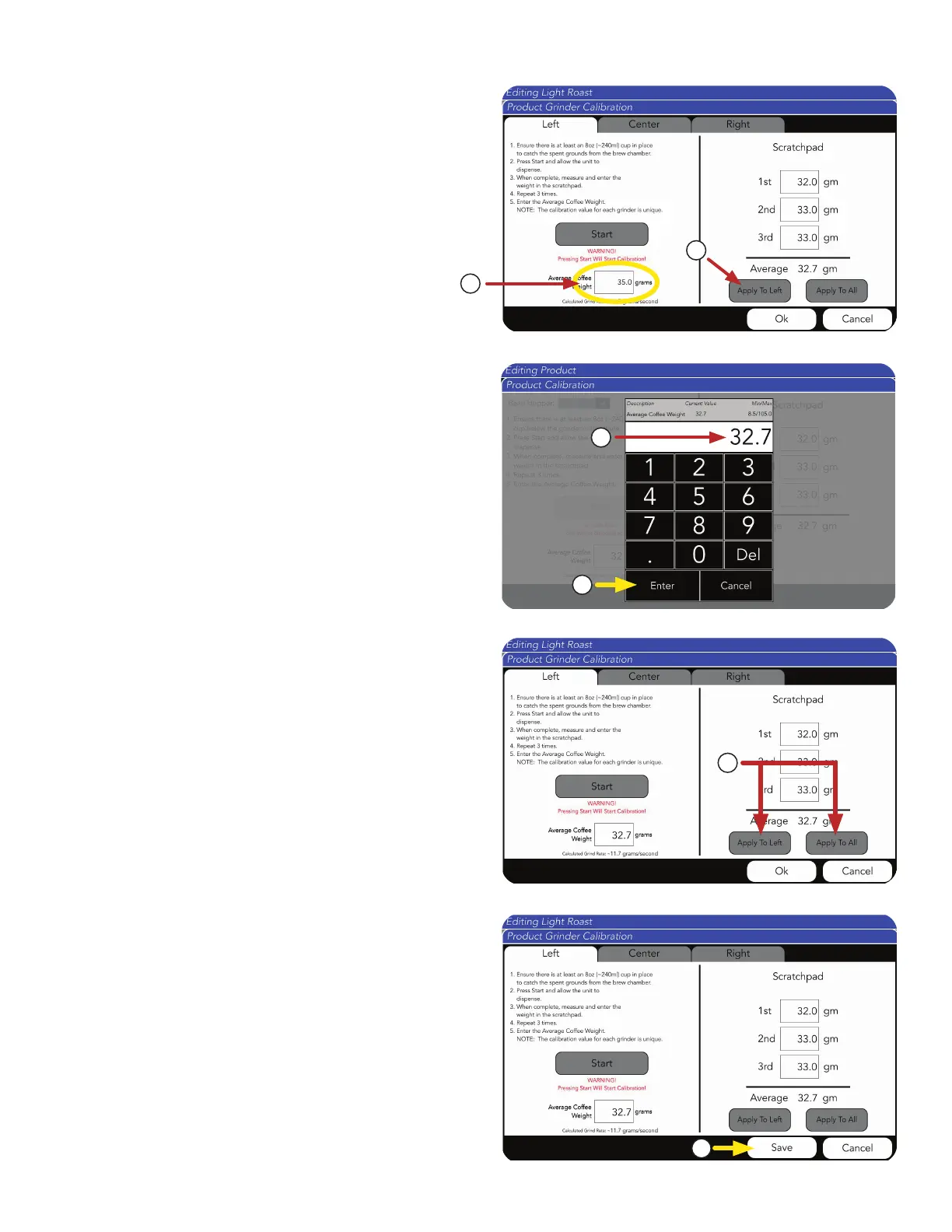
6. Press Save to complete Grinder Calibration.
5. Choose to Apply To Left or Apply To All.
IMPORTANT: A grinder calibration for a specific
product can be applied to the grinder selected
(The Left grinder is the default), or applied
to All.
If this step is completed and the Apply to Left
Center, or Right button is selected, the recipe
will need to be recalibrated if it’s moved from
the specified grinder to either of the other two
grinders. Or, it can be applied to All.
3. The input screen will appear. Type
average weight.
4. Press Enter.
2. a. Press Apply To Left button to automatically
input average.
OR
b. Manually press on the Average Coffee
Weight field to fill in this amount.
b
a
3
4
5
6
NOTE: Steps 2, 3, and 4 do not need to be done
for each hopper if Step 5 (Apply to All button)
is selected.
continued >



 To Next Page