SmartWAVE
®
Training Manual
12
Machine Composition
Exterior Overview
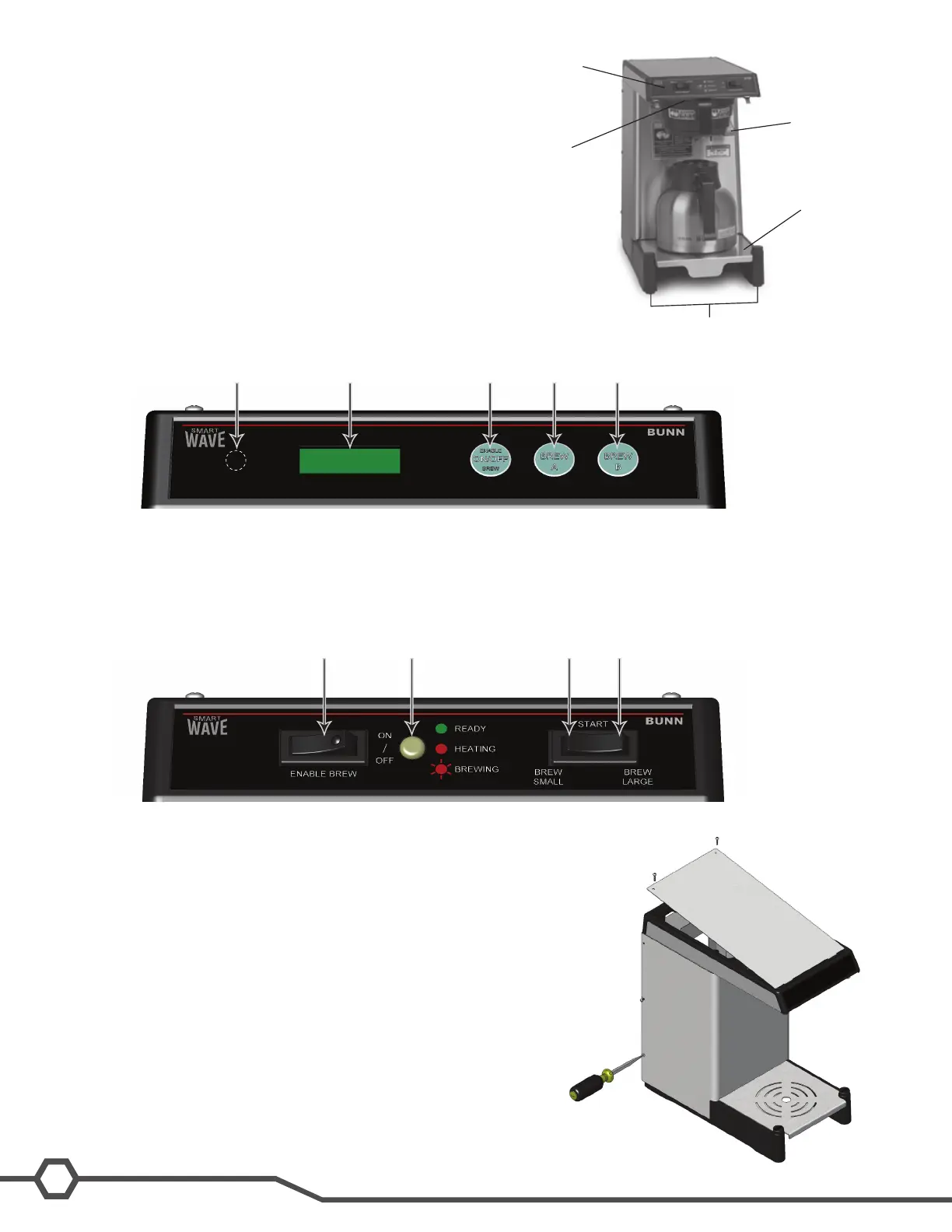
Product Outlets and Removable Parts
User interface (1)•
Hot water outlet (2)•
Sprayhead (3)•
Adjustable server base (4)•
Adjustable legs (5)•
User Interface
The SmartWAVE
®
brewer control panel features membrane switches and an alphanumeric display.
A. Enable Brew On/Off switch
B. Brew A switch
C. Brew B switch
D. Hidden programming switch
E. Display
The SmartWAVE
®
Silver series control panel features mechanical switches and LED status lights.
A. Enable Brew On/Off switch
B. Small batch switch
C. Large batch switch
D. Status indicator
Steady green- ready to brew
Steady red- tank heating
Flashing red- brewing
Accessing the Inside of the Brewer
The majority of service work to the SmartWAVE
®
brewer will require
the removal of the top panel, the front shroud or the control board
access panel on the rear. The top panel is secured with 2 philips
headscrews.Therearpanelissecuredwith6atheadscrews,and
therearpanelissecuredwithfouratheadscrews.
1
2
3
4
5
A B CED
A B CD



 To Next Page