Bunn-O-Matic Corporation
7
Setup and Programming
Accessing and using the brewer’s programming features is done from the user interface panel and requires no spe-
cial tools.
WatervolumesandowsettingsfortheSmartWAVE
®
brewer have been preset at the factory. The volumes can be
increased or decreased and optional pulse brewing can be programmed. Additionally there are four programming dip
switches located on the control board.
Programming Digital SmartWAVE
®
Level 1 Programming
Level 1 programming contains the programming options for the product parameters. Access to level 1 is done by
pressing the hidden switch for 5 seconds.
The two brew buttons allow for two different recipes and/or batch sizes to be stored on the brewer. Each button has
threedifferentsettingsthancanbetunedtospeciccustomerrequirements:
BrewTime:thetimerequiredinordertoachievethedesiredbrewvolume.•
PulseBrewsetting:thenumberofdesired“pulses.”Duringa“pulse”themachinecyclesthebrewfunctionoff,•
allowing the funnel to drain.
DripOuttime:thetimeafterthebrewthatthefunnelisdrainingintotheserverbeforethefunnelshouldbere•
moved from the machine.
Brew Button A* Default Minimum Maximum Adjustment Increments
A1:BatchSize(time) 2:05 0:26 5:00 Seconds
A2:BrewMeter(pulsebrewcycles) 1 1 14 1-14
A3:Dripout(time) 1:00 0:05 5:00 5 second
* Values are the same for Brew Button B
When programming the SmartWAVE
®
brewer It is important to know what type of holding vessel the customer will be
using in order to set batch sizes. The brewer can accept a variety of airpots and carafes. Even though the brewer’s
clearance can accomodate a 3.0 L airpot, the largest vessel recommended for use with the SmartWAVE
®
is a 2.5 L
airpot due to the size of the machine’s tank.
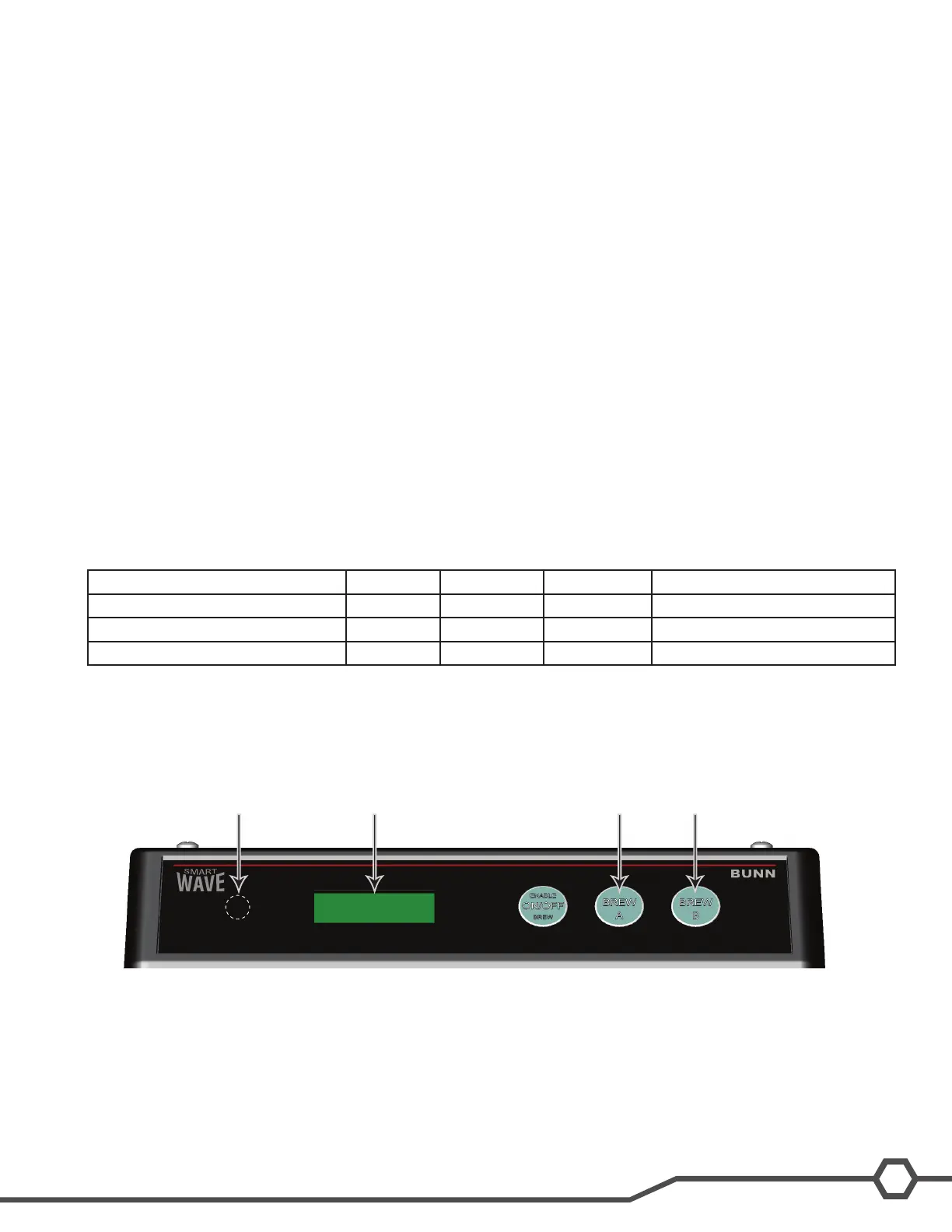
1 Hidden switch
2 Display
3 Brew A ( - )
4 Brew B (+)
Step 1: Press the hidden switch until the display reads A1. This represents the adjust mode Brew Time for the A brew
switch. The display will toggle between A1 and the setting. Press the BREW A button to decrease time or the BREW
B button to increase time.
Step 2: Press the hidden switch until the display reads A2. This represents the adjust mode Brew Meter (Pulse
Brew) for the A brew switch. The display will toggle between A2 and the setting. The brewer has 14 preset pulse brew
1 2 3 4



 To Next Page