this you must have electronic scale.
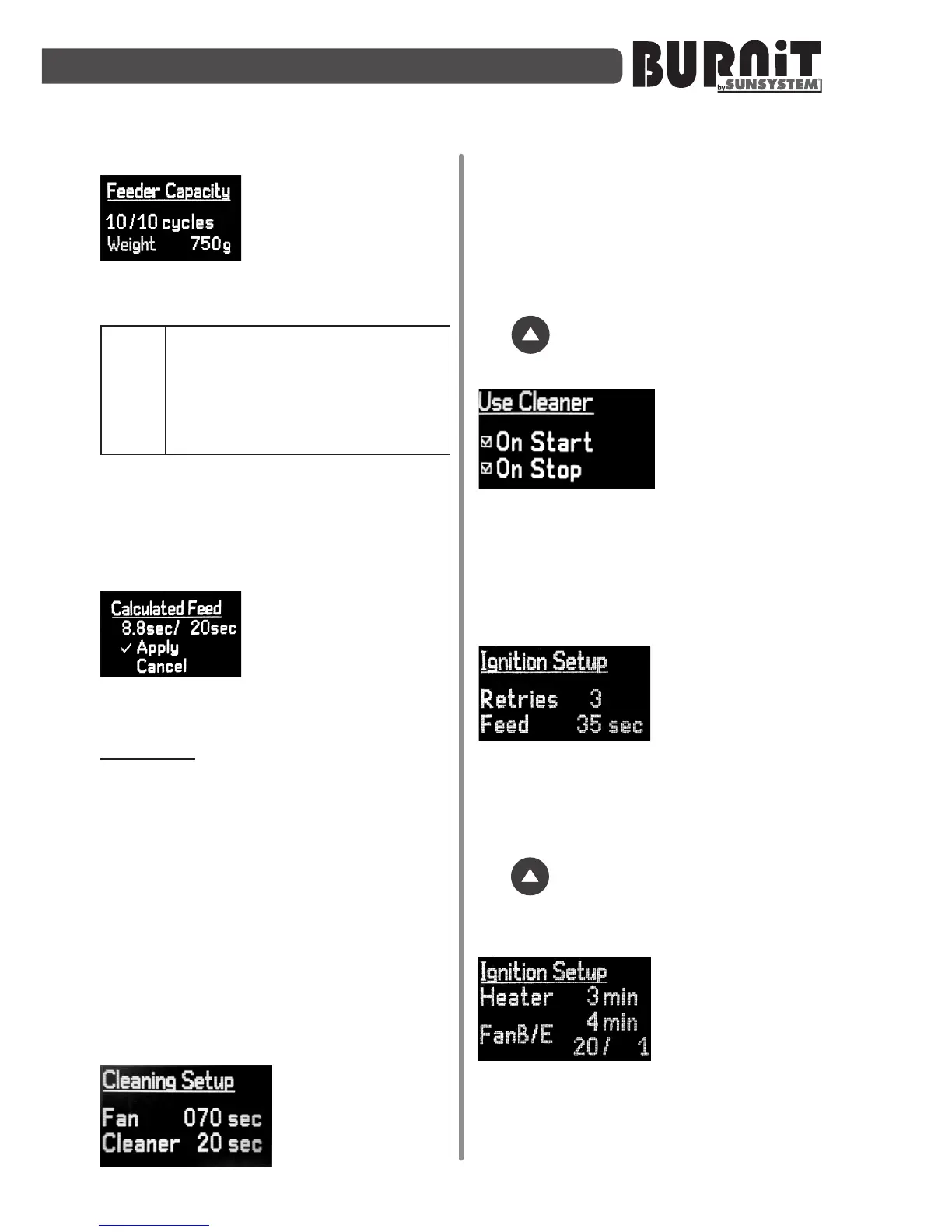
Entering the amount of
weighted pellets:
Use this menu to
enter the amount of
weighted pellets when all set cycles have
been executed.
Use accurate scales with range
ofatleast10grams.Ofthetotal
weight (pellets and plasc bag)
subtracttheweightofthebagto
get the right amount of pellets
duringmeasurement!
Usе "Up arrow" and "Down arrow"
buons to enter the amount of weighted
pellets as round the amount to 10 grams.
Press "F" buon to switch to next
submenu.
Applying the calculated
feed:
In this sub-
menu controller
automacally calculates the interval for
fuel feeding during combuson cycle.
Example: (see picture) for
combustion cycle of 20 sec.
calculated fuel feeding is 8.8
sec. Use "Up arrow" and "Down
arrow" button to Apply or Cancel
calculated value. By confirmation
with button “Apply” You confirm
this and this setting is saved for
maximum power setup.
Press „F” buon to conrm and exit the
menu.
9.3.2. Cleaningsetup
The burner
performs automac
cleaning before
each ignion and
shut-down.
You can use this menu to adjust the
running me of the main fan (FAN) and
of the cleaning motor (Cleaner).
Select the desired opon using the
navigaon arrows. Use the „Enter”
buon to open the next parameter. Use
the buon to open the next page of
the menu.
In this submenu
you can acvate or
deacvate the
automac cleaning
of the burner in
Ignion (Start) mode or exnguished
(Stop) mode. The checkmark in the box
indicates that the automac cleaning
system is acve.
9.3.3.Ignionsetup
In this submenu
you can set the
number of aempts
(Retries) to ignite
the burner and the
me of the inial feed poron of pellets
(Feed). Select the desired opon using
the navigaon arrows. Use the „Enter”
buon to open the next parameter. Use
the buon to open the next page of
the menu.
9.3.4.Cyclesetup
Use this submenu
to adjust the
running me of the
heater (Heater) and
the running me
and output of the main fan during the
ignion of the inial poron of pellets.
Principleofoperaon:
Aer feeding the inial poron of pellets,


 To Next Page