Product manual 2CKA001473B8291
8.6.4 OFFSET
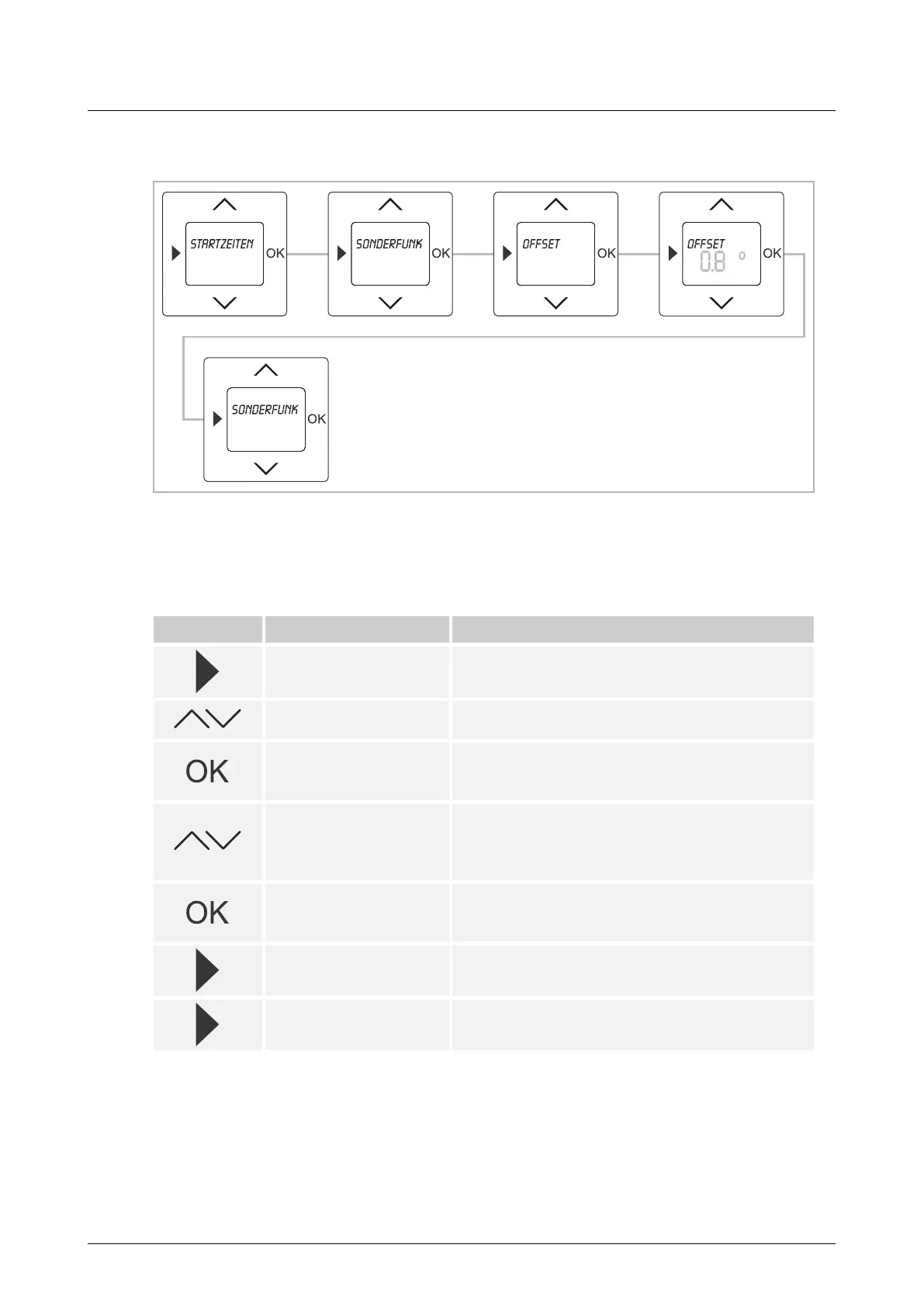
Fig. 15: Menu item OFFSET
If the room temperature set on the device and the temperature measured on-site do not
correspond, the temperature can be adjusted via the OFFSET value (correcting value) by up to
±5°C.
Button Display Entry / Comments
Starting times
– Press the menu button for 2 seconds to switch to
the setting mode.
Special functions
– Select menu "Special functions" via the arrow
buttons.
OFFSET
– Press the OK button to select menu item
"OFFSET".
The preset value flashes.
0.0°
Adjust the temperature:
– Set the temperature variance to the measured
temperature on-site via the arrow buttons.
– The value can be set in steps of 0.1°C.
0.8°
– Confirm your entry with the "OK" button.
In this example an OFFSET value of 0.8°C has been
entered.
Special functions
– Press the menu button to switch to menu level
"Special functions".
– Press the menu button again to switch to the
operating mode.
Table 5: Sequence of operating steps



 To Next Page