Product manual 2CKA001473B8291
8.6.5 Button lock
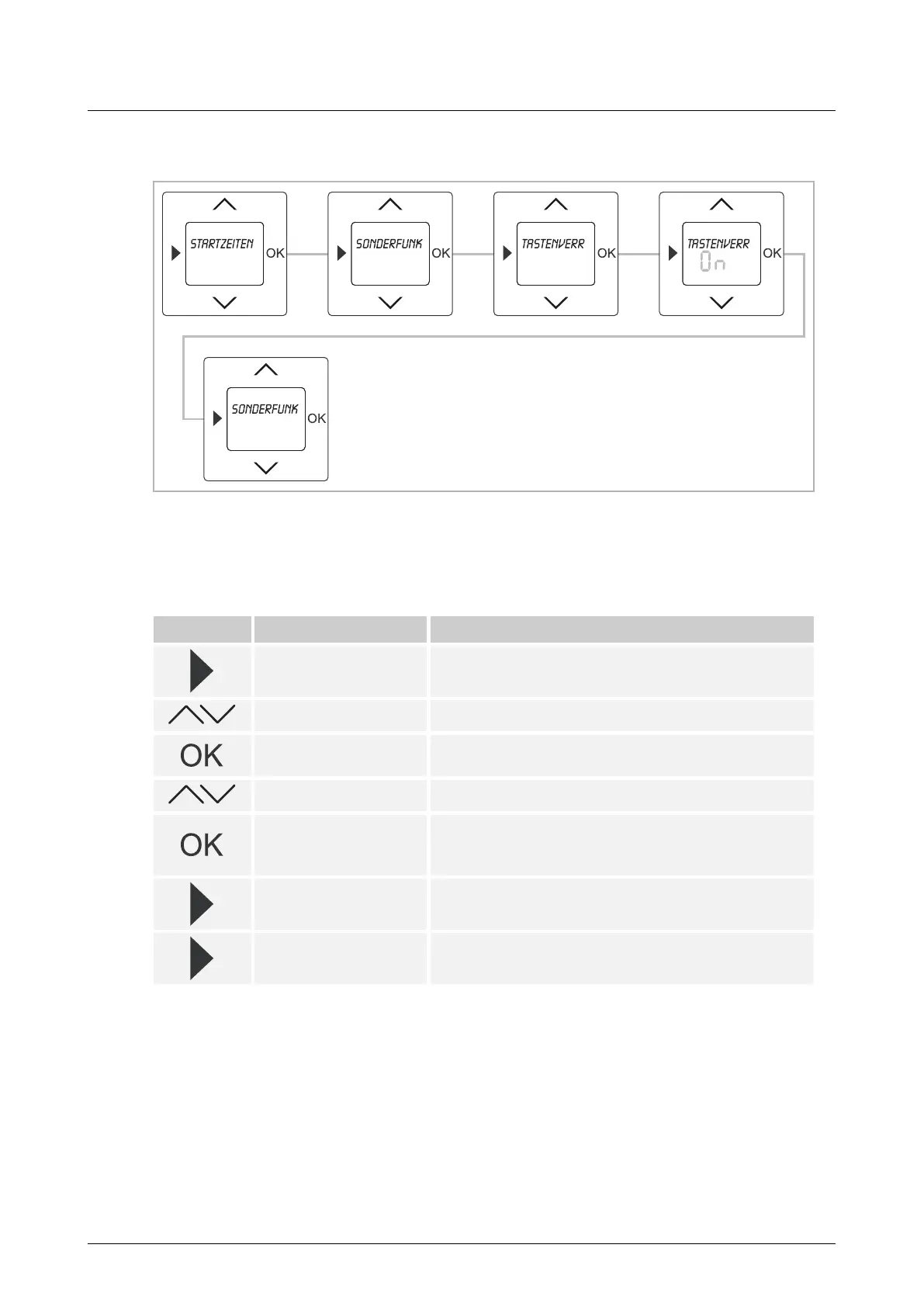
Fig. 16: Menu item - Button lock
To protect the basic settings against being unintentionally changed, the device has a button
lock. To release the button lock when it is active, one of the buttons must be pressed for 5
seconds.
Button Display Entry / Comments
Starting times
– Press the menu button for 2 seconds to switch to the
setting mode.
Special functions – Select menu "Special functions" via the arrow buttons.
Button lock
– Press the OK button to select menu item "Button lock".
The default setting flashes.
On / Off – Set the button lock to ON or OFF via the arrow buttons.
On
– Confirm your entry with the "OK" button.
In the example the setting "On" has been selected.
The button lock has been activated.
Special functions
– Press the menu button to switch to menu level "Special
functions".
– Press the menu button again to switch to the operating
mode.
Table 6: Sequence of operating steps



 To Next Page